2
ENG
Thank you for choosing Deltaco!
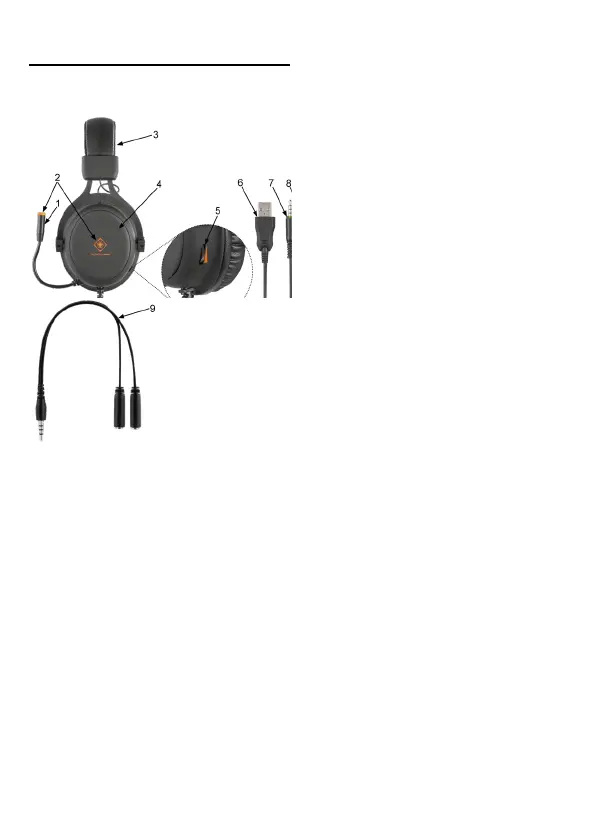
Headset
3. Adjustable headband
4. Ø57 mm headset drivers
5. Volume adjustment
6. USB-A connector
7. & 8. Audio connectors (3.5 mm)
9. Adapter for 2 x 3.5mm to 1 x 3.5mm
connections
Adapter
This product includes a 2 x 3.5mm to 1 x 3.5mm
adapter. Use the adapter to connect to gaming
consoles. Or other devices that has one 3.5 mm
port.
Use
Connect the headset to your device (for example
a computer or gaming console) with the audio
cable. The audio connection will power the
headset. Optionally connect the USB-A connector
to a power source such as a computer’s USB-A
port or a USB power adapter, to power the LEDs.
Before putting on the headset, lower the volume
to a minimum, then put on the headset, then
slowly increase the volume to a comfortable
listening level.
The microphone is flexible, adjust it as needed.
The headband is adjustable, adjust it to a
comfortable setting.
Cleaning
Clean the product by using a dry cloth.
Safety instructions
1. Keep the product dry. Keep it away from all
liquids. This product is not waterproof.
2. Do not open up or try to repair the product by
yourself.
3. Keep the product and packaging out of reach of
children to prevent accidents and chocking
hazards.
4. Do not drop or expose to shock damage.
Warranty
Please, see www.deltaco.eu for warranty
information.
Support
More product information can be found at
www.deltaco.eu.
Contact us by e-mail: help@deltaco.eu. (Only in
English).



 To Next Page
 Loading...