33
Inverse/regular barcodes
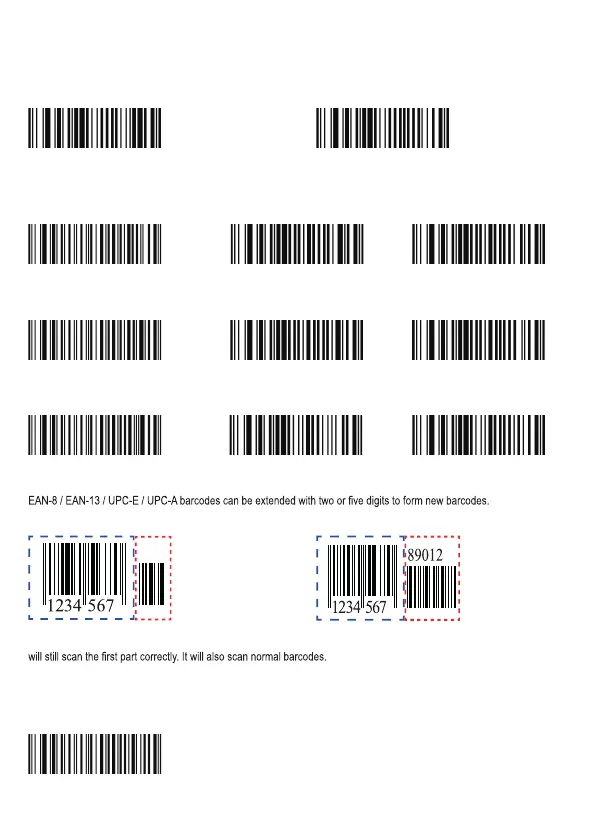
Regular barcode: Dark image on a bright background. Inverse barcode: Bright image on a dark background.
Barcode inverse on: Read both regular barcodes and inverse barcodes. Barcode reverse off (default): Read regular
barcodes only. The scanner shows a slight decrease in scanning speed when barcode inverse is on.
Barcode inverse: On Barcode inverse: Off
1D symbologies
Code 128
Restore factory defaults of Code 128 Enable Code 128 Disable Code 128
UCC/EAN-128 (GSl-128)
Restore factory defaults of UCC/EAN-128 Enable UCC/EAN-128 Disable UCC/EAN-128
AIM 128
Restore factory defaults of AIM 128 Enable AIM 128 Disable AIM 128
Add-on barcodes EAN-8 / EAN-13 / UPC-E / UPC-A
In the examples: The parts without dotted lines are the base/standard barcodes while the parts surrounded by dotted lines
are the barcode add-ons. Examples:
When 2-digit add-on and 5-digit add-on are enabled, the scanner can scan barcodes both with add-ons (2 and 5) and
without add-ons (2 and 5). When both are disabled, the scanner will ignore the add-on part of the barcodes. The scanner
The same applies for EAN-8 / EAN-13 / UPC-E / UPC-A.
EAN-8
EAN-8 is 8 digits in length. The last digit is a check digit used to verify the integrity of the data.
Restore factory defaults of EAN-8
W100210 W100200
WFFD990 W011601 W011600
W011701 W011700
W101610 W101600
WFFD991
WFFD992
WFFD994



 To Next Page