51
Appendix D: Examples
The following examples show you how to set some scanner settings by scanning barcode settings.
Set the scanning timeout
Example: Set the scanning timeout to 5.0s
1. Scan the scanning timeout barcode.
2. Scan the “digit barcodes” 5 and 0.
3. Scan save barcode.
Set the timeout between decodes
Example: Set the timeout between scans to 5.0s
1. Scan the timeout between scans barcode.
2. Scan the “digit barcodes” 5 and 0.
3. Scan save barcode.
Set the Light sense timeout
Example: Set the light sense timeout to 5.0s
1. Scan the light sense Timeout barcode.
2. Scan the “digit barcodes” 5 and 0.
3. Scan save barcode.
Set the light sensitivity level
Example: Set the light sensitivity level to 5
1. Scan the custom sensitivity barcode.
2. Scan the “digit barcode” 5.
3. Scan save barcode.
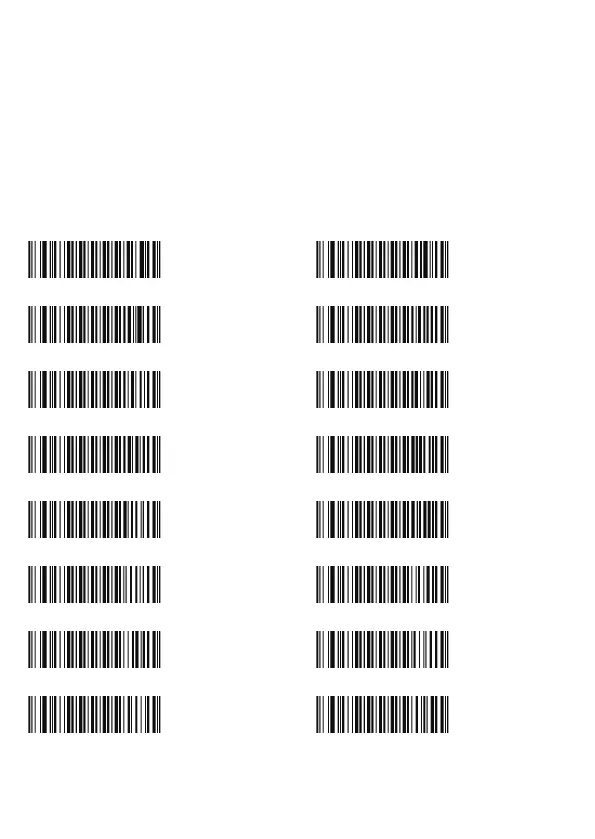
Digit barcodes 0-9 / A-F
0 1
2 3
4 5
6 7
8 9
A B
C D
E F
D000000
D000002
D000004
D000006
D000008
D00000A
D00000C
D00000E
D000001
D000003
D000005
D000007
D000009
D00000B
D00000D
D00000F



 To Next Page