Need help?
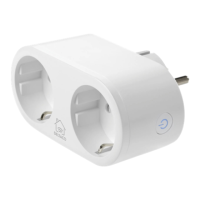
Do you have a question about the Deltaco SH-P02E and is the answer not in the manual?
Press and hold the button for approx. 6 seconds until the LED flashes quickly.
Download the 'Deltaco smart home' app and create or log in to your account.
Add device, connect to power, confirm Wi-Fi, and name the device.
Check LED status; reset if not flashing, confirm in app if flashing.
Add the device and the 'Deltaco Smart Home' service to Google Home.
Use 'Skills & Games' to find and enable the 'Deltaco Smart Home' app.
Clean exterior with a soft cloth. Avoid solvents, abrasives, internal cleaning, and repairs.
Find more info at www.deltaco.eu or contact help@deltaco.eu.
Statement of compliance with Directive 2014/53/EU. Full text and related documents are available online.
Return product to collection point for electronic waste recycling; do not treat as household waste.
 General
| Brand | Deltaco |
|---|---|
| Model | SH-P02E |
| Category | Home Automation |
| Language | English |


 To Next Page