3
A N O R D I C B R A N D
Kabel an das Gerät und an eine USB-Stromquelle (z. B.
einen Computer oder einen USB-Netzadapter) an.
Sicherheitshinweise
1. Halten Sie das Produkt von Wasser und anderen
Flüssigkeiten fern.
Reinigung und Wartung
Reinigen Sie das Produkt mit einem trockenen Tuch.
Für schwierige Flecken verwenden Sie ein mildes
Reinigungsmittel.
Unterstützung
Weitere Informationen zu den Produkten nden Sie unter
www.deltaco.eu.
Kontaktieren Sie uns per E-Mail: help@deltaco.eu.
ENG
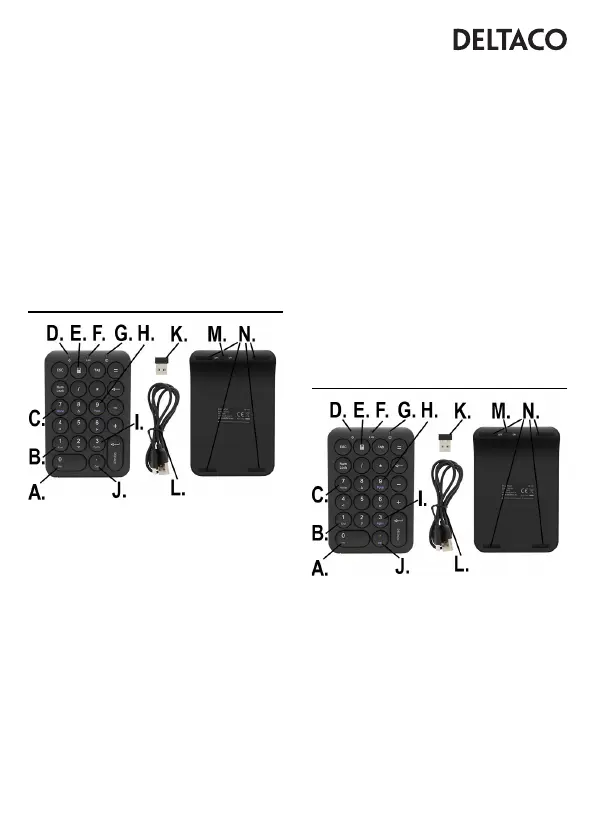
A. 0 = Insert
B. 1 = End
C. 7 = Home
D. LED (Power indicator)
E. Button to open calculator app
F. LED (Connection indicator)
G. LED (Num Lock indicator)
H. 9 = Page Up
I. 3 = Page Down
J. , = Delete
K. USB receiver
L. Micro USB cable
M. On/off switch
N. Non-slip pads
To use the num pad’s keys “0”, “1”, “7”, “9”, “3” and “,”
alternative functions, you must rst disable num lock, by
pressing on num lock and checking that the LED indicator
changes to off.
When num lock is enabled and the LED indicator is on, it
will use numbers as expected, “0” is 0 for example.
Use
To turn the device on or off use the switch (13)
underneath.
Connect the USB receiver to a USB port on the computer.
They will connect automatically.
Charge
To charge the device connect the Micro USB cable to the
device and to a USB power source such as a computer, or
a USB power adapter.
Safety instructions
1. Keep the product away from water and other liquids.
Cleaning and maintenance
Clean the keyboard with a dry cloth. For difcult stains use
a mild detergent.
Support
More product information can be found at www.deltaco.eu.
Contact us by e-mail: help@deltaco.eu.
EST
A. 0 = Insert
B. 1 = End
C. 7 = Home
D. Valgusdiood (toite indikaator)
E. Nupp kalkulaatori rakenduse avamiseks
F. Valgusdiood (ühenduse indikaator)
G. Valgusdiood (numbriluku indikaator)
H. 9 = Page Up
I. 3 = Page Down
J. , = Delete
K. USB-vastuvõtja
L. Micro-USB kaabel
M. Sisse/välja lüliti
N. Libisemiskindlad padjad



 To Next Page