EasyManua.ls Logo

Deluxe M618C - User Manual

Deluxe M618C
2 pages
Print Icon
To Next Page IconTo Next Page
Loading...
AA battery(Optioall)
5. Forward
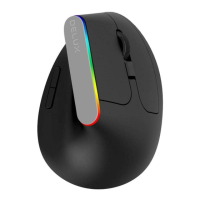
Vertical shape
With RGB light
RGB LED Light
Press the forward key and backward key at the same time for 3s to
turn on or turn off the RGB light.
7. ON/OFF switch
6. Backward
1
9. USB nano receiver
8. AA battery
2
3
4
5
6
Specification
DPI
Polling rate
Working voltage
Working current
Compatible system
1000/1200/1600
150Hz
1.5V
≤32mA
Windows 8/10/mac OS
Rebuilding up the Connection between Mouse and Receiver
If your mouse cannot work normally, you can try to build up the
connection again between mouse and receiver, as following steps:
1.Take out the nano receiver from computer and insert again,
it will detect automatically for about 15 seconds.
2.Keep the mouse in ON mode and with battery in correct direction.
3.Keep the effective distance within 10CM between the mouse and
receiver
4.Press the left button and right button at the same time for about
1-3 seconds, then release it. The connection is being built for about
10 seconds.
5.If you cannot build up the connection in 10 seconds, please repeat the
above steps.
Debugging Tips
● Check the receiver if it s connected to the USB port.
● Check the ON/OFF button if in ON mode.
● Check the effective distance between mouse and the receiver,
and shorten it.
● Rebuild up the connection between the mouse and receiver.
7
8
9
Question and Answer IconNeed help?

Do you have a question about the Deluxe M618C and is the answer not in the manual?

Summary

Button Function

Left click

Description of the left mouse button function.

Right click

Description of the right mouse button function.

Scroll wheel

Description of the scroll wheel function.

DPI cycle

Description of the DPI cycle button function.

Forward

Description of the forward button function.

Backward

Description of the backward button function.

ON;OFF switch

Description of the ON/OFF switch.

AA battery

Indicates the location of the AA battery.

USB nano receiver

Indicates the location of the USB nano receiver.

Features

Installation

RGB LED Light

Specification

Receiver Connection

Rebuilding Connection

Debugging Tips

Deluxe M618C Specifications

General IconGeneral
ModelM618C
CategoryMouse
ConnectivityWired
InterfaceUSB
Buttons6
Ergonomic DesignYes
ColorBlack
TypeVertical Ergonomic
Cable Length1.6m
DPI800/1200/1600 DPI