What to do if my Denali GEN II CANsmart is flashing red?
- CCody MurrayAug 4, 2025
If your Denali Controller is flashing red, the suggested solution is to check and increase the fuse settings. Then, cycle the ignition to reset the electronic fuses.
What to do if my Denali GEN II CANsmart is flashing red?
If your Denali Controller is flashing red, the suggested solution is to check and increase the fuse settings. Then, cycle the ignition to reset the electronic fuses.
What to do if Denali GEN II CANsmart Controller shows solid red?
If your Denali Controller shows a solid red light, connect it to the software. This should attempt to reset it to normal operation. Also, report the exact circumstances to DENALI for analysis.
What to do if Denali GEN II CANsmart is solid green and flashing red?
If your Denali Controller displays a solid green light and a flashing red light, connect it to the software. The software should then offer an upgrade or recovery option.
How to fix quick flashing green on Denali GEN II CANsmart?
If your Denali Controller is quick flashing green, connect it to the software. This should reset it to normal operation.
Why is my Denali Controller flashing red and flashing green?
If the Denali Controller is flashing red and flashing green, check that the correct CAN bus connector was used. If the problem persists, please send log files to info@DENALIelectronics.com for analysis by DENALI.
What to do if Denali GEN II CANsmart Controller shows solid red and solid green?
If your Denali Controller is showing a solid red and solid green light, return it to DENALI for analysis. Please also send log files to info@DENALIelectronic.com for analysis by DENALI.
Details the plug-n-play installation and control of up to four accessories via the CANsmart Controller and software.
Highlights features like independent light adjustment, 'flash to pass', 'strobe when horn active', and smart brake light capabilities.
Step-by-step guide for connecting the CANsmart Controller to bikes equipped with an Anti-Theft Alarm System (DWA).
Step-by-step guide for connecting the CANsmart Controller to bikes without an Anti-Theft Alarm System.
Connects DENALI Light Pods to the controller using light extension splitters, detailing red/white circuits.
Instructions for connecting an auxiliary horn using the blue circuit on the CANsmart Controller.
Guide for connecting an auxiliary brake light using the yellow circuit on the CANsmart Controller.
Details connecting the CANsmart wiring harness to the motorcycle battery terminals, including fuse holder placement.
Explains wiring LED lights split left/right for specific turn signal active features and software reassignment.
Explains how to select accessory functions for each circuit via the CANsmart software.
Details settings for Auxiliary Light One, including brightness, 'Off when turn signal active', 'Strobe when horn active', and dimming modes.
Details settings for Auxiliary Light Two, including brightness, 'Off when turn signal active', 'Strobe when horn active', and dimming modes.
Explains the smart brake light features, including running light, flash patterns, and deceleration braking.
Describes the horn circuit for adding an auxiliary horn without a relay.
Provides switched 12v power to an accessory, with optional time-out after ignition off.
Enables the addition of auxiliary turn signals without tapping into the bike's factory harness.
Adds auxiliary run, brake, and turn signals with flash patterns, without altering the factory harness.
Enables heated gear to work with the motorcycle's factory heated grip settings for temperature adjustment.
Information on where to download the CANsmart Accessory Manager Software for Windows and Mac.
Step-by-step instructions for connecting the CANsmart Controller to the Accessory Manager Software.
Explains how to control Auxiliary Light Set One using the motorcycle's controls for on/off, dimming, and intensity adjustment.
Explains how to control Auxiliary Light Set Two using the motorcycle's controls for on/off, dimming, and intensity adjustment.
Instructions for sounding the auxiliary horn using the vehicle's original horn button.
Details how to activate the auxiliary brake light, including settings for deceleration-activated flashing.
Overview of the Diagnostics Window for monitoring power consumption, battery/CAN bus voltage, and device temperature.
Defines CANsmart status indicator light colors/patterns and provides solutions for system faults.
Provides a link to the most up-to-date and comprehensive troubleshooting guide online.
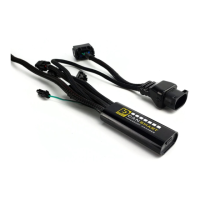
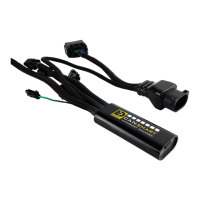
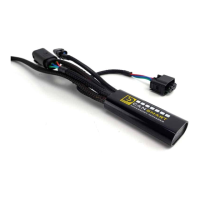
The DENALI CANsmart™ Controller is a sophisticated electronic device designed to integrate and control up to four motorcycle accessories, offering plug-n-play installation and extensive customization options. It is compatible with specific BMW models, including the K1600 Series, S1000XR, F850GS & GSA, and F750GS. The device aims to simplify accessory installation by eliminating the need for additional relays and complex wiring harnesses, while providing advanced control directly from the motorcycle's existing controls or dedicated software.
The core function of the CANsmart™ Controller is to act as an intelligent hub for motorcycle accessories. It connects to the motorcycle's CAN bus system, allowing for seamless communication and control. The device features four independent circuits, each pre-programmed for specific accessory types in its default configuration: two circuits for DENALI 2.0 lights, one for a SoundBomb horn, and one for a B6 auxiliary brake light. However, its versatility is a key feature, as the Circuit Function Selector in the CANsmart™ software allows users to reassign any accessory to any of the four circuits, making it adaptable to a wide range of needs.
The two auxiliary light circuits enable independent adjustment of high and low beam brightness, controllable directly from the vehicle's "WonderWheel" or other original switches. These circuits also support advanced lighting features such as "flash to pass" (strobing auxiliary lights when the high beam switch is pulsed), "strobe when horn active" (strobing auxiliary lights when the horn is sounded), "off when turn signal active" (canceling lights on the corresponding side when a turn signal is engaged), "inverse flashing when hazards active," and "modulation" for enhanced visibility. For two-wire auxiliary LED lights, a "Three-Wire Dimming Mode" can be disabled to ensure proper dimming operation.
The auxiliary brake light circuit transforms a simple two-wire brake light into a "smart brake light." This includes functionality such as a running light, multiple flash patterns, and deceleration-activated braking. Users can customize settings like "Brake Flashing Travel Speed" and "Deceleration activated braking sensitivity" through the software.
The auxiliary horn circuit simplifies the addition of an auxiliary horn, eliminating the need for a separate relay and dedicated wiring harness. This circuit provides a direct connection for the SoundBomb horn, with specific wiring instructions for positive and negative terminals.
An additional "Accessory/Ignition Supply" circuit provides switched 12V power to any accessory when the motorcycle's ignition is turned on. This circuit also features a configurable time-out, allowing the accessory to remain powered for a set duration (0-60 seconds) after the ignition is turned off, while the 3rd "data" wire turns off instantly with ignition.
Furthermore, the CANsmart™ Controller supports "Turn Signals" and "Run/Brake/Turn Light" functions, enabling the addition of auxiliary turn signals or combined run/brake/turn signals with flash patterns without tapping into the bike's factory harness. A "Heated Gear" circuit is also available, allowing heated gear to work in conjunction with the motorcycle's factory heated grip settings, with adjustable temperature for each stage.
The CANsmart™ Controller is designed for ease of use, both in installation and daily operation. Installation: The device offers plug-n-play installation, connecting in-line with the motorcycle's DWA (Anti-Theft Alarm) unit or directly to the DWA connector for bikes without an alarm. Wiring accessories involves plugging male 3-pin or 2-pin connectors into the corresponding circuits on the CANsmart™ Controller. Routing harnesses requires securing them to the vehicle's frame with included zip ties, avoiding moving components like radiator fan blades or suspension. Connecting to the battery involves ring terminals, with the fuse holder placed in an easily accessible location. Software Control: The CANsmart™ Accessory Manager Software, available for Windows and Mac, is central to customizing the device. It allows users to:
The CANsmart™ Controller includes several features to aid in maintenance and troubleshooting: Diagnostics Window: Accessible from the main menu of the software, this window provides an overall view of the system's power consumption, battery/CAN bus voltage, and device temperature.
By combining robust functionality with intuitive control and comprehensive diagnostic tools, the DENALI CANsmart™ Controller offers a powerful and user-friendly solution for integrating and managing motorcycle accessories.
| Input Voltage | 12 VDC |
|---|---|
| Output Channels | 4 |
| Communication Protocol | CAN bus |
| Dimensions | 4.25 x 1.5 x 0.5 inches |
| Weight | 2.5 oz |
| Compatibility | Select BMW, KTM, Honda, Yamaha, Suzuki, Kawasaki, Triumph, Ducati, Harley-Davidson motorcycles |
| Waterproof | Yes |
| Connectivity | CAN bus |
| Function | Control and manage motorcycle accessories |
| Control Method | CAN bus commands |
| Power Handling | Up to 25 amps total |
| Voltage Range | 12 VDC |
| Water Resistance | IP67 (submersible to 1m for 30 minutes) |
| Software | DENALI CANsmart Controller Software |
| Features | Programmable accessory circuits, CAN bus communication |
Loading...