
 Need help?
Do you have a question about the Denon AH-C120MA and is the answer not in the manual?
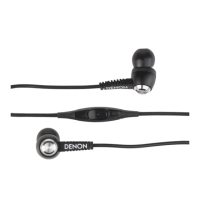
The Denon AH-C120MA are in-ear headphones designed for music playback and phone calls, part of the MUSIC MANIAC™ series. This owner's manual provides comprehensive guidance on their use, maintenance, and troubleshooting.
The primary function of the Denon AH-C120MA headphones is to deliver high-quality audio for music listening and to facilitate hands-free communication through phone calls. They are designed for use with compatible devices, including iPod®, iPhone®, iPad®, and Android™ smartphones. The headphones feature a built-in remote control and microphone, allowing users to manage audio playback and answer/end calls without directly interacting with their connected device.
The AH-C120MA headphones offer several user-friendly features to enhance the listening experience and ensure comfort:
Comfortable Fit with Customizable Ear Tips: The headphones come with a selection of ear tips made from different materials and in various sizes (S/M/L silicone ear tips and Comply™ foam tips). This allows users to choose the ear tips that provide the best fit for their ears, optimizing sound quality and comfort. The M size silicone ear tips are pre-fitted at the factory. The Comply™ foam tips are highlighted for their ability to provide a good fit and minimize the impact of surrounding noise, contributing to a more immersive listening experience. Proper insertion of the ear tips, ensuring a snug fit, is crucial for optimal bass performance and balanced sound between the left and right channels. The left headphone is marked with a bump to help users identify the correct orientation for their left ear.
Integrated Remote Control: The headphones feature an in-line remote control that simplifies interaction with a connected device.
Built-in Microphone: The integrated microphone enables hands-free communication during phone calls. Users can speak directly into the microphone without needing to hold their smartphone. For optimal performance, it's advised to ensure the microphone hole on the back of the remote control is not covered.
Smartphone Compatibility Adapter: Recognizing that some smartphones may not use a standard audio jack configuration, Denon provides a supplied adapter. This adapter is crucial for resolving potential issues such as incorrect sound playback, lack of sound, non-functional remote control, or the inability of the other person on a call to hear the user. By connecting the headphones to the smartphone via this adapter, compatibility issues can be mitigated, ensuring proper functionality of both audio and communication features. Users are cautioned not to use this adapter as an extension cable.
Carrying Case: A dedicated carrying case is included with the headphones. This accessory provides a convenient and protective way to store and transport the AH-C120MA headphones when not in use, helping to prevent tangling and damage.
While the manual primarily focuses on usage, it also touches upon aspects related to the longevity and proper functioning of the headphones:
Ear Tip Care: Users are advised to fit the ear tips securely on the nozzle of the headphones. The manual also notes that ear tips may deteriorate after extended use or storage. This implies that users should periodically inspect their ear tips and consider replacing them if they show signs of wear, which could affect both comfort and sound quality.
Troubleshooting Guide: A comprehensive troubleshooting section is provided to help users diagnose and resolve common issues. This includes guidance on:
By following these guidelines, users can ensure the optimal performance and extend the lifespan of their Denon AH-C120MA in-ear headphones. The manual emphasizes the importance of reading all instructions, including the quick guide and precautions, and retaining the manual for future reference.
 General
| Type | In-ear |
|---|---|
| Driver Size | 11.5 mm |
| Driver | Dynamic |
| Frequency Response | 20 Hz - 20 kHz |
| Impedance | 16 ohms |
| Cable Length | 1.2 m |
| Connector | 3.5 mm |
| Microphone | Yes |
| Remote | Yes |
| Connector Type | 3.5 mm |

 To Next Page