EasyManua.ls Logo

Denon DCD-1800 - Page 4

Denon DCD-1800
47 pages
Print Icon
To Next Page IconTo Next Page
To Previous Page IconTo Previous Page
Loading...
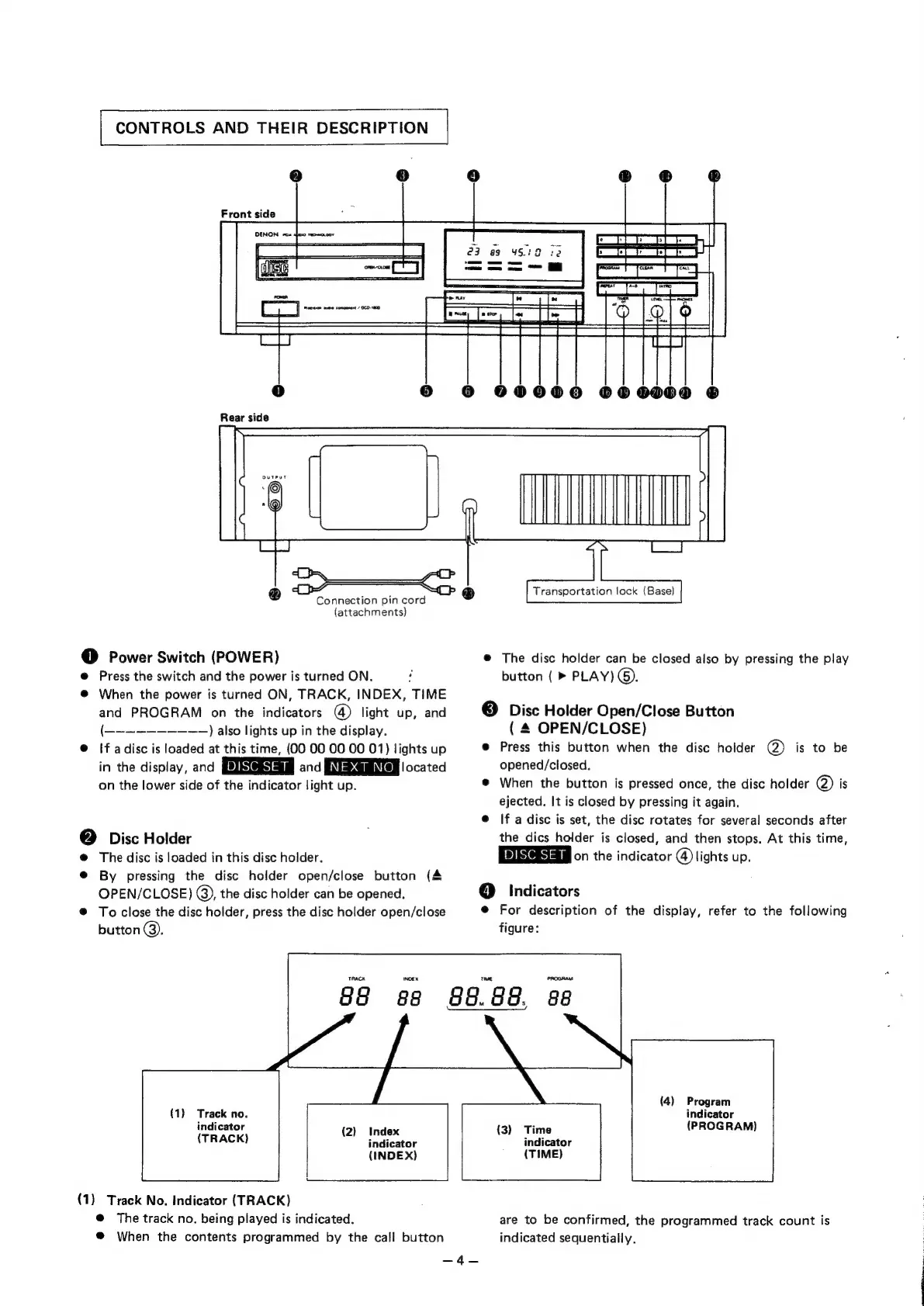
CONTROLS
AND
THEIR
DESCRIPTION
Front
side
Transportation
lock
(Base)
Connection
pin
cord
(attachments)
@
Power
Switch
(POWER)
@
The
disc
holder
can
be
closed
also
by
pressing
the
play
@
Press
the
switch
and
the
power
is
turned
ON.
.
button
(
»
PLAY)
©).
@
When
the
power
is
turned
ON,
TRACK,
INDEX,
TIME
and
PROGRAM
on
the
indicators
@)
light
up,
and
©
Disc
Holder
Open/Close
Button
(-——~—-—————~+
)
also
lights
up
in
the
display.
(
4
OPEN/CLOSE)
@
If
adisc
is
loaded
at
this
time,
(00
00
00
00
01)
lights
up
@
Press
this
button
when
the
disc
holder
(@)
is
to
be
in
the
display,
and
and
BNI
@MINTen
located
opened/closed.
on
the
lower
side
of
the
indicator
light
up.
®
When
the
button
is
pressed
once,
the
disc
holder
@)
is
ejected.
It
is
closed
by
pressing
it
again.
@
If
a
disc
is
set,
the
disc
rotates
for
several
seconds
after
@
Disc
Holder
the
dics
holder
is
closed,
and
then
stops.
At
this
time,
@
The
disc
is
loaded
in
this
disc
holder.
esas
on
the
indicator
@
lights
up.
®
By
pressing
the
disc
holder
open/close
button
(4
OPEN/CLOSE)
@),
the
disc
holder
can
be
opened.
@
Indicators
@
To
close
the
disc
holder,
press
the
disc
holder
open/close
@
For
description
of
the
display,
refer
to
the
following
button
@.
figure:
(4)
Program
(1)
Track
no.
indicator
indicator
(2)
Index
(3)
Time
(PROGRAM)
(TRACK)
indicator
indicator
(INDE
X)
(TIME)
(1)
Track
No.
Indicator
(TRACK)
@
The
track
no.
being
played
is
indicated.
are
to
be
confirmed,
the
programmed
track
count
is
@
When
the
contents
programmed
by
the
call
button
indicated
sequentially.
=A

Related product manuals