EasyManua.ls Logo

Denon HOME SUBWOOFER - User Manual

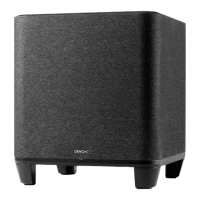
Denon HOME SUBWOOFER
33 pages
Print Icon
To Next Page IconTo Next Page
Loading...
DENON HOME SUBWOOFER
WIRELESS SUBWOOFER
Owner’s Manual
Contents Connections Settings Tips Status LED Appendix
1

Other manuals for Denon HOME SUBWOOFER

Question and Answer IconNeed help?

Do you have a question about the Denon HOME SUBWOOFER and is the answer not in the manual?

Summary

Part names and functions

Front panel

Identifies and describes the front panel components of the Denon Home Subwoofer.

Rear panel

Details the various ports and buttons on the rear panel of the Denon Home Subwoofer.

Connections

Positioning

Guidance on placing the subwoofer for optimal wireless connectivity and performance.

Connecting the power cords

Instructions for connecting the power cord to the subwoofer and a power outlet.

Getting the HEOS App

Information on downloading and obtaining the HEOS App for managing the subwoofer.

Setting up first HEOS built-in device

Step-by-step guide to configuring the first HEOS built-in device with the app.

Adding more HEOS built-in devices

Instructions for adding additional HEOS built-in devices to the system.

Connecting devices

Overview of establishing connections between the subwoofer and other devices.

Pairing this unit to a HEOS built-in device

Detailed steps for pairing the subwoofer with another HEOS built-in device.

Pairing this unit to HEOS built-in device from “Rooms” menu.

Instructions for pairing the subwoofer using the 'Rooms' menu in the HEOS app.

Unpairing this unit

Steps to disconnect or unpair the subwoofer from the HEOS system.

Settings

Adjusting the subwoofer output level

How to adjust the subwoofer's bass output level for desired sound.

Adjusting the low pass filter

Guide to setting the low pass filter frequency for optimal audio performance.

Adjusting the phase

Instructions for adjusting the subwoofer's phase setting for better integration.

Adjusting the status light brightness

How to control the brightness of the status indicator light on the unit.

Tips

Troubleshooting

Basic checks and initial steps to take when encountering issues with the unit.

The power turns off and the status LED flashes in red

Diagnosing and resolving issues when the unit powers off with a red status LED.

Connecting to a WPS network

Steps for connecting the unit to a network using the WPS push-button method.

Resetting factory settings

Procedure to reset the subwoofer to its original factory default settings.

Resetting the firmware to the default state

Guide to restoring the unit's firmware to its default state for troubleshooting.

Status LED

Status LED table

A table detailing the meaning of various front and rear LED indicator states.

Power management

Power modes

Details the different power modes like Quick start, Deep Standby, and Off.

Appendix

Supported file types and codecs

Lists the audio file formats and codecs compatible with the subwoofer.

Trademark information

Information regarding trademarks and certifications used on the product.

Specifications

Technical specifications including operating temperature, power, and network standards.

Dimensions

Physical dimensions and weight of the Denon Home Subwoofer.

Licence

Details about the software licenses used in the unit.

Summary

Part names and functions

Front panel

Identifies and describes the front panel components of the Denon Home Subwoofer.

Rear panel

Details the various ports and buttons on the rear panel of the Denon Home Subwoofer.

Connections

Positioning

Guidance on placing the subwoofer for optimal wireless connectivity and performance.

Connecting the power cords

Instructions for connecting the power cord to the subwoofer and a power outlet.

Getting the HEOS App

Information on downloading and obtaining the HEOS App for managing the subwoofer.

Setting up first HEOS built-in device

Step-by-step guide to configuring the first HEOS built-in device with the app.

Adding more HEOS built-in devices

Instructions for adding additional HEOS built-in devices to the system.

Connecting devices

Overview of establishing connections between the subwoofer and other devices.

Pairing this unit to a HEOS built-in device

Detailed steps for pairing the subwoofer with another HEOS built-in device.

Pairing this unit to HEOS built-in device from “Rooms” menu.

Instructions for pairing the subwoofer using the 'Rooms' menu in the HEOS app.

Unpairing this unit

Steps to disconnect or unpair the subwoofer from the HEOS system.

Settings

Adjusting the subwoofer output level

How to adjust the subwoofer's bass output level for desired sound.

Adjusting the low pass filter

Guide to setting the low pass filter frequency for optimal audio performance.

Adjusting the phase

Instructions for adjusting the subwoofer's phase setting for better integration.

Adjusting the status light brightness

How to control the brightness of the status indicator light on the unit.

Tips

Troubleshooting

Basic checks and initial steps to take when encountering issues with the unit.

The power turns off and the status LED flashes in red

Diagnosing and resolving issues when the unit powers off with a red status LED.

Connecting to a WPS network

Steps for connecting the unit to a network using the WPS push-button method.

Resetting factory settings

Procedure to reset the subwoofer to its original factory default settings.

Resetting the firmware to the default state

Guide to restoring the unit's firmware to its default state for troubleshooting.

Status LED

Status LED table

A table detailing the meaning of various front and rear LED indicator states.

Power management

Power modes

Details the different power modes like Quick start, Deep Standby, and Off.

Appendix

Supported file types and codecs

Lists the audio file formats and codecs compatible with the subwoofer.

Trademark information

Information regarding trademarks and certifications used on the product.

Specifications

Technical specifications including operating temperature, power, and network standards.

Dimensions

Physical dimensions and weight of the Denon Home Subwoofer.

Licence

Details about the software licenses used in the unit.

Denon HOME SUBWOOFER Specifications

General IconGeneral
ColorBlack
ConnectivityWi-Fi
Wireless TechnologyWi-Fi
Compatible SystemsDenon Home series products
Driver Size8 inches

Related product manuals