-13-
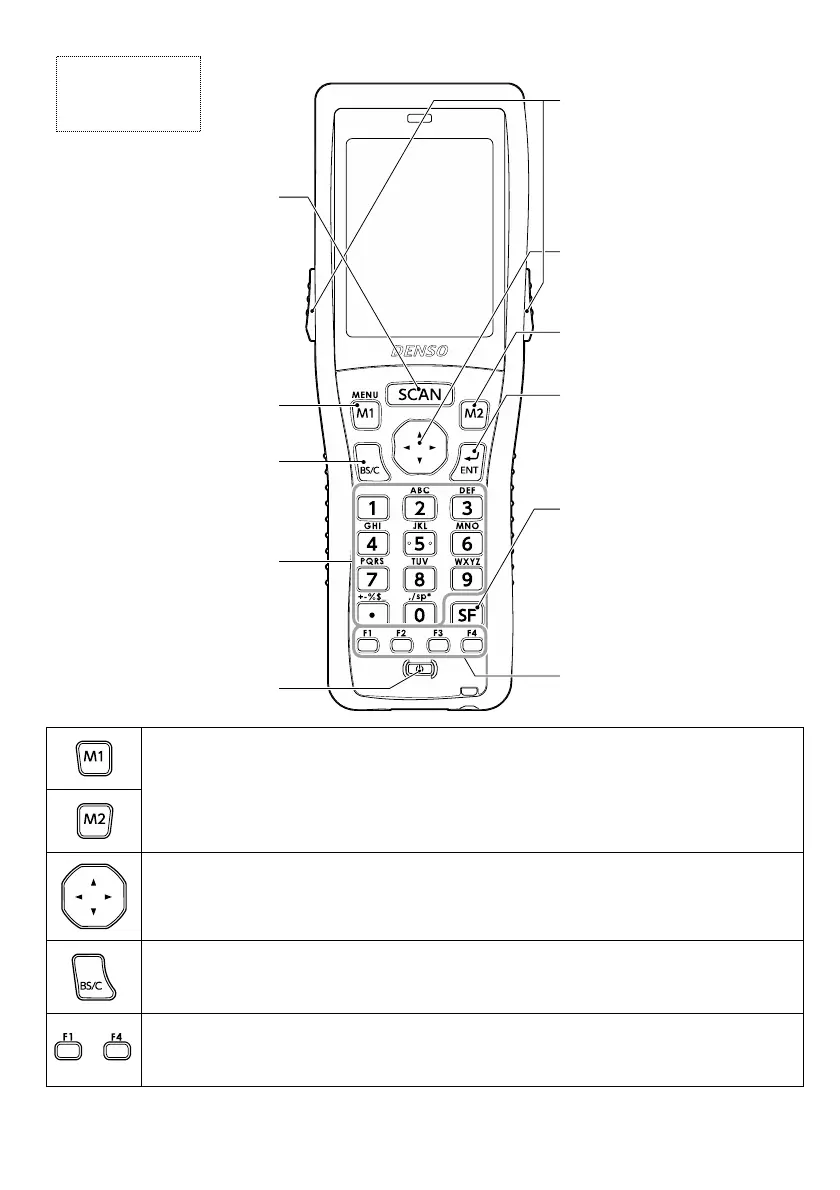
・SYSTEM MENU(システムメニュー)※の設定で[SF]キーや[ENT]キーを割り当てることができます。
・ユーザプログラムで文字列を割り当てることもできます。
・1 秒以上長押しするとメニュー画面が表示されます。(M1 マジックキーのみ)
• The SF or ENT key function can be assigned with the SYSTEM MENU.*
• A characters or character string can also be assigned with the user program.
*The MENU screen displays when held down for one second or longer.(Only M1 magic key)
文字入力時のカーソルの移動や、メニューの選択に使います。
Used to move the cursor and select menus.
最後に入力された1文字を消去します。(バックスペース)
0.5 秒以上の長押しで入力のキャンセルや1つ前の画面に戻るときに使います。(クリア)
Deletes the last entered character (backspace). When pressed and held for 0.5 seconds or
more, cancels entry and returns the LCD to the previous screen (clear.)
~
機能の選択に使用します。ファンクションキーの機能はユーザプログラムで割り当てます。詳細はプロ
グラミングマニュアルを参照してください。
Used to select functions.Function key functions are assigned with the user program.
Refer to the “BHT-BASIC Programmer’s Manual (For BHT-1300 Series)” for further details.
※SYSTEM MENU(システムメニュー)の操作方法は取扱説明書を参照してください。
* Refer to the User’s Manual on how to use the SYSTEM MENU.
キー操作部
Keypad
M1 マジックキー
M1 magic key
M2 マジックキー
M2 magic key
カーソルキー
Cursor key
エンターキー
入力データの確定や、操作を実
行します。
ENT(Enter) key
Finalize entered data or
execute operations
バックスペース
クリアキー
Backspace/
Clear key
数字キー
Numerical keys
電源キー
Power key
ファンクションキー
Function keys
シフトキー
特殊な入力操作をするときに、
数字キー、電源キーなどと一緒
に使います。
SF(Shift) key
Used in combination with other
keys such as the numerical key
or power key for special input
procedures.
スキャンキー
コードを読み取るときに押して
ください。(トリガキーと同じ機
能をします。)
Scan key
Press to scan codes.
This key performs the same
function as a Trigger key.
トリガキー
コードを読み取るときに押して
ください。(スキャンキーと同じ
機能をします。)
Trigger keys
Press to scan codes.
This key performs the same
function as a Scan key.


 To Next Page
 Loading...