-23-
3
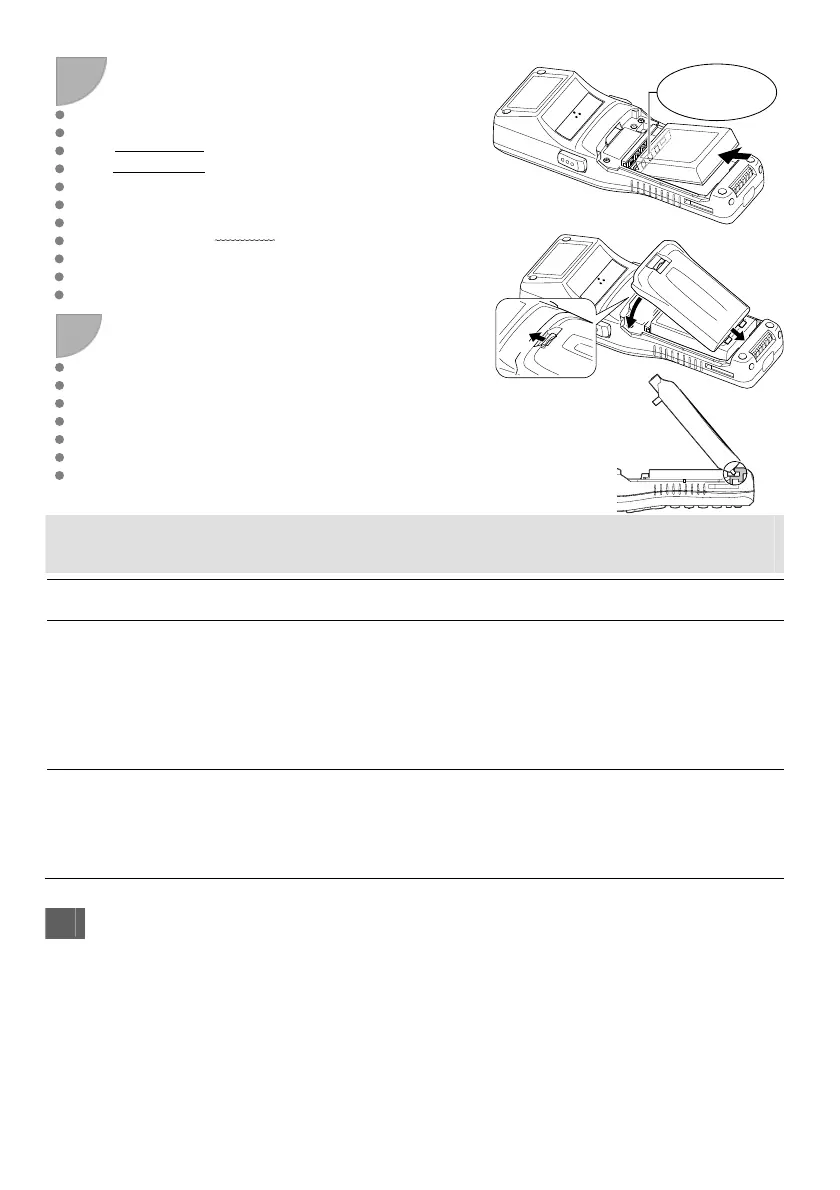
新しい充電池カートリッジの電極を確認し、
矢印方向に取り付けます。
Insert a new battery cartridge in the direction
indicated by the arrow. Make sure that the battery
cartridge is in the right orientation.
Point
・当社指定の充電池カートリッジ以外は
使用しないでください。
・データの消失をさけるため、新しい充電池カー
トリッジを 3分以内
に取り付けてください。
• Never use battery cartridges other than those
specified by DENSO WAVE.
• Insert the new battery cartridge within 3 minutes
after you removed the old one to avoid data loss.
4
①電池カバーの2つのツメを本体側の2つの溝の
奥まで斜めに差し込み、②電池カバーを閉め、カ
バースイッチを操作して電池カバーをロックしま
す。
Fit the battery cover two tabs deeply to the two slot
of BHT at a slant (1), and then close the battery
cover and operate cover switch (2). The battery
cover is now locked in position.
充電池カートリッジの交換後、こんな表示がでたら・・・
If the Screen Below Displays After Replacement…
表示内容
Displayed Message
処置方法
Solution
「現在の時刻を設定してください」と
表示される。
“Set the current date and time”.
BHT を長期間使用しなかったとき、BHT の電源をオンする
と、日付・時刻の再設定が必要な場合があります。
このメッセージが表示された場合は、現在の日付・時刻を設
定してください。
When the BHT power is turned ON after a long period of
non-use, you may need to reset the date and time.
If this error message displays on the screen, you need to set
the current date and time.
「管理者に連絡してください。
(XXXX)」と表示される。
“Contact your administrator (XXXX)”.
このメッセージが表示された場合は、再度電源をオンしてく
ださい。このエラーが繰り返し発生する場合は、表示をメモ
してシステム管理者に連絡してください。
If this message displays on the screen, reboot the BHT. If
this error persists, take a note on the error message and
then contact the system administrator.
長期間使用しないとき Using the BHT after Long Non-Use
長期間使用しなかったときは、BHT 内のデータが消失したり、カレンダ時計が停止したりしている
場合があります。
・大切なデータは必ず控えを取っておいてください。
・カレンダ時計が停止している場合は、再度設定ください。
・メモリバックアップ用電源の充電のため、充電池カートリッジは、10 分以上つけたままにしてください。
その他の対処方法は、取扱説明書を参照ください。
Data stored in the BHT may be lost or damaged and the calendar clock may stop if the BHT is left
unused for a long period of time.
・Keep a backup copy of important or critical information.
・Reset the calendar clock if it is stopped.
電極側
Terminals
①
②
③


 To Next Page
 Loading...