EasyManua.ls Logo

Denver BTN-210 - User Manual

Denver BTN-210
4 pages
Print Icon
To Next Page IconTo Next Page
Loading...
Safety information
Please read the safety instructions carefully before using the product for the first time
and keep the instructions for future reference.
1. This product is not a toy. Keep it out of reach of children.
2. Warning: This product includes lithium polymer batteries.
3. Keep product out of the reach of children and pets to avoid chewing and swallowing.
4. Product operating and storage temperature is from 0 degree Celsius to 40 degree
Celsius. Under and over this temperature might affect the function.
5. Never open the product. Touching the inside electrics can cause electric shock. Repairs
or service should only be performed by qualified personnel.
6. Do not expose to heat, water, moisture, direct sunlight!
7. Please remove the earphones in case of any leakage or excessive heat from the product
to avoid burns or rash.
8. Please protect your ears against loud volume. Loud volume can damage your ears and
risk in hearing loss.
9. Bluetooth wireless technology operates within a range of about 10 m (30 feet). The
maximum communication distance may vary depending on the presence of obstacles
(people, metal objects, walls, etc.) or the electromagnetic environment.
10. Microwaves emitting from a Bluetooth device may affect the operation of electronic
medical devices.
11. The unit is not waterproof. If water or foreign objects enter the unit, it may result in fire
or electric shock. If water or a foreign object enters the unit, stop use immediately.
Charge It
• On the right earcup,carefuIIy plug the Type-C cable into Type-C charging port. and
connect the other end of the cable to either a computer USB port or to a USB-compatible
car or wall charger.
• Solid red LED light will appear to indicate when the headphone is charging.
• When charging is complete, the LED light will turn Blue.
• Charging time is approximately 2 hours.
Turn It On/Off
• Press & hold the power button on the right side of the headphone for about 3 seconds
until the LED indicator light turns on.
• Press & hold the power button again for 4 seconds until the LED light turns off.
Pair & Connect With New Device
ENG 1
• Power on the wireless bluetooth headphone(refer to the "Turn It On" section).
• To pair the headphone with a new device,the Red and blue LED light blink to indicate it
isready to be paired with your device.
Question and Answer IconNeed help?

Do you have a question about the Denver BTN-210 and is the answer not in the manual?

Overview

This document provides safety information, usage instructions, and technical specifications for the DENVER BTN-210 wireless Bluetooth headphones.

Safety Information

The headphones are not a toy and should be kept out of reach of children and pets due to the inclusion of lithium polymer batteries. The operating and storage temperature range is 0°C to 40°C; temperatures outside this range may affect functionality. Users should never open the product, as touching internal electronics can cause electric shock. Repairs should only be performed by qualified personnel. The device should not be exposed to heat, water, moisture, or direct sunlight. In case of leakage or excessive heat from the product, earphones should be removed to avoid burns or rash. Protecting ears against loud volume is crucial, as it can lead to hearing loss. Bluetooth wireless technology operates within a range of approximately 10 meters (30 feet), though this distance can vary based on obstacles (people, metal objects, walls) or electromagnetic interference. Microwaves emitted from Bluetooth devices may affect electronic medical devices. The unit is not waterproof; if water or foreign objects enter, stop use immediately to prevent fire or electric shock.

Function Description

The DENVER BTN-210 is a pair of wireless Bluetooth headphones designed for audio playback and hands-free calling. It features an ANC (Active Noise Cancellation) function.

Important Technical Specifications

  • Battery: Lithium polymer battery (inside).
  • Bluetooth Range: Approximately 10 meters (30 feet).
  • Operating Frequency Range: 2402-2480MHz.
  • Max Output Power: 0.5mW.
  • Charging Port: Type-C.
  • Audio Jack: 3.5mm.
  • Operating/Storage Temperature: 0°C to 40°C.

Usage Features

Charging:

To charge the headphones, plug the Type-C cable into the Type-C charging port on the right earcup and connect the other end to a computer USB port or a USB-compatible car/wall charger. A solid red LED light indicates charging, which turns blue when charging is complete. Charging time is approximately 2 hours.

Power On/Off:

  • Power On: Press and hold the power button on the right side for about 3 seconds until the LED indicator light turns on.
  • Power Off: Press and hold the power button again for 4 seconds until the LED light turns off.

Pairing and Connecting with a New Device:

  1. Power on the headphones.
  2. The red and blue LED lights will blink, indicating pairing mode.
  3. On your Bluetooth-enabled smartphone, tablet, or media player, navigate to the Bluetooth settings menu, turn on Bluetooth, and search for new devices.
  4. After a few seconds, "DENVER BTN-210" will appear. Tap to select it.
  5. A solid blue LED light indicates successful pairing. The headphones will automatically reconnect to the last connected Bluetooth device if its Bluetooth is on and in range. Note: If the headphones are not used within 5 minutes, they will automatically turn off to save battery.

Playback Control:

  • Connect your device via Bluetooth.
  • Open your music app and press play.
  • Play/Pause Music & Answer Calls: Press the power button once.
  • Redial Last Number: Press the power button twice.
  • Reject Incoming Call: Press and hold the power button for 1-2 seconds.
  • Next Track: Press the "+" area (Next Track / Volume Up button).
  • Previous Track: Press the "-" area (Previous Track / Volume Down button).
  • Turn Up Volume: Press and hold the "+" area (Next Track / Volume Up button).
  • Turn Down Volume: Press and hold the "-" area (Previous Track / Volume Down button).
  • ANC Function: Press the ANC button once; a white LED light will turn on to indicate ANC is active. All audio, including music, games, videos, and notifications, will be routed through the headphones.

Troubleshooting:

  • No Power: Recharge the headphones using the Type-C cable.
  • Music Not Playing Over Bluetooth: Ensure your Bluetooth device has an A2DP profile. Verify that both devices are paired and connected. Restart the headphones to reconnect.
  • Bluetooth Device Will Not Reconnect:
    • On your Bluetooth device, navigate to Bluetooth settings, tap "DENVER BTN-210," and select "Forget." Then, follow the pairing steps again.
    • Alternatively, press and hold the power button on the headphones (while powered on) to disconnect from any connected devices, then follow the reconnection steps.

Maintenance Features

  • Cleaning: The manual does not specify cleaning instructions, but general electronic device care suggests using a soft, dry cloth.
  • Charging: Only charge with the original cable supplied with the product.
  • Storage: Store within the recommended temperature range of 0°C to 40°C. Avoid exposure to heat, water, moisture, or direct sunlight.

Environmental Information:

Electric and electronic equipment and included batteries contain materials that can be hazardous to health and the environment if not handled correctly. The crossed-out trash can symbol indicates that these items should not be disposed of with household waste but must be disposed of separately. End users are responsible for submitting used batteries to appropriate designated facilities for recycling in accordance with legislation. Collection points for electric and electronic equipment and batteries are available free of charge at recycling stations or can be collected from households. Additional information is available from your city's technical department.

EU Declaration of Conformity:

DENVER A/S declares that the radio equipment type BTN-210 complies with Directive 2014/53/EU. The full text of the EU declaration of conformity is available at www.denver.eu (search for model number BTN-210 under downloads/other downloads).
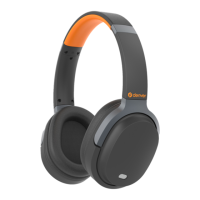
Denver BTN-210 Specifications

General IconGeneral
BrandDenver
ModelBTN-210
CategoryHeadphone
LanguageEnglish

Related product manuals