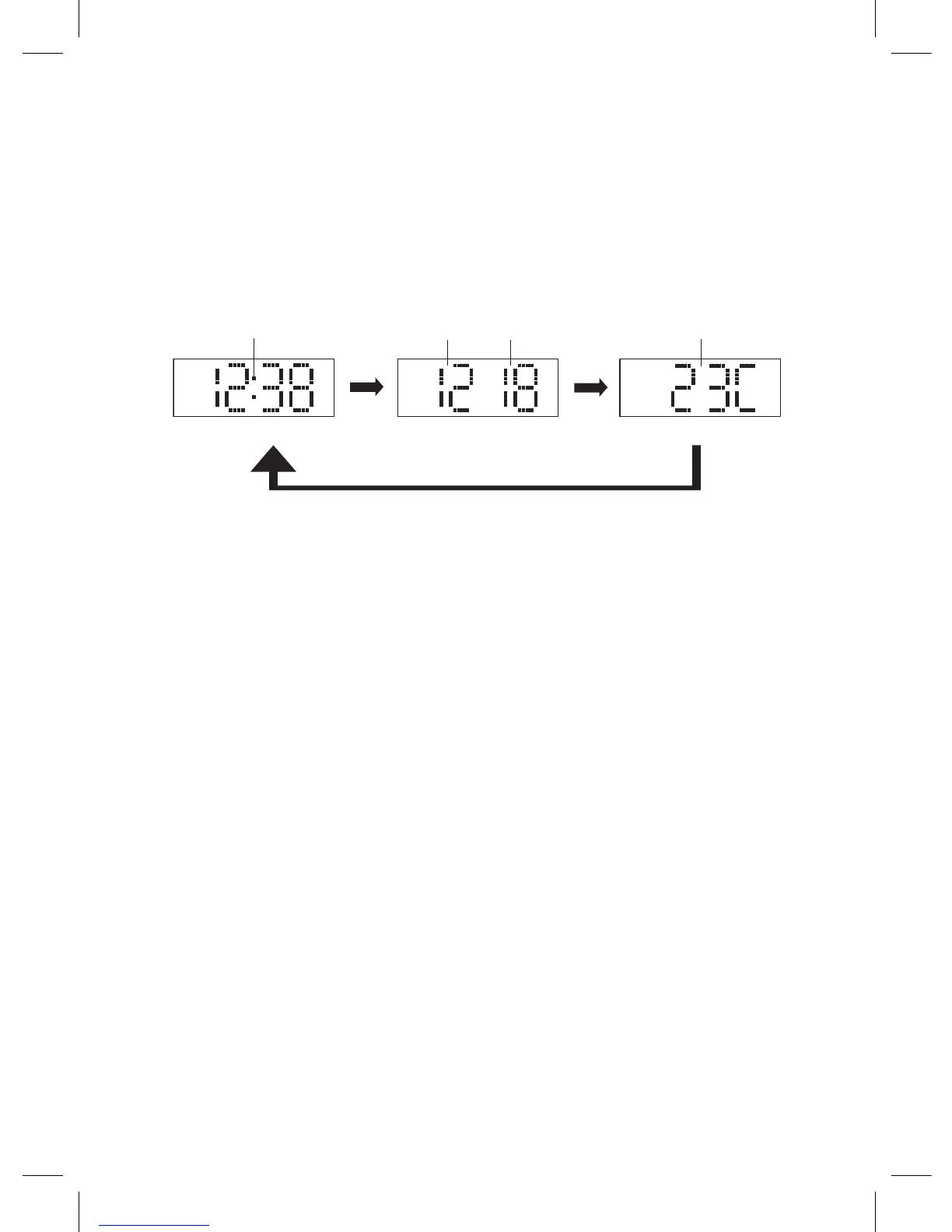
ALTERNATE DISPLAY BETWEEN TIME AND TEMPERATURE
MONTH-DATE DISPLAY
1. In radio off mode, press and hold the unit button (10) or the
remote control button (7) for about 3 seconds until “ON” appears
in the LED DISPLAY.
2. The DISPLAY will alternate between the current Time for 10
seconds and month- date for 5 seconds and temperature for 5
seconds as follows:
To cancel this function, press and hold the unit button (10) or the
remote control button (7) for about 3 seconds until “OFF” appears
on the LED DISPLAY. The DISPLAY will switch back to normal time
display.
NOTE
If you replace the battery, do not disconnect AC plug from AC outlet.
Otherwise, current time and alarm will be initialized.
SPECIFICATIONS
Frequency range: FM 87.5 – 108 MHz
In door Temperature Sensor Range: 32 °F to 122 °F (0°C to +50°C)
Battery backup: 3V (CR2032 Flat Lithium
battery x 1)
Power Adaptor: Input AC 100-240V 50- 60 Hz
- Output DC 5V 1200mA
ENG-12
TIME Indicator
Display for 10 second Display for 5 second Display for 5 second
TEMPERATURE IndicatorMONTH Indicator
DAY Indicator


 To Next Page