Need help?
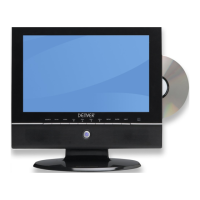
Do you have a question about the Denver DV3 T TFD-1020DVBT and is the answer not in the manual?
General warnings, cautions, and operational notes for safe use of the appliance.
Instructions for proper disposal of the product according to WEEE directive.
Lists all items included in the product packaging.
Details buttons and ports on the main unit of the DVD player.
Describes the purpose and operation of each button on the remote control.
Guides for connecting TV antenna and headphones to the player.
Instructions for connecting external devices via AV, VGA, and USB ports.
Details on using the AC adapter for power and battery charging.
Information on using the car adapter and rechargeable battery.
Steps to turn on the DVD player for the first time.
How to navigate menus and adjust picture parameters like brightness and color.
Settings for aspect ratio, OSD language, and system preferences.
Configuring system parameters and performing automatic channel scans.
Adjusting channel reception and managing channel lists.
Inserting discs, selecting titles/chapters, and basic playback controls.
Using zoom, repeat functions, and changing audio channels during playback.
Accessing special DVD features like camera angles, subtitles, and audio languages.
Information on supported bitrates, sampling frequencies, and file naming conventions.
How to pause, skip tracks, and set repeat playback for audio discs.
Inserting JPEG discs, browsing folders, and selecting files.
Using zoom, rotate, and thumbnail/slideshow modes for JPEG images.
Notes on playing DVD-RW discs and CPRM content protection.
Supported MPEG4 resolutions, file names, and playable formats.
Using the program feature to select and play titles, chapters, or tracks in a custom order.
Starting, stopping, and resuming programmed playback sequences.
How to insert and select USB or digital cards for playing MP3 and JPEG files.
Accessing and configuring general settings like TV Display and Angle Mark.
Adjusting aspect ratio and enabling angle mark display for DVDs.
Settings for closed captions, OSD language, and screen saver activation.
Configuring speaker output modes like Downmix and Stereo.
Settings for Dual Mono and Dynamic sound output.
Setting TV color system and optimizing dynamic sound output levels.
Selecting audio/subtitle languages and setting parental control levels with rating explanations.
Resetting to defaults, setting passwords, and configuring area/time zone.
Step-by-step guide to perform an automatic scan for available TV and radio channels.
Performing manual channel scans and accessing teletext features.
Using the Electronic Program Guide and reserving programs.
Reordering channels in the list according to user preference.
Adding favorite channels, deleting channels, and setting protected channels.
Understanding the meaning of various icons displayed on the On-Screen Display.
Details on playable disc formats, disc terminology, and compatibility.
Guidelines for handling discs and information about region code playback restrictions.
Common problems and solutions related to TV and DVD playback modes.
Troubleshooting steps for USB device recognition and remote control functionality.
Technical details for TV system, resolution, power, and DVD player capabilities.
Technical specs for USB/card handling and remote control operating parameters.
Guidance on environmentally responsible disposal of the product at the end of its lifecycle.
 General
| Screen Size | 10.2 inches |
|---|---|
| Resolution | 1024 x 600 pixels |
| DVD Player | Yes |
| TV Tuner | DVB-T2 |
| Connectivity | USB |
| Card Reader | SD |

 To Next Page