EasyManua.ls Logo

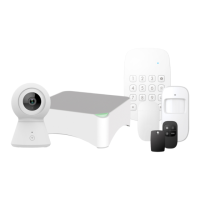
Denver HSA-120 - User Manual

Denver HSA-120
28 pages
Print Icon
To Next Page IconTo Next Page
Loading...
denver-electronics.com
DENVER
HSA-120
Alarm Security System™
Alarm- og Sikkerhedssystem™
INSTALLATION AND USER MANUAL
INSTALLATIONS- OG BRUGERMANUAL
Question and Answer IconNeed help?

Do you have a question about the Denver HSA-120 and is the answer not in the manual?

Summary

Introduction

Warnings

Lists important safety precautions and user responsibilities for the alarm system.

Getting Started

Setup Mode Operations

Exit Delay & Entry Delay

Configuring time delays for arming and disarming the system.

Connecting the Control Panel

Connect the Control Panel

Instructions for inserting the SIM card and powering the control panel.

Wireless Remote Control Operations

Arming the System

How to arm the alarm system using the remote control.

Wireless Motion Detector

Usage and Registration

Instructions for activating, using, and registering the motion detector.

RFID Tag Functionality

Registration

Steps to register the RFID tag by swiping it on the control panel's reader.

Setup Mode Commands

Change Password

Modifying the system's access password.

System Configuration via Setup Mode

Control by Phone Call

Methods and commands for remotely controlling the system via phone.

Advanced System Settings

SOS Emergency Function

Using the panic button to trigger an alarm and send notifications.

Disarming the System

Procedure for disarming the alarm system via the control panel.

DENVER HSA-120 APP OPERATION

Instructions for using the dedicated mobile application for system control.

Control Panel Operations Summary

Enter Connection Mode

Command to enter connection mode for accessory pairing.

SMS Operations

Store Phone Numbers for SMS Notifications

Instructions for saving numbers that will receive SMS alerts.

SMS Settings and Enquiries

Store Phone Numbers

Method for storing additional phone numbers via SMS.

SMS Commands for System Management

Restore System to Factory Settings

Command to reset the system to its default factory configuration.

Summary

Introduction

Warnings

Lists important safety precautions and user responsibilities for the alarm system.

Getting Started

Setup Mode Operations

Exit Delay & Entry Delay

Configuring time delays for arming and disarming the system.

Connecting the Control Panel

Connect the Control Panel

Instructions for inserting the SIM card and powering the control panel.

Wireless Remote Control Operations

Arming the System

How to arm the alarm system using the remote control.

Wireless Motion Detector

Usage and Registration

Instructions for activating, using, and registering the motion detector.

RFID Tag Functionality

Registration

Steps to register the RFID tag by swiping it on the control panel's reader.

Setup Mode Commands

Change Password

Modifying the system's access password.

System Configuration via Setup Mode

Control by Phone Call

Methods and commands for remotely controlling the system via phone.

Advanced System Settings

SOS Emergency Function

Using the panic button to trigger an alarm and send notifications.

Disarming the System

Procedure for disarming the alarm system via the control panel.

DENVER HSA-120 APP OPERATION

Instructions for using the dedicated mobile application for system control.

Control Panel Operations Summary

Enter Connection Mode

Command to enter connection mode for accessory pairing.

SMS Operations

Store Phone Numbers for SMS Notifications

Instructions for saving numbers that will receive SMS alerts.

SMS Settings and Enquiries

Store Phone Numbers

Method for storing additional phone numbers via SMS.

SMS Commands for System Management

Restore System to Factory Settings

Command to reset the system to its default factory configuration.

Denver HSA-120 Specifications

General IconGeneral
BrandDenver
ModelHSA-120
CategorySecurity System
LanguageEnglish

Related product manuals