8 9
2). Use the ◄▲▼►buttons to navigate the keypad in the screen to entry your Wi-Fi
password, then press the OK button to select the characters. Finally select the and press
the OK button. In a second or two your TV will show Success after connection successful.
WIRED Connection
If you have connected your Ethernet cable to the LAN socket on the back of your TV, select
Wired Network and the press the OK button. Then select Connect to start connect to the
internet.
SKIP Connection
1). If you do not need to connect to the network, select Skip and press the OK button to
confirm.
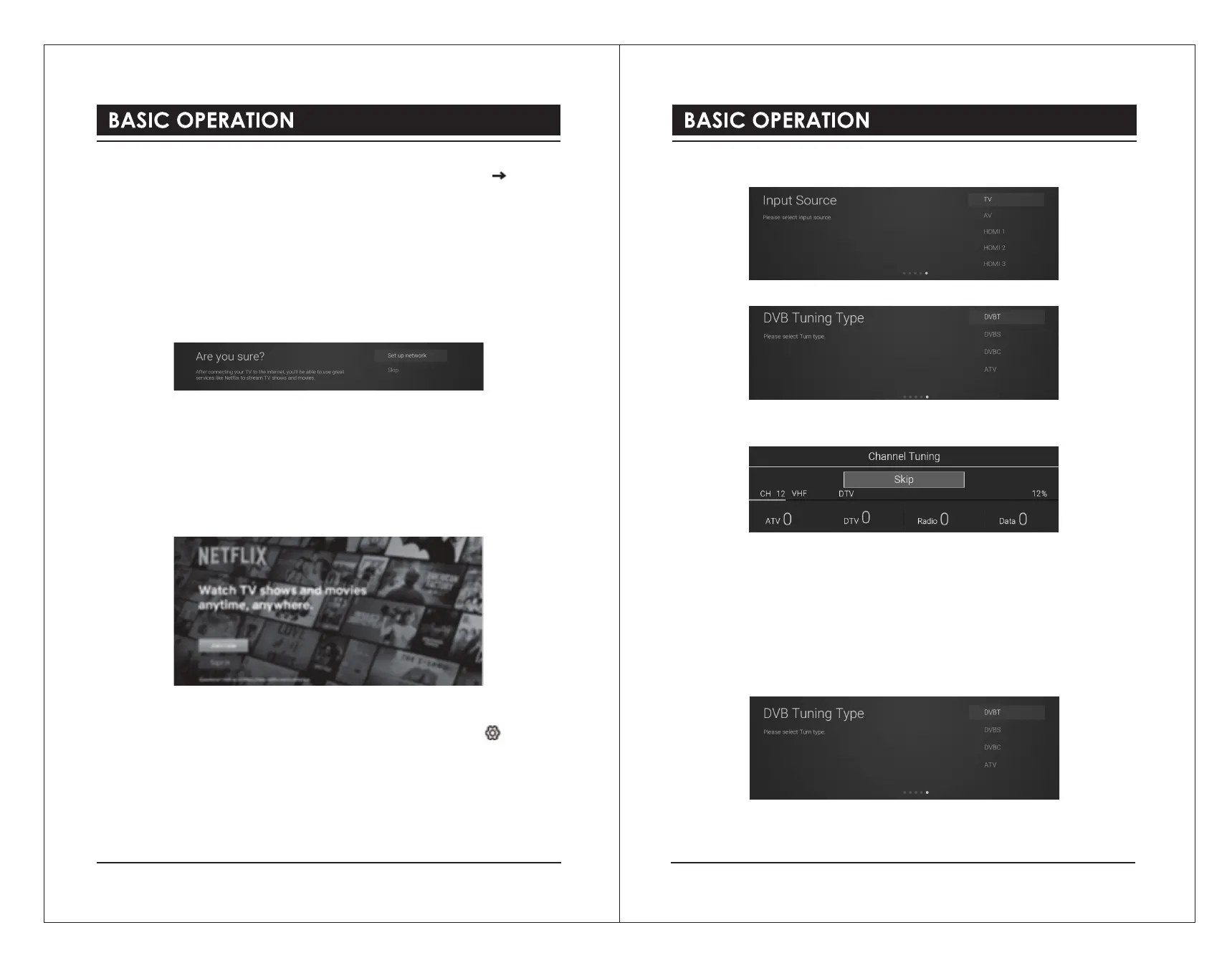
2). A pop up menu will be display. If you want to go back the network setting page, select Set
up Network. If you want to confirm to skip the network setting, select Skip. Then will enter
to Input Source menu and start TV Tuning.
Signing in to Your Netflix Account
Press the ▲▼buttons to select Start Netflix then press the OK button. You will now be
asked to sign in to your Netflix account. If you don’t already have an account you can set one
up on your TV go to the ‘Join Now’ section.
If you want to temporary skip the Netflix setting, select Skip to enter to Input Source menu
and start TV Tuning.
If you complete Netflix setting, press the EXIT button to leave and press the button and
select Programme, then select Auto Tuning for TV tuning.
Tuning in Your TV
If you select Skip option in Netflix setting page, then you now need to tune in your TV so that
you can watch LIVE TV (broadcast TV). If you watch TV via a Set Top Box you can skip this
section by selecting the correct HDMI input source.
DVB-T
1) Input Source page shown on the TV, use the ▲▼buttons to select TV. Then press the
OK button.
2) In DVB Tuning Type page, use the ▲▼buttons to select DVB-T.
3) Your TV will now start scanning for all the available TV channels. This operation may take
a few minutes. The display will show the progress of the tuning and the number of channels
found.
4) If you want to skip the DTV tuning, press the OK button to interrupt the tuning half way. A
pop-up screen will be displayed, press the ◄button to select YES to confirm.
e. Your TV is now setup and ready to watch.
DVB-S
1). Input Source page shown on the TV, use the ▲▼buttons to select TV. Then press the
OK button.
2). In DVB Tuning Type page, use the ▲▼buttons to select DVBS.
3). Auto Tuning window will be displayed. use the ▲▼buttons to select options. Press the
OK button and then press the ◄►buttons to adjust each option’s setting. Press the OK
button to confirm.



 To Next Page