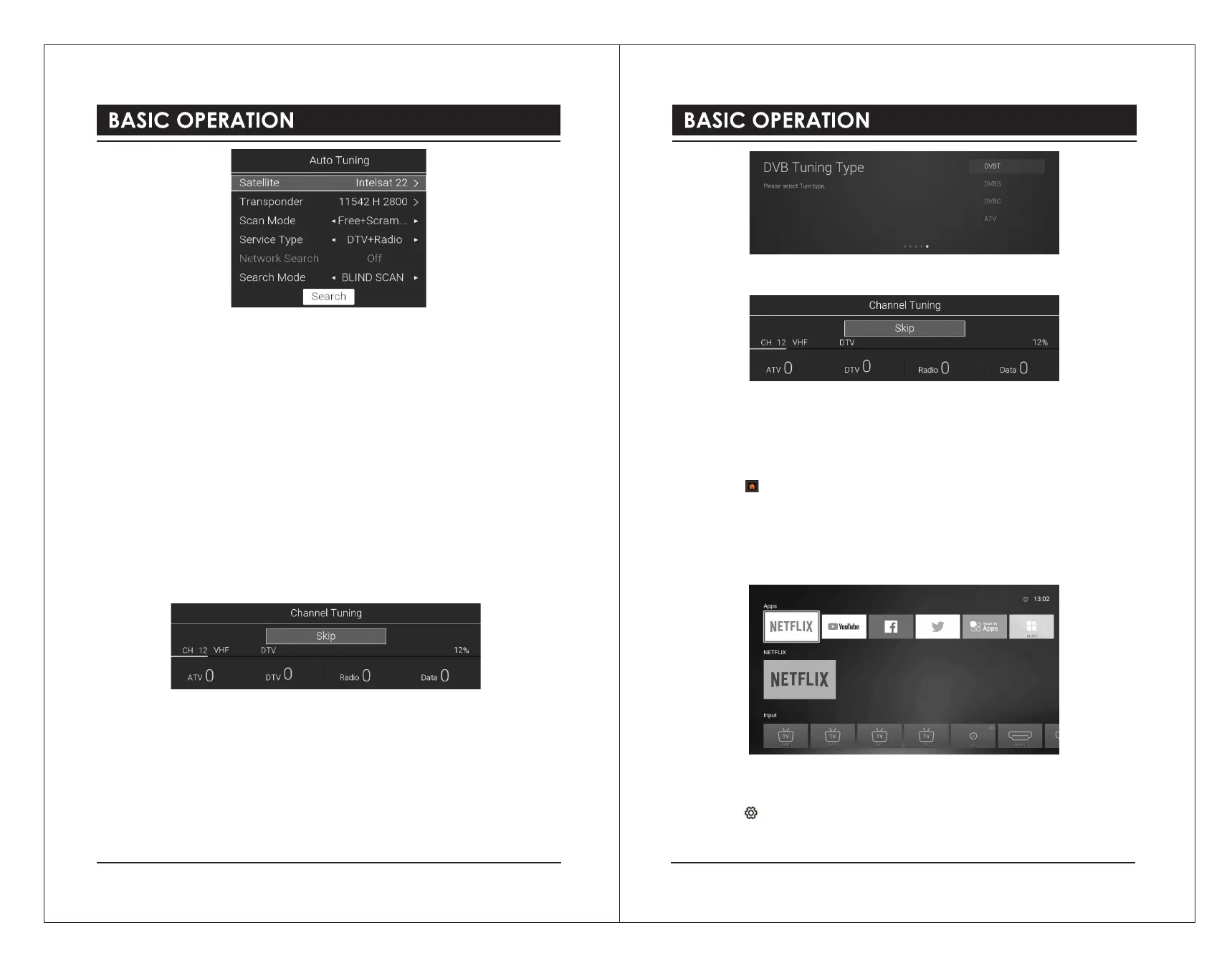
Satellite
Selects your desired satellite.
Transponder
Selects your desired frequency.
Scan Mode
Selects your desired watching channel type: Free + Scramble / Free / Scramble.
Service Type
Selects the channel service type: DTV + Radio / Radio / DTV.
Network Search
Whether to perform Network Quick Search (Search Mode is optional for FAST SCAN)
Search Mode
Selects the scanning method: BLIND SCAN / FAST SCAN.
Search
Starts searching.
4). Your TV will now start scanning for all the available TV channels. This operation may take
a few minutes. The display will show the progress of the tuning and the number of channels
found.
5). If you want to skip the DTV tuning, press the OK button to interrupt the tuning half way. A
pop-up screen will be displayed, press the ◄button to select YES to confirm.
6). Your TV is now setup and ready to watch.
DVB-C
1). Input Source page shown on the TV, use the ▲▼buttons to select TV. Then press the
OK button.
2). In DVB Tuning Type page, use the▲▼ buttons to select DVBC.
3). Your TV will now start scanning for all the available TV channels. This operation may take a
few minutes. The display will show the progress of the tuning and the number of channels found.
4). If you want to skip the tuning, press the OK button to interrupt the tuning half way. A
pop-up screen will be displayed, press the ◄button to select YES to confirm.
5). Your TV is now setup and ready to watch.
HOME Menu
1). Press the button to display the home menu.
2). Use the ▲▼buttons to switch between the Apps, NETFLIX, Input, and Settings
sections of the Home page.
3). Use the ◄►buttons to select the desired App, Input source or Setting, then press the OK
button to confirm.
Setting
Allows you to set various performance of your TV.
1). Press the button to display the main menu.
2). Press the ▲▼buttons to select Setting menu and then press the OK button.
10 11



 To Next Page