Need help?
Do you have a question about the Denver MCR-50MK3 and is the answer not in the manual?
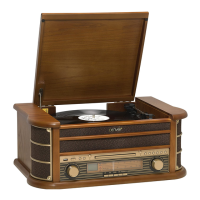
This document provides a comprehensive guide to the MCR-50MK3, a versatile audio system from Denver, designed to play various media formats including vinyl records, CDs, USB drives, and cassette tapes, while also featuring an AM/FM radio. The device emphasizes ease of use, recyclability, and adherence to safety and environmental standards.
The MCR-50MK3 serves as an all-in-one entertainment system, integrating multiple audio playback functionalities. It features a 3-speed belt-drive turntable for vinyl records, a CD player compatible with CD, CD-R, CD-RW, and MP3 formats, a USB socket for MP3 playback and recording, and a cassette mechanism for C60 and C90 tapes. An AM/FM radio tuner is also included, along with an AUX-IN jack for connecting external audio devices and a headphone jack for private listening. The system is equipped with built-in speakers and offers line-out connectivity. A remote control is provided for convenient operation.
Before first use, carefully unpack the unit, unwind the AC power cord and FM antenna wire to their full length. Raise the turntable lid, remove the opaque white plastic stylus cover by sliding it in the direction of the arrow, and release the tone arm lock lever. Connect the power plug to a 220V, 50Hz outlet.
To play vinyl records, press POWER to turn on the system, then press the PHONO button. Ensure the stylus cover is removed and the tone arm lock is released. Set the speed selector to 33 1/3, 45, or 78 RPM as appropriate for the record. For 45 RPM singles, use the 45 RPM adapter. Place the record on the spindle. Use the cue lever to lift the tone arm, move it to the record's edge, and gently lower it. The turntable starts automatically. Adjust the volume with the control. The turntable stops automatically when the record ends. Do not manually turn or stop the turntable to avoid damage.
Press the CD/USB button to enter CD mode. The LCD display will show "---" and "DISC". Press the OP/CL button to open the CD drawer, place the disc label-side up, and press OP/CL again to close it. Playback will begin automatically from the first track. The "MP3" icon will appear if an MP3 file is detected.
Press POWER to turn on the system, then press the TAPE button to enter TAPE mode. Insert the cassette into the slot on the right side of the cabinet, with the desired side facing up and the open end on the right. Playback begins automatically. Adjust the VOLUME control. To rapidly advance the tape, depress the button approximately halfway; normal playback resumes when released. To stop playback or remove the tape, fully depress the button.
Press POWER, then press the MW button for AM or UKW button for FM radio. Ensure the FM antenna cable is connected. Rotate the TUNING control to find a station; the FM ST/REC indicator will light up.
Connect an external audio system to the AUX IN jack on the rear panel. Press the TAPE/AUX button to play audio from the connected device.
Insert a USB flash drive into the USB socket. Press the CD/USB button to enter USB mode (or press MODE on the remote for 2 seconds to switch between CD and USB). The "USB" icon will be shown. PLAY/PAUSE, DN/UP, and STOP functions are similar to CD functions.
In USB mode (selected via CD/USB button or long-press PLAY/PAUSE on remote), select the track to delete. Press DELETE for 2 seconds.
The product is not a toy and should be kept out of reach of children and pets. Operating and storage temperature should be between 0°C and 40°C. Do not mix old and new batteries or different types in the remote. Remove batteries during long periods of disuse and ensure correct polarity. Never open the product; repairs should only be performed by qualified personnel. Avoid exposure to heat, water, moisture, or direct sunlight. Protect ears from loud volumes. The unit is not waterproof; stop use immediately if water or foreign objects enter. Use only original accessories.
Wipe the wooden cabinet with a soft, non-abrasive dust cloth. Do not use water or spray cleaners, as this can damage the cabinet and plastic/metal parts.
The device is recyclable. Collection points are available at www.quefairedemesdechets.fr. Users are encouraged to prioritize repair or donation of their appliance. The crossed-out trash can symbol indicates that electric and electronic equipment should not be disposed of with household waste but separately.
Denver A/S declares that the MCR-50MK3 complies with Directive 2014/53/EU. The full text of the declaration is available on denver.eu by searching for model number MCR-50MK3.

 To Next Page

 General