Need help?
Do you have a question about the Denver MIR-260 and is the answer not in the manual?
Illustrates the top side of the device, showing controls and indicators.
Depicts the rear side of the device, indicating connection ports and features.
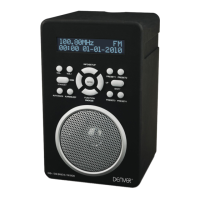
Shows the front panel of the device, highlighting key operational elements.
Instructions for connecting the power adapter to the unit and mains socket.
Guidance for configuring network settings to diagnose and fix issues.
Details on using volume controls to increase or decrease audio output.
Methods for automatically updating or manually setting the date and time.
Steps to access and select Internet Radio modes like Skytune or History.
Procedure for scanning and selecting stations in DAB Radio mode.
Process for scanning and selecting stations in FM Radio mode.
Instructions on saving and accessing favorite FM radio stations.
Operations for playing, pausing, skipping tracks, and ejecting CDs.
Enables streaming music from networked devices using UPnP.
Detailed steps for connecting to and accessing UPnP media servers.
 General
| Type | Internet Radio |
|---|---|
| Wi-Fi | Yes |
| Internet radio | Yes |
| Headphone outputs | 1 |
| AUX in | Yes |
| Headphone Jack | 3.5mm |
| Frequency Range | FM 87.5-108 MHz |

 To Next Page