-3-
OPERATION INSTRUCTIONS
1. Turn on/off
Briefly press the power button, then the LED battery indicators
and wireless charging function are on. If you do not need the
LED battery indicators and wireless charging function, just plug
in your device then it will charge. If there are no devices being
connected, the power bank will automatically shut down in 30
seconds.
2. How to charge the power bank
(1) Power supply
Connect the TYPE-C input port and wall/car adapter USB port
with a cable. The blue LED indicators will be flickering while
charging. The power bank is fully recharged when the indicators
are steadily on.
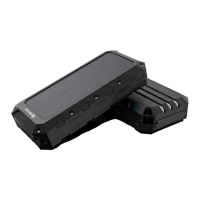
(2) Solar charging
Place the power bank outside in direct sunlight. The green light
is on and the blue light is flashing, indicating the unit is being
charged. (Do not leave the power bank in an unattended vehicle,
as the high temperature can damage the unit.)
3. Charge mobile phones or other devices
Cable charging
Press the power button, then plug two ends of the cable into an
USB output port and the devices. USB Quick Charge port and
TYPE-C bidirectional PD port support 5V/3A fast charging.


 To Next Page