Need help?
Do you have a question about the Denver TCU-61 and is the answer not in the manual?
Connects the unit to a wall outlet for power supply via AC cord.
Details on inserting 8 'C' size batteries for portable use.
Important cautions regarding electrical shock, moisture, and laser product safety.
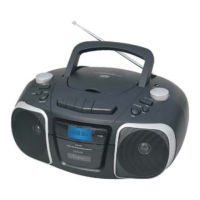
Identifies and explains all buttons, jacks, and indicators on the unit's panels.
Instructions for tuning, manual/auto scan, and preset channels for radio.
Steps for playing, rewinding, pausing, and stopping cassette tapes.
Connect external devices like MP3 players or Walkmans via the AUX jack.
How to play CDs and MP3 discs, including track selection and modes.
Instructions for connecting and playing music files from a USB drive.
Solutions for problems like no sound, no disc indication, and display errors.
 General
| Brand | Denver |
|---|---|
| Model | TCU-61 |
| Category | CD Player |
| Type | Portable |
| Media type | CD |
| ESP (Electronic Skip Protection) | Yes |
| Frequency Response | 20Hz - 20kHz |
| Playable disk types | CD, CD-R |
| Connections | 3.5mm headphone jack |
| Features | LCD display, FM radio |
| Signal-to-Noise Ratio | 80dB |

 To Next Page