Need help?
Do you have a question about the Denver TWE-36 and is the answer not in the manual?
Connect two earbuds for stereo sound pairing.
Connect one earbud for mono sound pairing.
Instructions for charging the earbuds.
Instructions for charging the charging box.
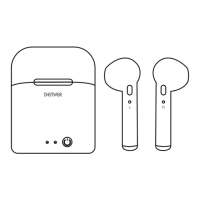
The DENVER True Wireless TWE-36 TWS earbuds are designed for a seamless audio experience, offering both stereo and mono modes to suit various listening preferences. These earbuds are accompanied by a charging box, a USB cable, and a user guide, ensuring you have everything needed to get started.
The core function of the TWE-36 TWS earbuds is to provide wireless audio playback and hands-free calling. They operate as True Wireless Stereo (TWS) devices, meaning the left and right earbuds can function independently or together to deliver a stereo sound experience.
To power on the earbuds, simply press and hold the multi-function button on each earbud until the red and blue LEDs flash alternately. This visual cue indicates that the earbuds are active and ready for connection. To power them off, press and hold the multi-function button until the LED turns red. The earbuds also feature an automatic power-off mechanism; if they remain disconnected from your Bluetooth device for more than five minutes, they will switch off to conserve battery.
The TWE-36 offers two primary pairing modes: Stereo Mode and Mono Mode.
Stereo Mode: This mode is designed for an immersive audio experience, connecting both earbuds to your smartphone to create stereo sound. To initiate stereo pairing, press and hold the multi-function buttons on both earbuds simultaneously until their LEDs flash red and blue alternately. Once this alternating flash begins, press either of the multi-function buttons twice to enter the pairing mode. The earbuds will then connect to each other, indicated by a voice prompt stating "your headset is connected." Alternatively, you can wait approximately 10 seconds for the earbuds to automatically pair with each other. After the earbuds are connected to each other, enable Bluetooth on your smartphone, search for "TWE-36," and select it to complete the pairing process. A slow blue LED flash on the earbuds confirms successful pairing with your smartphone. Once paired, the earbuds will automatically reconnect to your smartphone in the future when powered on and within range.
Mono Mode: For situations where you only need one earbud, the Mono Mode allows you to connect either the left or right earbud independently to your smartphone. In this mode, only mono sound is available. To pair an earbud in mono mode, press and hold the multi-function button of the desired earbud until its LED flashes red and blue alternately. Then, enable Bluetooth on your smartphone, search for "TWE-36," and select it to pair. If you wish to switch which earbud is paired in mono mode, you must first turn off the earbud currently paired with the smartphone. Then, press and hold the multi-function button of the earbud you want to pair with the smartphone to initiate the new connection.
The earbuds facilitate hands-free calling when connected to your smartphone. When an incoming call is received, the calling numbers are broadcast audibly. To answer a call, press the multi-function button once. To reject an incoming call, press the multi-function button twice. During music playback, you can redial the last phone number by pressing the multi-function button twice.
The TWE-36 earbuds and their charging box are designed for convenient recharging.
Charging the Earbuds: When the earbuds are placed in the charging box, a red LED will illuminate on the earbuds, indicating that they are charging. Once fully charged, the red LED will turn blue. It's important to note that the earbuds are forcibly turned off when they are placed in the charging box for charging.
Charging the Charging Box: To charge the charging box itself, connect it to a power source using the provided USB cable. During the charging process, a red LED on the charging box will flash. When the charging box is fully charged, the red LED will turn to a solid light, indicating that it is ready for use.
The TWE-36 earbuds are designed for ease of use and portability, making them suitable for everyday activities. The multi-function button on each earbud serves as the primary control interface for power, pairing, call management, and potentially music playback (though specific music controls like play/pause, skip track are not detailed in the provided information, the multi-function button typically handles these). The dust-proof mesh helps protect the internal components, contributing to the longevity of the device. The LED indicators provide clear visual feedback on the status of the earbuds, such as power on/off, pairing mode, and charging status. The compact charging box allows for convenient storage and on-the-go recharging, extending the usage time of the earbuds without needing an external power source.
Proper care and maintenance are crucial for ensuring the longevity and optimal performance of your TWE-36 earbuds.
Regular Charging: It is recommended to charge the earbuds at least once every 6 months, even if they are not in regular use. This helps maintain battery health and prevents deep discharge, which can reduce battery life.
Temperature Control: Avoid storing the earbuds in extreme temperatures. Temperatures below 0°C (32°F) or above 45°C (113°F) can negatively impact battery performance and the overall integrity of the device.
Cleaning: Do not use harsh chemicals or detergents to clean the earbuds. A soft, dry cloth is usually sufficient for cleaning the exterior surfaces. Harsh cleaners can damage the materials and electronic components.
Physical Handling: To prevent damage, avoid dropping or knocking the earbuds on hard surfaces. The internal components are delicate and can be affected by impact. Similarly, do not scrape the surface of the earbuds with sharp objects, as this can cause cosmetic damage and potentially compromise the housing.
Disassembly: Do not attempt to take the product apart. Disassembling the earbuds can void the warranty and may lead to irreparable damage. Any repairs should be handled by authorized service personnel.
If you encounter pairing or reconnecting issues, follow these steps:
The DENVER TWE-36 TWS earbuds are designed to be a reliable and user-friendly audio companion, offering flexibility in listening modes and straightforward operation, with clear guidelines for maintenance to ensure a lasting experience.
 General
| Impedance | 32 Ω |
|---|---|
| Ear coupling | Intraaural |
| Battery type | Built-in battery |
| Standby time | 130 h |
| Battery capacity | 50 mAh |
| Rechargeable battery | Yes |
| Continuous audio playback time | 1.8 h |
| Wireless range | 10 m |
| 3.5 mm connector | No |
| Bluetooth version | 5.0 |
| Connectivity technology | Wireless |
| Charging case capacity | 400 mAh |
| Number of microphones | 1 |
| Headset type | Binaural |
| Product type | Headset |
| Product color | White |
| Wearing style | In-ear |

 To Next Page