EasyManua.ls Logo

Denver VDB-216 - Page 10

Denver VDB-216
13 pages
Print Icon
To Next Page IconTo Next Page
To Previous Page IconTo Previous Page
Loading...
ENG 9
Note: If the doorbell does not recognize the QR code, press the
“doorbell” button to wake up the doorbell and try again.
Because this doorbell is a low power product, the device may enter
standby mode if there not operated for long periods of time.
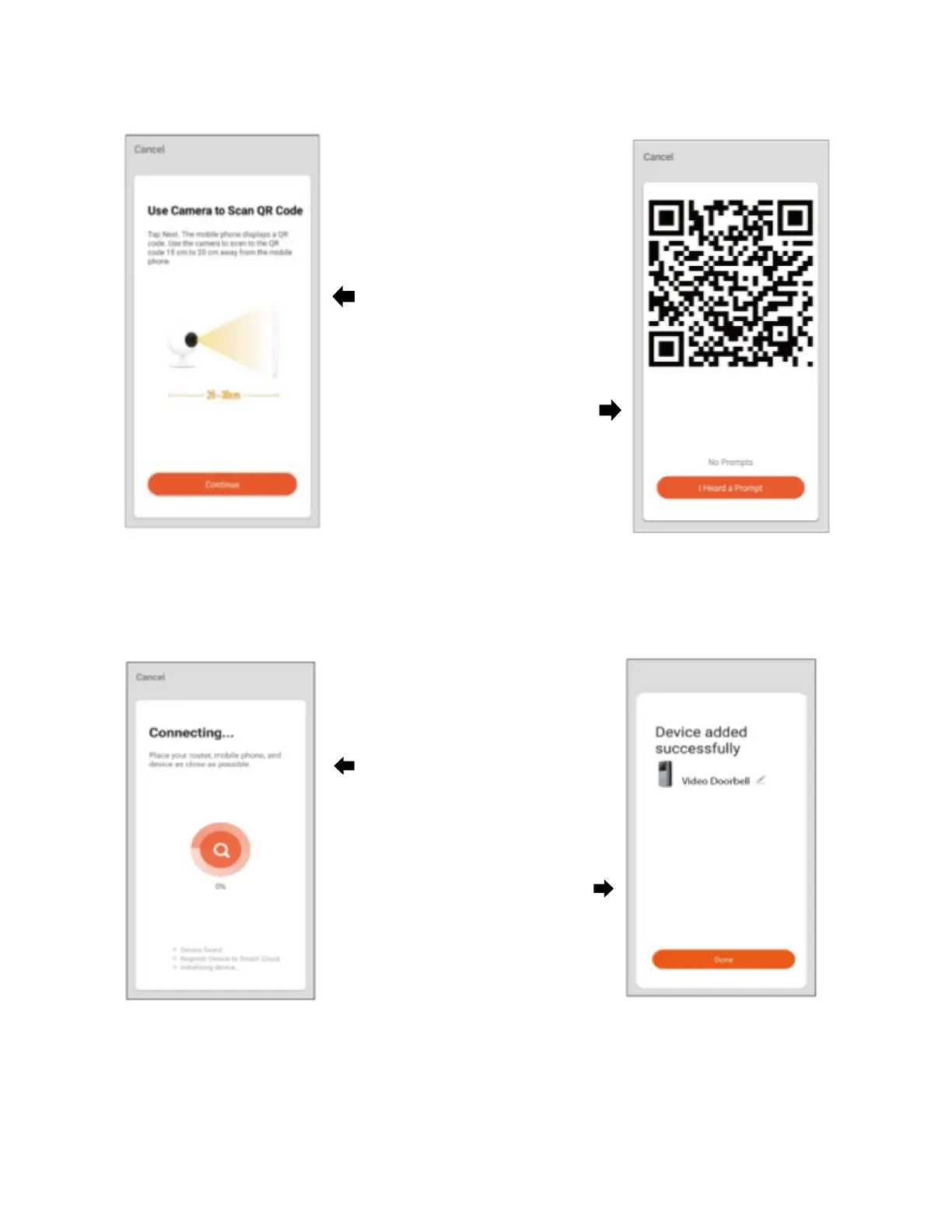
5.
The app will prompt
you to scan a
smartphone or tablet
with the doorbell.
When you tap
“Continue”, the
smartphone or tablet
will display a QR code
.
6. Hold the doorbell 15
to 20 cm in front of the
smartphone or tablet
device for the doorbell
to scan the QR code.
7.
Wait while the Wi
Fi
connection is
established.
Once the connection is
established, you can
use the app to monitor
your doorbell at all
times from anywhere.

Related product manuals