- 04 -
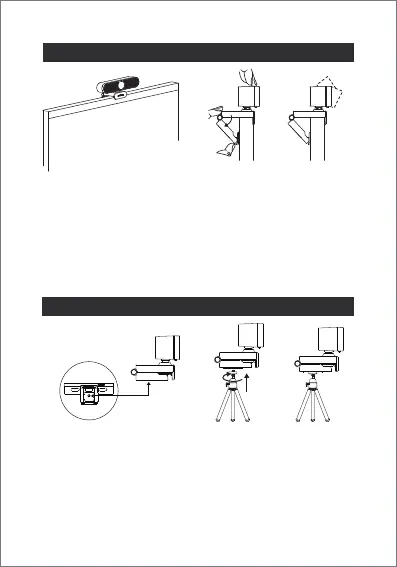
Camera Installation Guide
Tripod Installation Guide
(A) Open the camera bracket and find a suitable installation
position on the computer screen.
(B) Adjust the angle of the anti-skid bracket to ensure that the
anti-skid bracket and the back of the display are close to
each other.
(C) Manually adjust the camera angle to achieve the best,
make sure the lens is aimed at the subject.
(B) (C)(A)
(B) (C)(A)
(A) There are 1/4 screw holes at the bottom of the camera
bracket.
(B) Screw the top screw column of the accessory tripod into the
1/4 screw hole and tighten it clockwise.
(C) Turn on the tripod, place it on the desk and adjust the best
angle for shooting.


 To Next Page