www.desatech.com
116662-01G12
INSTALLATION
Continued
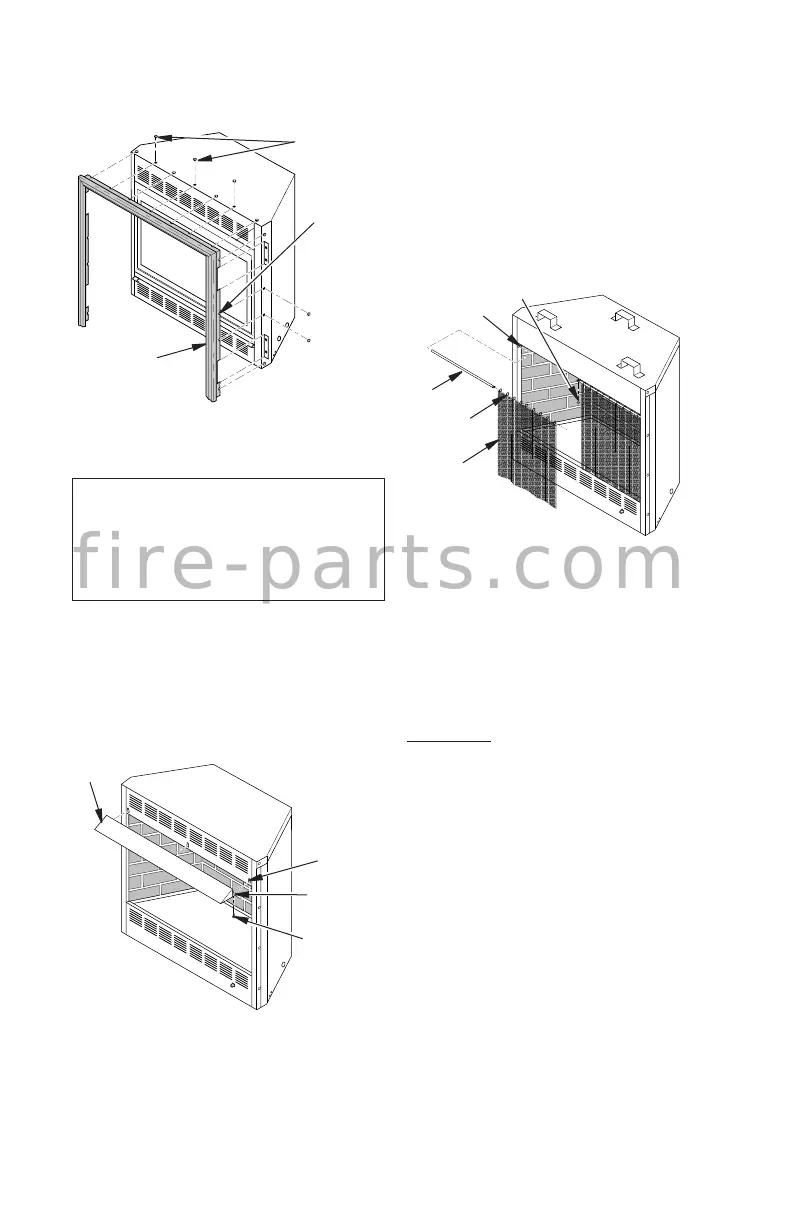
Figure 16 - Installing Fireplace Hood
Hood
Hood
Mounting
Slot
Screw
Shoulder
Screw
INSTALLING FIREPLACE SCREEN
1. Insert each rod through nine rings located
at top of screen.
2. Insert rst rod into rear hole in left side
of rebox. Fasten rod to rear hole near
center of rebox using black shoulder
screw.
3. Insert other rod into front hole on right
side of rebox and fasten using remain-
ing shoulder screw.
Figure 17 - Installing Fireplace Screen
(Shown Without Fireplace Hood for Clarity)
Rod
Front and
Rear Hole
Ring
Screen
Screw
FIREBOX INSTALLATION USING
OPTIONAL ACCESSORY MANTELS
This rebox may be installed using the corner
or cabinet mantel with hearth base against
a wall in your home. A perimeter trim kit is
included with the mantel accessories (see
Accessories, page 19). Follow the instructions
included with mantel for installation.
BUILT-IN FIREBOX INSTALLATION
Built-in installation of this rebox involves
installing rebox into a framed-in enclosure.
This makes the front of rebox ush with wall.
If installing a mantel above the rebox, but you
must follow the clearances shown in Figure 7,
page 8. Follow the instructions below to install
the rebox in this manner.
1. Frame in rough opening. Use dimensions
shown in Figure 18, page 13 for the rough
opening. If installing in a corner, use
dimensions shown in Figure 19, page 13
for the rough opening. The height is 33"
(FB32CB) or 34
1
/
4
" (FB32NCB), which is
the same as the wall opening in Figure
18, page 13.
INSTALLING FIREPLACE HOOD
NOTICE: The firebox canopy
(hood) must not be modied or
replaced with a canopy (hood) that
may be provided with the unvented
decorative room heater.
1. Attach three zinc-colored shoulder screws
to back of hood.
2. Insert hood into hood-mounting slots on
rebox.
3. Hold hood in place. Insert two black Phil-
lips screws through bottom of hood and
tighten.
Figure 15 - Attaching Brass Trim to
Fireplace
Trim
Hanging
Screws
Assembled
Brass Trim
Hanging
Notches
on Trim
f i r e - p a r t s . c o m



 To Next Page