DESCO WEST - 3651 Walnut Avenue, Chino, CA 91710 • (909) 627-8178
DESCO EAST - One Colgate Way, Canton, MA 02021-1407 • (781) 821-8370 • Website: Desco.com
TB-3058 Page 3 of 5
© 2013 DESCO INDUSTRIES, INC.
Employee Owned
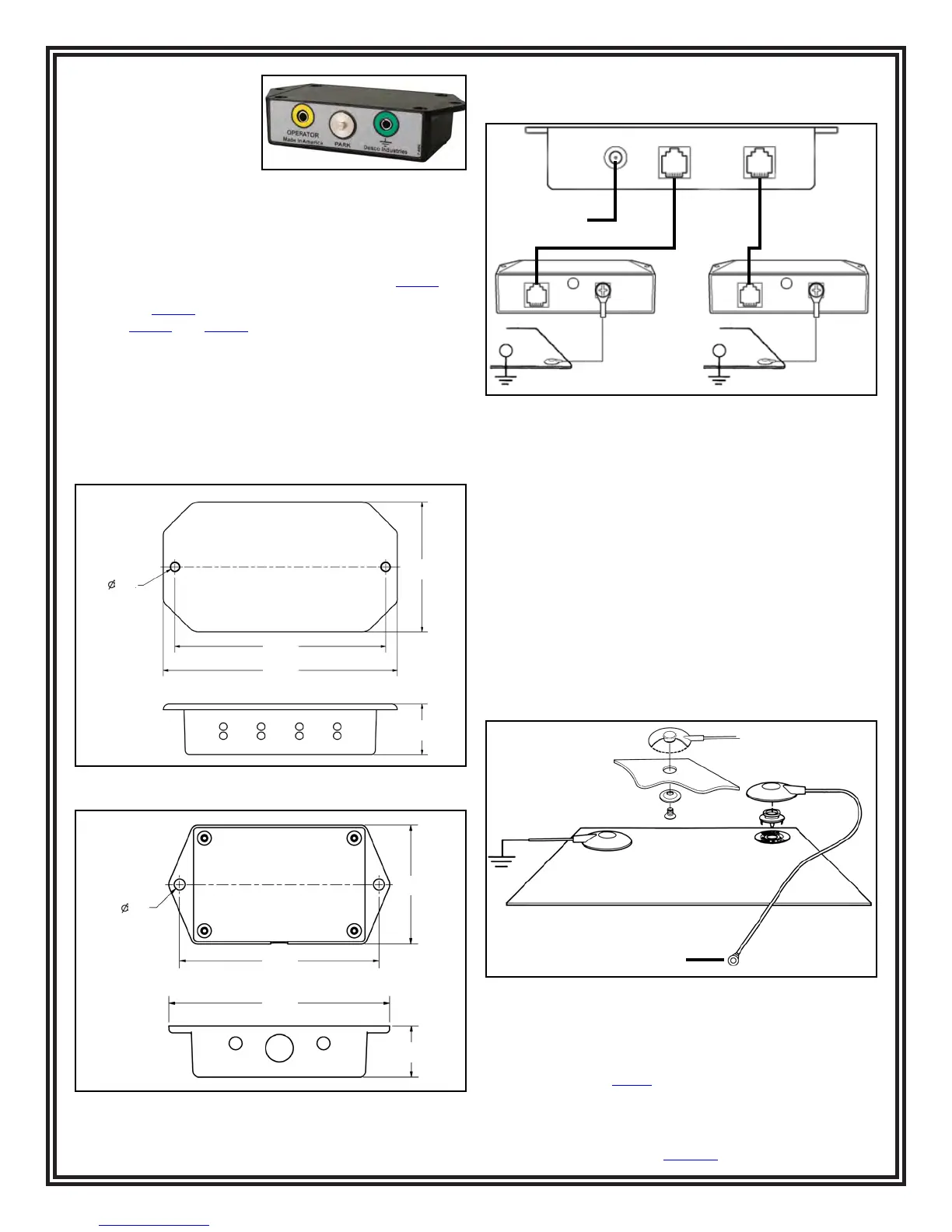
SATELLITE REMOTES
The Satellite Remotes can
be installed up to 7 feet
away from the monitor
control unit. Two operators
plus two worksurfaces
can be monitored at separate adjacent workstations. The
worksurface mat circuit may be bypassed by a switch located
at the rear of the satellite. Also shown on each satellite
remote is an unmonitored ground connection jack where a
supervisor, guest, or equipment can be grounded.
Replacement Satellites are offered as Desco item
19248
.
NOTE: The
19248
Replacement Satellite is only compatible
with the
19246
and
19247
Dual Operator Continuous
Monitors.
The following procedure will outline how to correctly install
the Dual Operator Continuous Monitor and its satellites to
properly monitor an ESD protected workstation.
1. Follow the dimensions listed in figures 4 and 5 to properly
mount the Dual Operator Monitor’s Control Unit and
Satellite Remotes.
2. Connect the Satellite Remotes to the Control Unit using
the included cables.
Power Adapter
Workstation #2 Workstation #1
Figure 6. Typical setup of the Dual Operator Continuous
Monitor and Satellites
To Satellite
Mat Monitor
Cord
Mat Ground
Cord
Worksurface Mat
or
Screw allows ground
cord to be bolted to
mat and prevent it
from disconnecting
Figure 7. Installing the Mat Ground and Mat Monitor
Cords
2.85"
4.63"
5.13"
1.11"
2X .21"
Figure 4. Mounting hole locations of the Control Unit
2.09"
3.50"
3.87"
.90"
2X .19"
Figure 5. Mounting hole locations of the Satellite
Remote
3. Mat monitoring may be bypassed by using the switch
located inside the hole located at the rear of the satellite
remote.
4. Install Screws and Washers or Push and Clinch snaps
12 to 72 inches apart from each other on the worksurface
mat. Make sure that they pierce and clinch the bottom
side of the mat.
5. Ground the worksurfaces by using the included mat
ground cords. Snap one end to the worksurface mat and
connect the other end to common point ground.
6. Connect the mat ground cord to the remaining worksurface
snap. Connect the other end of the cord to the back of the
satellite remote.
7. A convenient 3-wire 120 VAC outlet should be located and
tested for proper wiring and grounding. We recommend
using the Desco 98130 AC Outlet Analyzer to perform
these tests.


 To Next Page
 Loading...