USER TIPS AND NOTES
The Remote Car Starter must be “enabled” each time the driver has finished driving and taken out the key
in order for the unit to start the vehicle remotely.
After the key has been removed, you must turn OFF the
control switch and then turn it back ON again while no key is in the ignition. This “control switch” or “set
switch” prevents unauthorized starting of the car by someone unfamiliar with the system who may be
using the vehicle. If you forget to set the switch, it may also be activated by pushing the transmitter and
holding the button down for ten seconds. To eliminate the need for this, see Option #7.
The Ready Start!
®
Remote Car Starter will turn the car off if the driver does not insert and turn the key
within 10 or 15 minutes. After the Ready Start!
®
Remote Car Starter has started your car, simply put in
the key and turn it to the “run” or “on” ignition position (not the crank position) to drive away.
The Ready Start!
®
Remote Car Starter has numerous safety and security features that make it difficult to
steal your car without the key being in the ignition. Putting your car in gear, pushing the brake pedal or
opening the hood will turn the unit off unless your key is in the ignition and turned to the “run” or “on”
position.
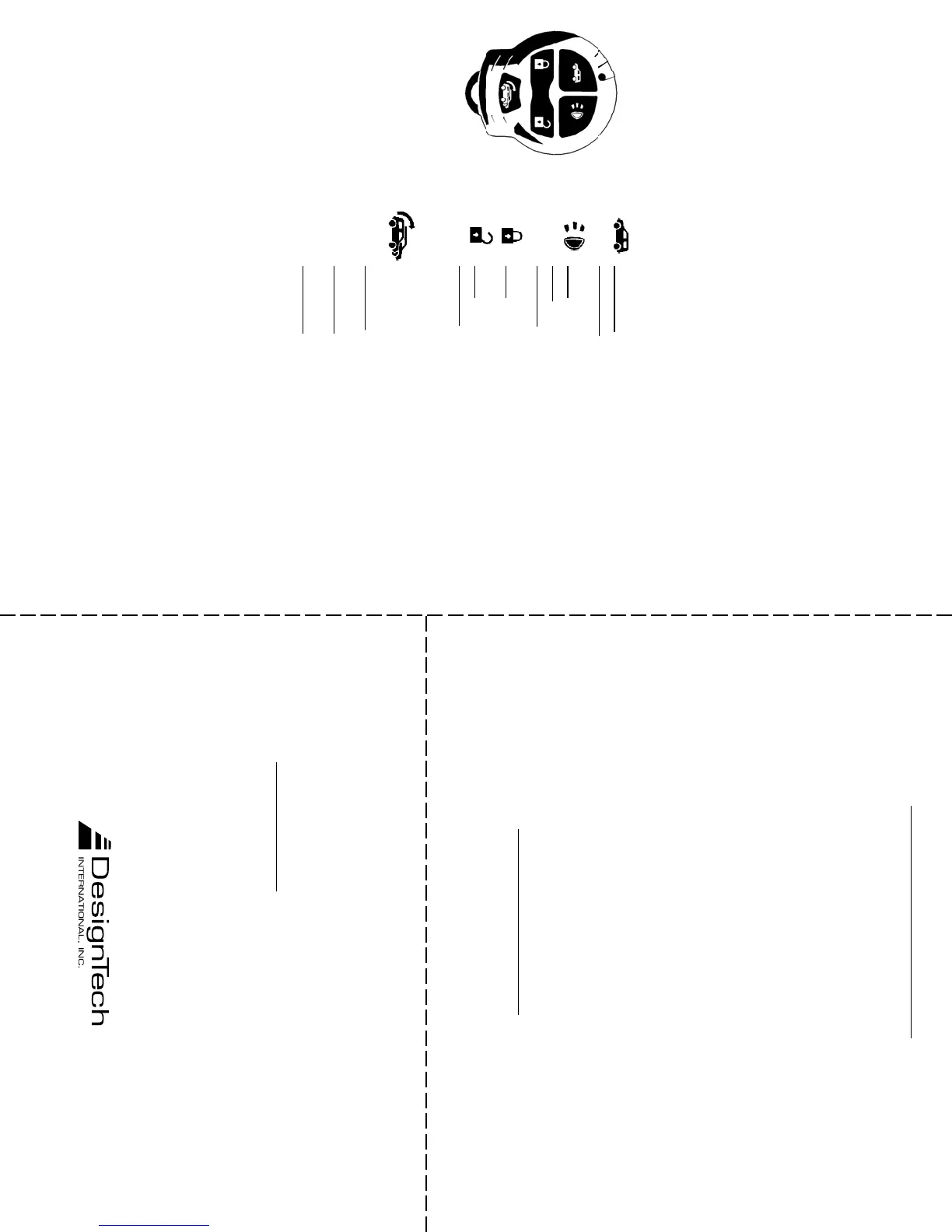
If all features are hooked up, your transmitter will function as follows:
Button Press Once: Start the car
Press Again: Stop the car
Button
Once: Turn on headlights for 30 seconds
Again: Turn off headlights
Hold down for panic alarm.
Button Once: Lock the door / arm the alarm
Button Once: Unlock the door / disarm the alarm
Hold down for 4 seconds to open the Trunk.
(If you get 4 chirps – that means the alarm was triggered
while you were away)
Button This is used to operate additional vehicles with Ready Start
®
Remote Car Starters as follows:
Press once: To operate vehicle #2 - then any of the 4 but-
tons while LED flashes red and green
Press again: For vehicle #3 - then any of the 4 buttons while
LED flashes red
Press again: For vehicle #4 - then any of the 4 buttons while
LED flashes green
Do not press for your ‘main’ vehicle
The transmitter is powered by a long life lithium battery (style #2032). The transmitter and the remote
starter receiver module are FCC and DOC approved.
Alarm Disarm without transmitter:
If the doors are locked and the alarm is set and you’ve lost your
transmitter, you can disable the alarm. Here is how: Enter the vehicle (alarm will sound) and insert the
key and turn it to the ‘run’ position (the position where the dash lights come on). Turn the On/Off switch
off and on 4 times in a row to disable the alarm.
Valet Mode:
Turning the Control switch off puts you in Valet Mode. In Valet Mode the Remote Car Starter
and the alarm will not function. This lets you turn off the car starter when having the vehicle serviced. The
only functions that work in Valet Mode are the keyless entry, lights and panic. The red LED dash light will
flash twice every few seconds when in Valet Mode.
The Quick Stop Option
™
: You can leave the car running and take the key with you for a quick visit to a
store. With the car running, push the Start button on the keychain transmitter just before pulling out the
key. The car will run for 10 minutes or until you tap the brake or put the car in gear.
TWO YEAR LIMITED WARRANTY
DesignTech International, Inc. Warrants to the original consumer/purchaser that this product shall be
free of defects in material and workmanship under normal use and circumstances for a period of
twotwo
twotwo
two
(2) years from the date of original purchase for use. When the original consumer/purchaser returns the
product to DesignTech International Inc., 7955 Cameron Brown Court, Springfield, Virginia 22153,
USA within the warranty period, and if the product is defective DesignTech International, Inc. will at its
option repair or replace such.
This warranty shall constitute the sole liability of DesignTech International, Inc. concerning the product.
DesignTech International, Inc. expressly disclaims all other warranties INCLUDING, WITHOUT
LIMITATION, THE WARRANTIES OF MERCHANT ABILITY AND FITNESS FOR A
PARTICULAR PURPOSE. NO PERSON, FIRM , OR CORPORATION IS AUTHORIZED TO
ASSUME FOR DESIGNTECH INTERNATIONAL, INC. ANY OTHER LIABILITY IN
CONNECTION WITH THE SALE AND USE OF THE PRODUCT. DesignTech International, Inc.
and agents and distributors will bear no liability whatsoever for incidental or consequential damages or
charges of any kind.
Some states do not allow the exclusion or limitation of incidental or consequential damages, so the above
disclaimer regarding incidental or consequential damages may not apply to you.
Please complete the warranty registration card below and mail to: DesignTech International, Inc., 7955
Cameron Brown Court, Springfield, Virginia 22153 USA within ten (10) days after date of purchase.
This warranty is void if the product or has been damaged or tampered with or if the product or any such
parts have been opened. In all cases of damage during shipment, a claim must be filed with the shipping
carrier and not with DesignTech International, Inc.
This warranty gives you specific legal rights; you may also have other rights which vary from state to
state.
OUT OF WARRANTY REPAIRSOUT OF WARRANTY REPAIRS
OUT OF WARRANTY REPAIRSOUT OF WARRANTY REPAIRS
OUT OF WARRANTY REPAIRS
DesignTech International, Inc. will at its option either (1) replace this product with a functionally similar
(but not necessarily visually identical) refurbished product or (2) repair the original product and return
it to the original consumer/purchaser C.O.D. covering all reasonable repair or replacement charges if the
product is returned prepaid to DesignTech International, Inc., 7955 Cameron Brown Court, Springfield,
VIRGINIA 22153, USA after the two year warranty period has expired.
Please return this warranty registration card within ten (10) days of purchase.
Name_________________________________________________________ User's Age_________
Address _________________________________________________________________________
City____________________________________ State__________________ Zip_______________
Phone Number: Home___________________________ Office_______________________
Place of Purchase__________________________________ Date of Purchase________________
Product Purchased:
_24739/24739T/24740___Price of Purchase:____________
Vehicle Make:__________________Vehicle Model:________________Year:__________
This product was purchased for: ( ) Myself ( ) Spouse ( ) Relative ( ) Friend
How did you first become interested in this product?
( ) Retailer Newspaper Ad ( ) Magazine Ad ( ) In-Store Display
( ) Newspaper / Magazine Article ( ) Mail Order ( ) Friend / Relative
( ) In-Store Salesperson ( ) Other _____________________
__________ Please send me FREE information on other innovative DesignTech products.
7955 Cameron Brown Court, Springfield, Virginia 22153-2809, USA
Tel: 703-866-2000 or 1-800-337-4468 Fax: 703-866-2001
v4.1



 To Next Page