13
12
Note the meaning of below terms used in the manual:
THERAPY = HEALTH IMPROVEMENT and DIAGNOSTICS = PROGNOSIS OF HEALTH STATUS
Note the meaning of below terms used in the manual:
THERAPY = HEALTH IMPROVEMENT and DIAGNOSTICS = PROGNOSIS OF HEALTH STATUS
VRT Testing Using the Electronic Selector (ES)
Testing (VRT) according to Dr. Schimmel, the following set-up is required – see summary in
Diagram 1 below:
1 2
The protocols used for using bioresonance
measures and determining the deviations from
wellness standards are beyond the scope of this
manual. It will be taught in the intensive wellness
practicum that is an essential part of training to
use this sophisticated device. The manual is only
designed to help the practitioner set the device
up and it is good to really familiarize yourselves
with this.
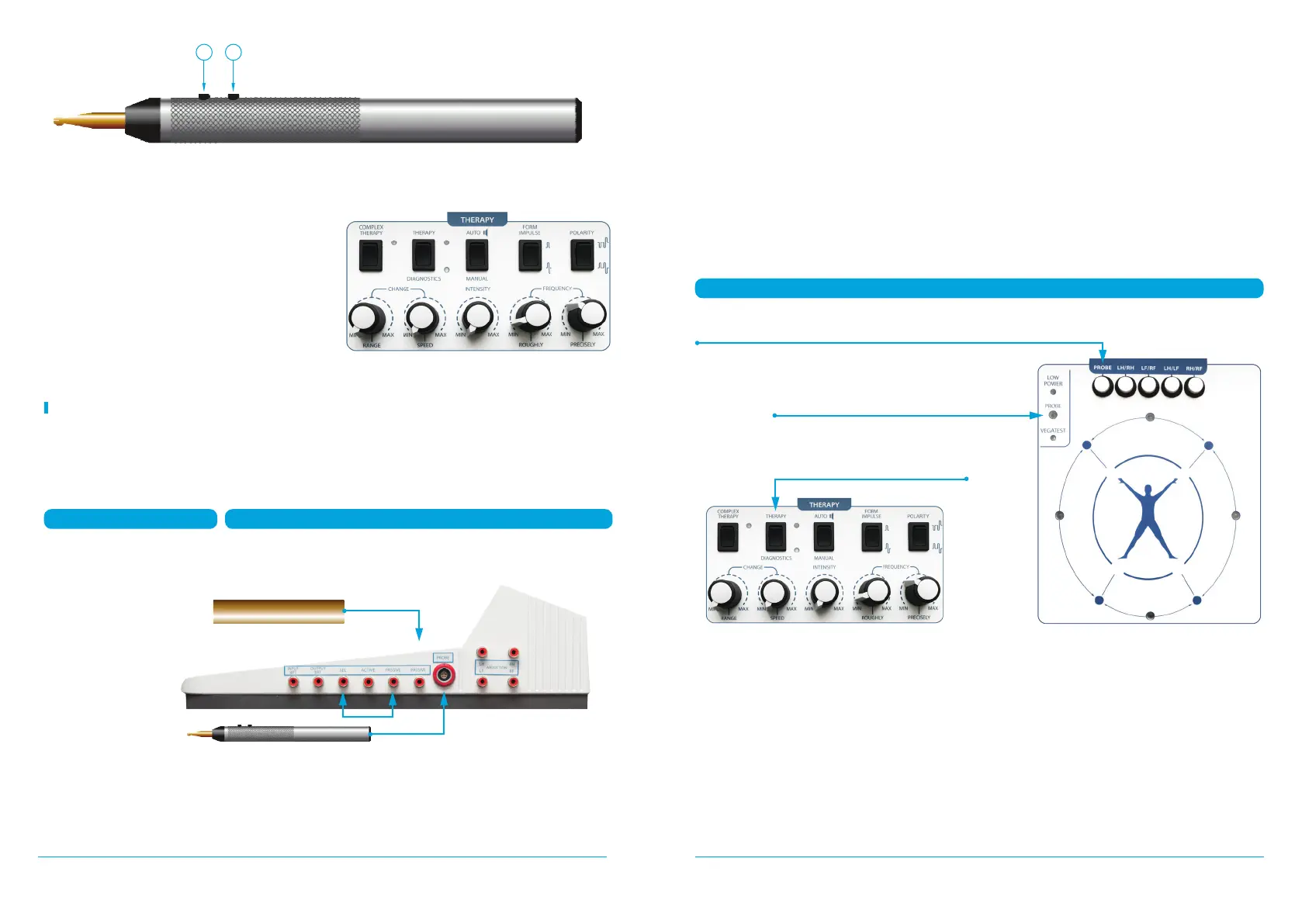
Diagram 1: VRT Testing Using the Electronic Selector (ES)
1. Connect
HAND ELECTRODE
(brass cylinder)
to PASSIVE
connector
VOLL OR VRT MODE
CONNECTING THE ELECTRONIC SELECTOR
2. Connect SEL
to PASSIVE together
with short wire
3. Connect PROBE
to connector
The procedure is summarized in Diagram 2 below:
1. On the «THERAPY» panel, set the «THERAPY/DIAGNOSTICS» key to the «DIAGNOSTICS»
position (see Fig. 6).
2. On the « panel, press the «PROBE» button (see Fig. 4, number 4). In this case, the
«PROB» LED illuminates green.
3. For working with the Selector, it is necessary to connect a wire to the «PASSIVE» socket
(see Fig. 2), located on the right side of the device with the brass hand electrode.
4. Connect a short wire to the selector output «SEL» (see Fig. 2) and then to the second socket
«PASSIVE».
5. Insert the measure probe (Fig. 5) into the socket «PROBE» (Fig. 2).
For VRT testing, it is necessary to switch from Voll testing to the vegetative resonance «VRT»
test mode.
showing a low reading – usually around 20 – as it is in the Voll Testing Mode.
In order to begin testing in the VRT mode, it is necessary to place the probe on the point to
be measured, and then press and hold button «2» on the probe (see Fig. 5) for about 1 second,
Measure Mode- Press «PROBE»
LED turns green when the PROBE is pressed
Press to «DIAGNOSTICS»
MEASURES MODE


 To Next Page