7
D7T+
6
D7T+
2. Product overview
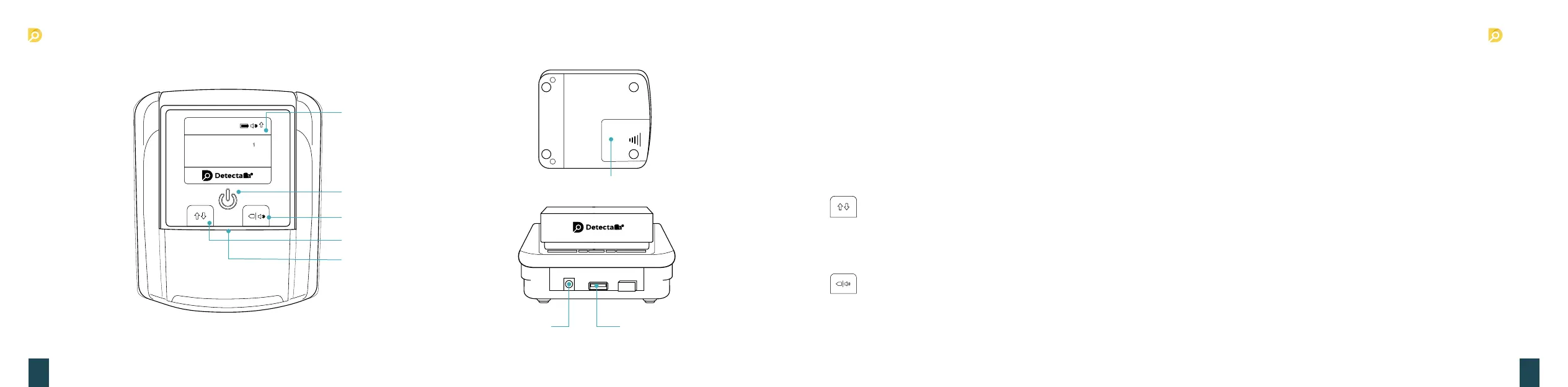
DC Input socket
TFT Display
Sound / clear button
Direction button
Banknote feeding sensor
Power switch
USB port
Battery cover
50€
Units :100 :200 :500
:5 :10 :20
:5
0
EUR
x
3. Product operation
1. Turning the machine on and off
■ Connect the power adapter to a 110V or 220V outlet, then connect to the machine. NOTE: Insert lithium battery (OPTIONAL).
■ Once connected, press the power switch button to turn on the machine.
□ The indicator light will light up and machine will run a self test.
□ If the test is successful, the TFT display will show the software version and currency interface.
■ Hold the power switch button for about 2 seconds to turn off machine. when the indicator lights off, it means the machine has been
successfully turned off.
2. Button Introduction
■ Press the button to choose the exiting direction of the valid banknotes. Take your nger away when hear the beep sound, as the direc-
tion indicator will be changed. The denotation of direction will be shown on the top part of the display. ↑ means the valid banknote will go
out from the back of the machine, ↓ means the valid banknote will retreat and come back to you where your inserted the banknote.
■ Press the button to clear the records. Hold the button for about 2 seconds to turn on or off the sound.
x


 To Next Page
 Loading...