9
D7T+
8
D7T+
EUR
E-11
50€
Units :100 :200 :500
:5 :10 :20
:5
0
EUR
3. Product operation
4. Detection
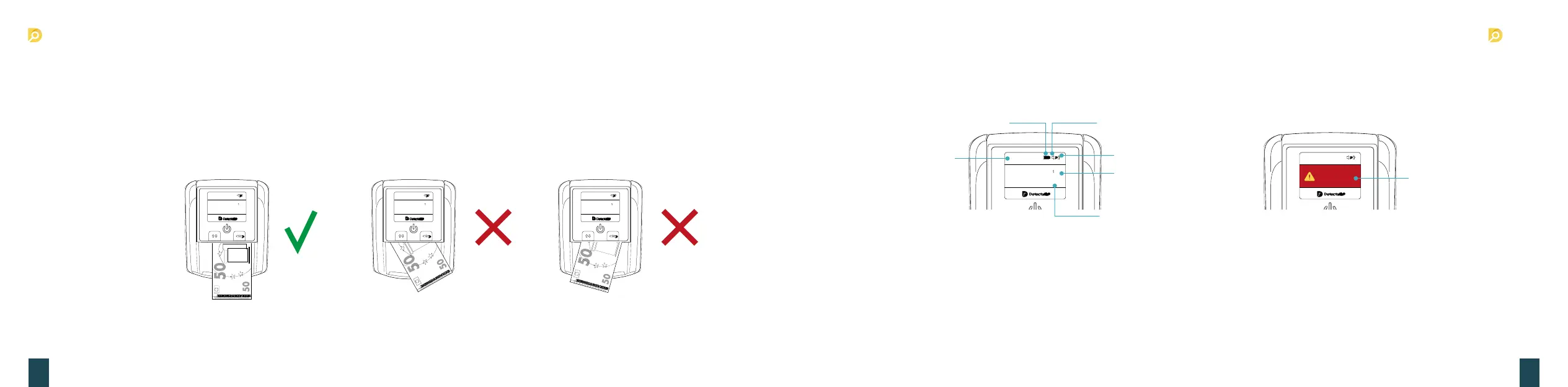
If the banknotes are genuine, the pieces of each denomination and the total value will be shown on display, with the banknotes
exiting form the selected direction (see figure 1).
If a banknote is a suspicious, it will be rejected and exit the machine from the currency feeding with three beeps. At the same time,
the power switch light will glint, and the corresponding error code will be shown on the display (See figure 2).
5. Sleep (Power Saving) Mode
The detector will enter sleep mode after 3 minutes of being idling to save power. The information on the display window will turn off and only
the blue power button indicator light will remain on. The machine can be woken up and return to working mode by touching any key or by
feeding a banknote through the machine. If the machine is idle for more than 30 minutes, the machine will power off automatically.
3. Product operation
3. Inserting the banknote correctly
Please insert the banknotes as shown in the pictures below. On the right side of the insertion. If a banknote is incorrectly inserted, the
machine will refuse it and alert the user that an error has occurred. This machine is equipped with 4-Way orientation. This allows the
user to insert the banknote in any direction they want.
Error Code
50€
Units :100 :200 :500
:5 :10 :20
:5
0
EUR
x
50€
Units :100 :200 :500
:5 :10 :20
:5
0
EUR
x
50€
Units :100 :200 :50
0
:5 :10 :20
:5
0
EUR
x
Error Code
Total Value
Sound
Exit direction
Pieces of Each
Denomination
Battery
Figure 1
Currency Type
Figure 2


 To Next Page
 Loading...