SV ND CS PT DE FR IT ES EN
7
D7X
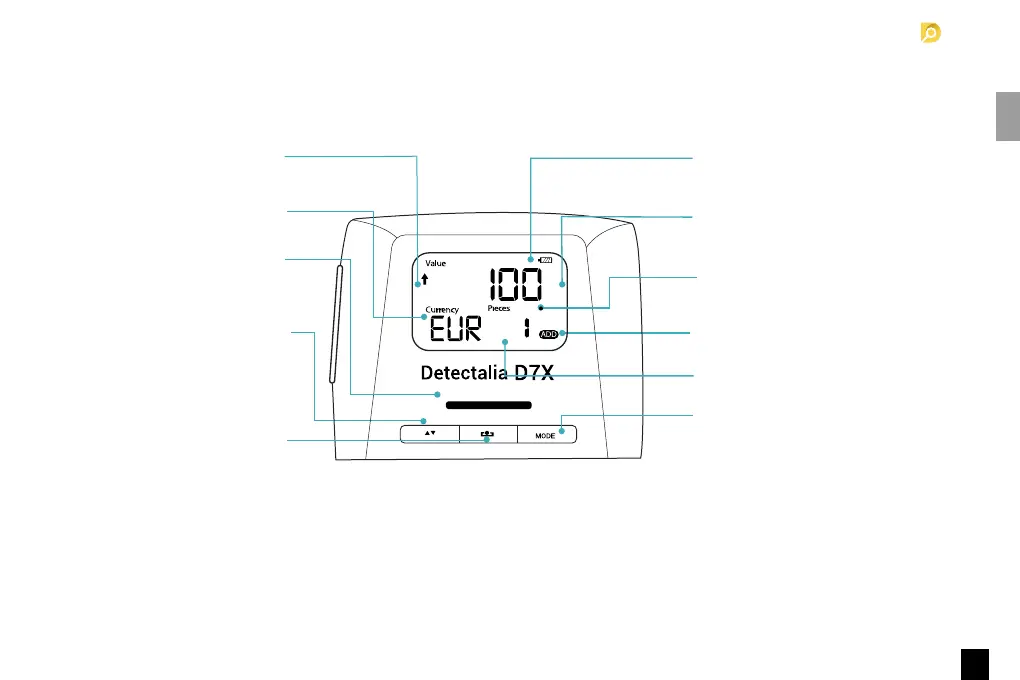
1.1 Display and controls
Battery status indicator
(when battery is inserted).
Denomination of last scanned
banknote (in DEN mode only).
Total number of scanned banknotes
(in ADD mode only).
ADD function indicator.
Error message.
Short press: Mode selection button
(ADD or DEN).
Long press: Counterfeit alarm sound
on or sound off.
Banknote exit direction indicator.
Currency.
Blue light: ON/Standby.
Red light: Error.
Green light: Genuine.
Long press: Banknote exit direction
selection.
Short press in ADD mode: Shows
counting results.
Short press: ON/clear count
Long press: OFF



 To Next Page