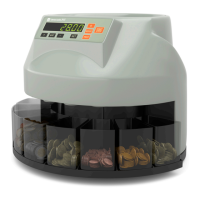
the unsorted coins in the hopper and press the “START/STOP” key to start counting and sorting.
• Batch count mode. In this mode, the machine counts and sorts a batch of coins according to a preset number for each
coin denomination. Press the “SET” key followed by pressing the “+” and “-”keys to set the batch size. Repeat this for all coin
denominations. Then press the “START/STOP” key to start counting and sorting.
3. When finished counting, press the “START/STOP” key to stop the machine. The total value is shown in the display.
4. By pressing the “REPORT” key, the individual quantity for each coin denomination is shown in the display. Press the “REPORT”
key again to select the different coin denominations.
5. If available : it is also possible to sort and stack coins with the 8 included coin tubes Instead of the coin trays. The stacked coins
can then easily be filled into coin wrappers for bank-ready coin rolls.
6. PRINT YOUR COUNT RESULTS. To make your administrative task even easier, the M5 can automatically print your complete
results to the optional Detectalia M5 thermal printer.
3.0 MAINTENANCE
Clean the coin counter with a soft, clean cloth. Do not use aggressive or abrasive cleaners. Never insert any hard objects into the slot.
4.0 TECHCNICAL SPECIFICATIONS
OPERATING TEMPERATURE 0ºC - 40ºC COUNTING NUMBER DISPLAY 4-DIGIT LED
AMBIENT HUMIDITY 30% - 80% POWER SOURCE AC220V / 50HZ
CAPACITY HOPPER 300 - 500 COINS POWER CONSUMPTION 45W (MAX)
CAPACITY RECEIVING SLOT 80 - 150 COINS DIMENSIONS - NET WEIGHT / 355 x 330 x 266 (mm) - 4,5 Kg
BATCH PRESET NUMBER DISPLAY 3-DIGIT LED COUNTING SPEED 250 COINS PER MINUTE
6


 To Next Page
 Loading...