Thank you for purchasing the Detectalia M5 Coin Counter. You have purchased a product of outstanding simplicity and quality. The
Detectalia M5 features both free counting and batch counting and sorting mode.
Warning
• Do not use the machine in humid or high temperature
environment (see specifications for more details).
• Keep machine horizontal during operation.
• Do not open back cover while power is on.
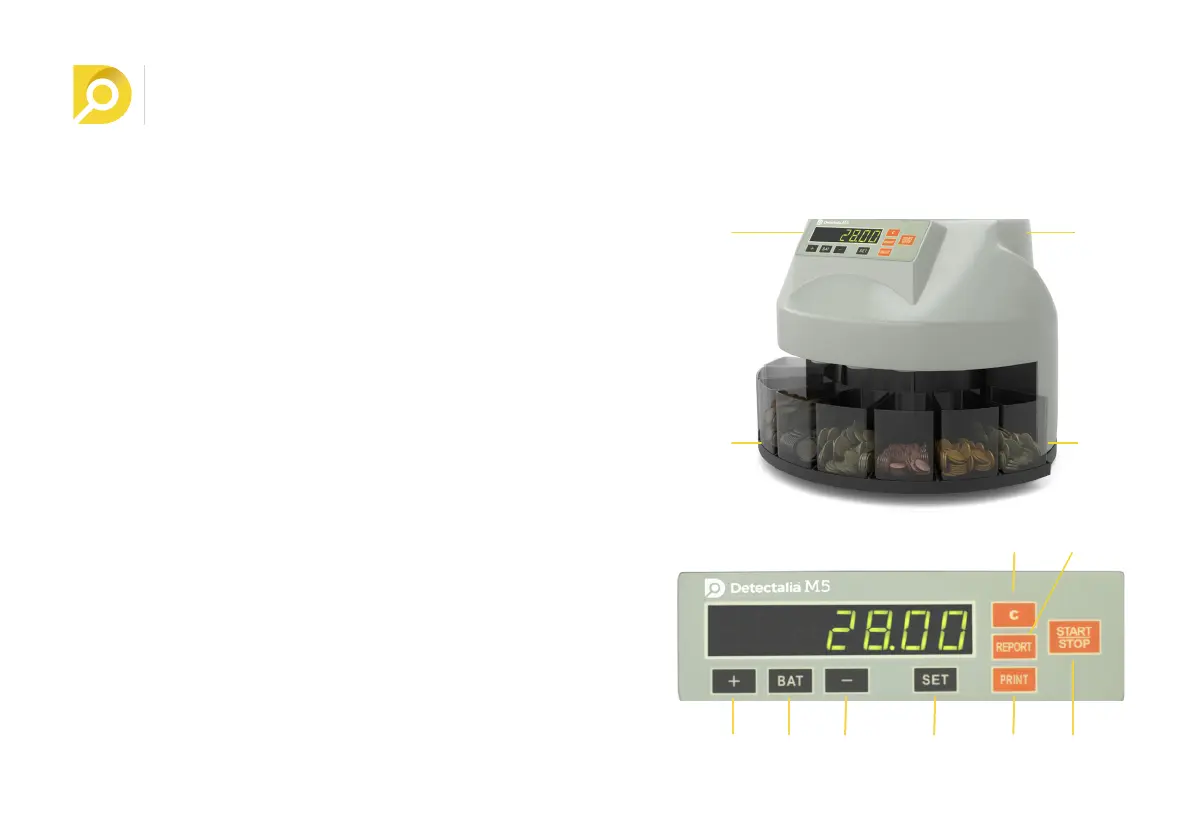
1.0 PARTS
1. Hopper
2. Display
3. Coin tray
4. Power switch
5. + key
6. BAT key
7. - key
8. SET key
9. REPORT key
10. START / STOP key
11. CLEAR key
12. PRINT Key
2.0 OPERATING THE MACHINE
1. Turn on the power switch.
2. Select the counting mode. This machine can work in two
ways: Default Count and Batch count mode. When switching on
the machine, the Free Count mode is automatically activated.
• Default counting mode. In this mode, the machine
continuously counts and sorts all the coins in the hopper. Feed
ENGLISH
1
5
1
43
5 6 7 8 9 10
11
2
12


 To Next Page