Functionality Characteristics
10
3. Functionality
Installing OpenPhone IPC also automatically installs a current version of DirectX, if
it is not already on your PC.
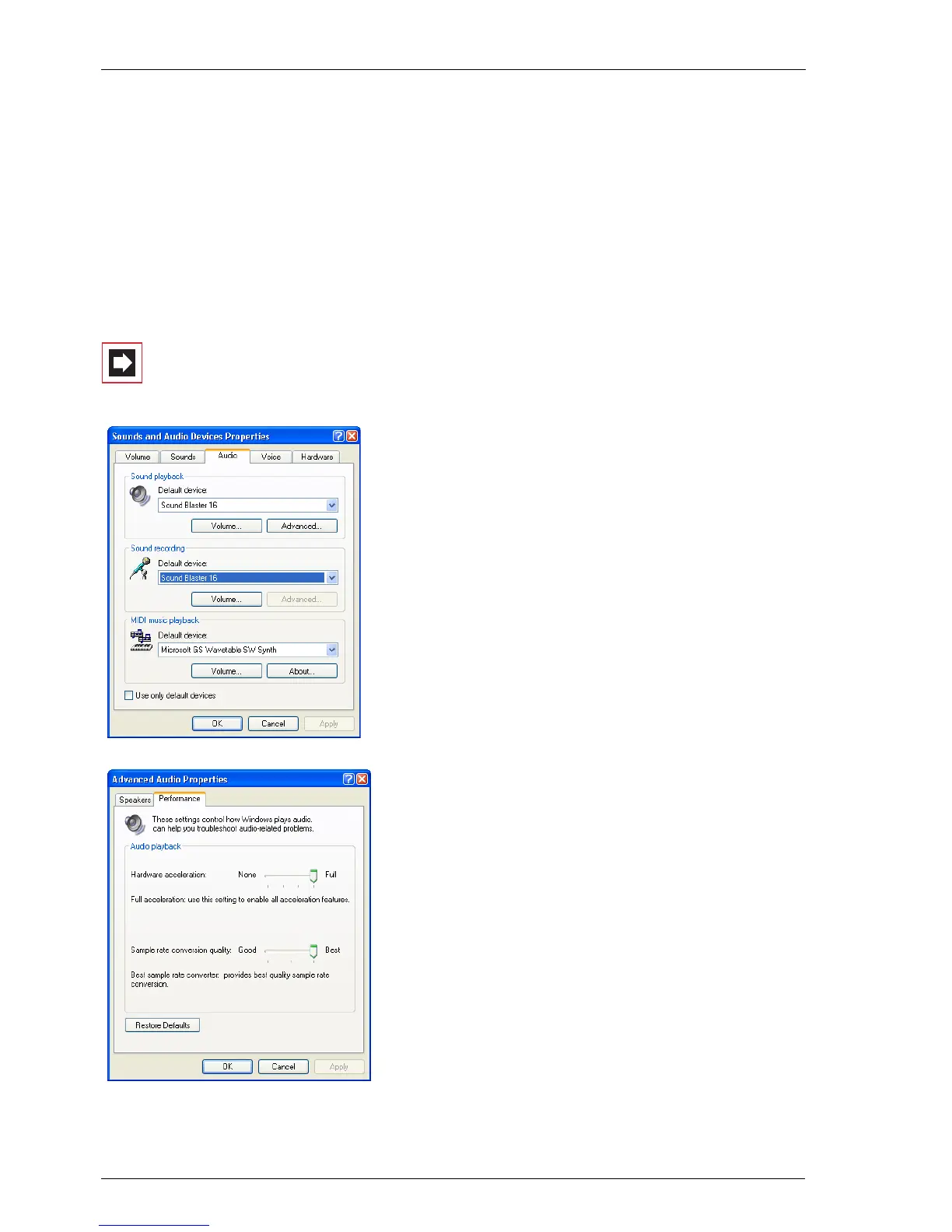
In a standard DirectX installation, DirectSound is configured with default settings
that minimize processor load, but which may also reduce audio quality. You can
improve the quality by taking the following steps.
Note: You must have administrator rights to be able to ad-
just the DirectSound audio quality!
1. Go to the Control Panel (in Windows XP),
then to Sounds and Multimedia and
select the Audio tab.
2. In the Sound playback section, click on
Advanced, then select the Performance
tab. Change the Hardware acceleration
to Full and the Sample rate conversion
quality to Best. Confirm the settings with
OK.
3. In the Sound recording section, click on
Advanced. (if available). Change the
Hardware acceleration to Full and the
Sample rate conversion quality to Best.
Confirm the changes with OK.
4. Close the Audio tab with OK.



 To Next Page