9
REMOTE CONTROL
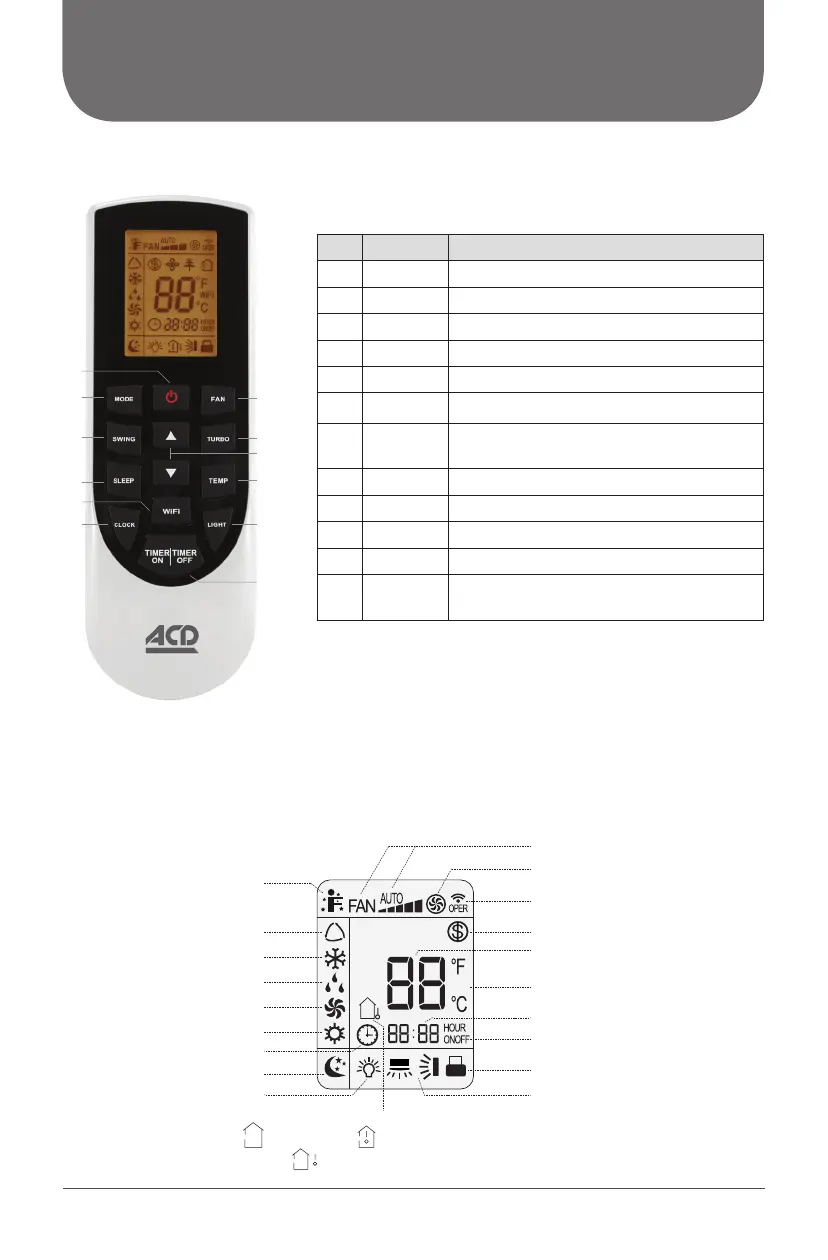
BUTTONS ON REMOTE CONTROL
No. Button Function
1 ON/OFF Turn on or turn off the unit
2 MODE Set operation mode
3 FAN Set fan speed
4 SWING Set fan oscillating angle
5 TURBO Set turbo fan speed
6
5/6
Set temperature and time
7 SLEEP
Lowering or raising the temperature
gradually during the night
8 TEMP Switch temperature displaying type
9 WiFi Set WiFi control
10 LIGHT Lighted display
11 CLOCK Set up the clock
12
TIMER
ON/OFF
Set starting/ending time
ICON IDENTIFICATION
ON REMOTE CONTROL DISPLAY
Fan speed setting
TURBO mode
Working indicator
FREEZE PROTECT mode
Temperature setting
Time setting
TIMER ON / TIMER OFF
Child lock
SLEEP function
Clock
I FEEL function
Up & down swing
Operation mode
AUTO mode
COOL mode
DRY mode
FAN mode
HEAT mode
Temperature display type
Set temperature Indoor ambient temperature
Outdoor ambient temperature
Light
1
2
4
3
7
5
9
11
8
6
10
12
WiFi (This is a general remote controller.
Some models have this function while some do not.
Please refer to the actual models)
WIFI



 To Next Page