Troubleshooting
Warranty
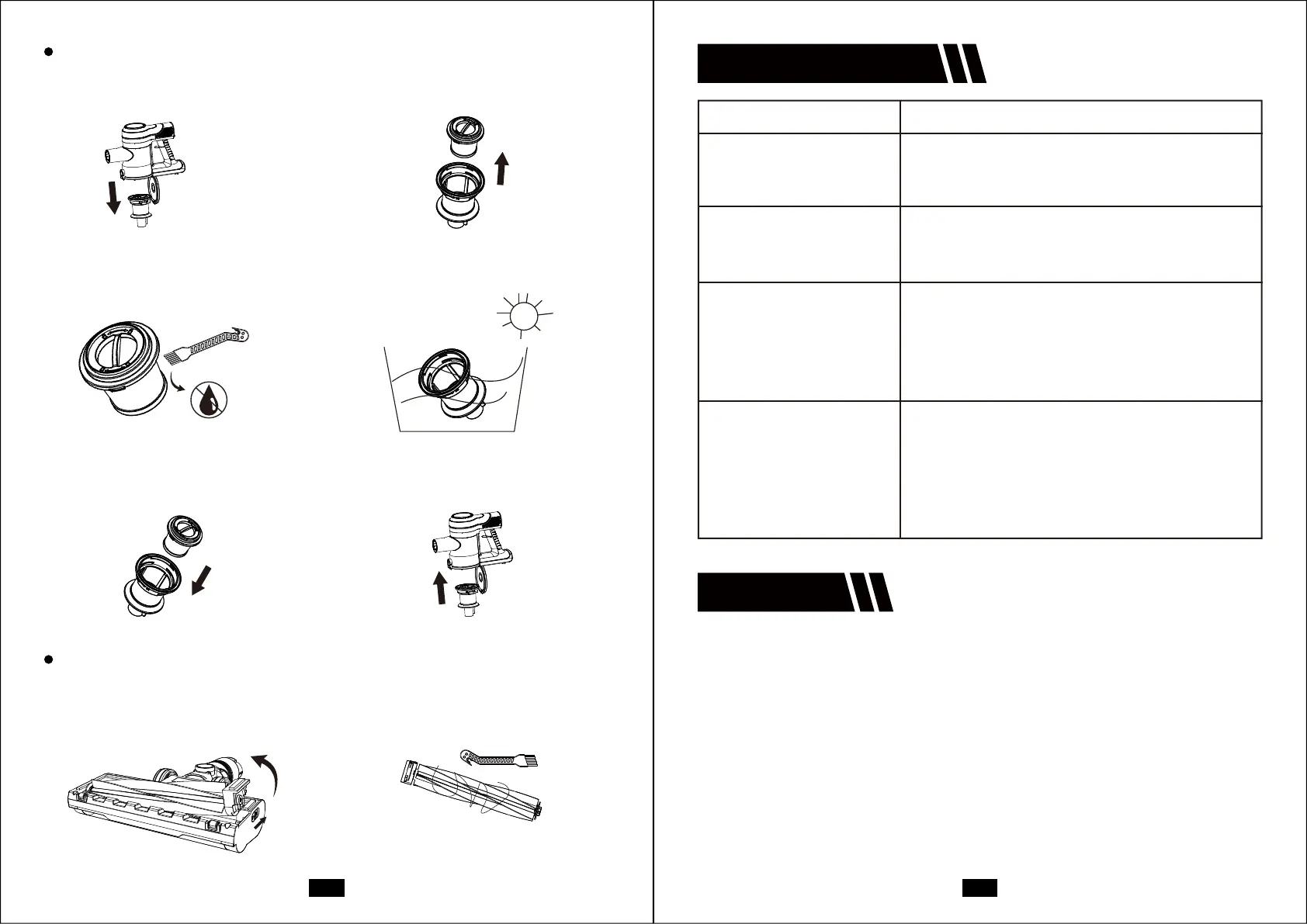
(1) Open the dust box, and rotate
to take out the lter.
(2) Rotate to take out the HEAP lter.
(3) Clean the HEPA with the
cleaning tool, not washable.
(4) Wash the mesh lter and d
before installing.
(5) Assemble the HEPA lter into
the metal lter.
(6) Put the metal lter into the
dust box.
How to clean lters
(1) Open the button and take out
the roller brush.
(2) Clean the roller brush with the
cleaning tool.
How to clean the roller brush
12-monthWarranty & LifetimeCustomerSuppo
OnlyapplytoeligiblepurchasesmadedirectlyfromtheDevoacauthorized
distributors.Warrantycoverageappliestotheoriginalownerandtotheoriginal
productonlyandisnottransferable.
Howtoinitiateawarrantyclaim
Ifyourapplianceoperatesimproperlywhileinuseundernormalhousehold
conditionswithinthewarrantyperiod,pleasecontactourcustomersuppo
suppo@devoac.comVisithttps://devoac.comtolloutthewarrantyformto
initiateawarrantyaims.
Formorewarrantydetails,pleaserefertohttps://devoac.comAllrights are reseed
by Devoac’s ocial website.
Problem Solution
Poor suction or no suction
Batte can’t charge
Stop working
Roller brush stops spinning
or has strange noise
1. Clean the lter.
2. Empty the dust box.
3. Check that the lters is correctly installed.
1. Check the adapter.
2. Check the connection between the main body
and the charger.
1. Charge the batte.
2. Batte can’t charge, and replace it.
3. Brush head is broken, and replace it.
4. Clear debris/hair from roller brush with
2-in-1 cleaning tool.
1. Check if the brush is stuck by hair.
2. Check if the lter cup is installed correctly in the
right position.
3. Detach the tube, and use the accessories the
main body only. If still don’t work, contact with
the seice team for help.
08 09



 To Previous Page