Need help?
Do you have a question about the DeWalt DCB184B and is the answer not in the manual?
Essential safety precautions for using electric tools, reducing risks of fire, shock, and injury.
A directive to carefully read and follow all provided instructions before use.
Identifies the specific battery models DCB183B and DCB184B covered by the declaration.
Instructions on how to download the DEWALT Tool Connect™ app from app stores.
Guide to creating a user account within the Tool Connect™ mobile application.
Steps to connect the battery pack to the app and register it.
Instructions for initiating the pairing process via the battery's charge button.
 General
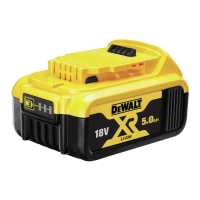
| Product type | Battery |
|---|---|
| Product color | Black, Yellow |
| Battery voltage | 18 V |
| Battery capacity | 5000 mAh |
| Brand compatibility | DeWalt |
 Weight and Dimensions
| Depth | 110 mm |
|---|---|
| Height | 69 mm |
| Weight | 670 g |

 To Next Page