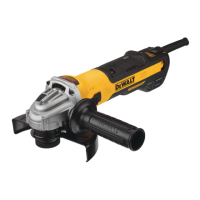
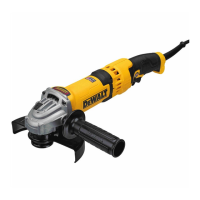
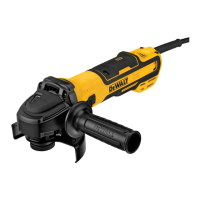
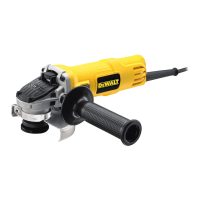
The DEWALT Brushless AC Small Angle Grinder, part of the Wolverine SAGs series, is a robust power tool designed for various grinding applications. This service guide outlines its operational features, troubleshooting steps, and maintenance considerations to ensure optimal performance and longevity. The grinder incorporates advanced brushless AC motor technology, which typically offers increased efficiency, longer motor life, and reduced maintenance compared to brushed motors.
Function Description
The primary function of this device is to perform grinding tasks using abrasive accessories. As a small angle grinder, it is suitable for applications such as cutting, grinding, polishing, and deburring various materials, including metal, stone, and concrete. The brushless motor provides consistent power output, making it effective for demanding jobs. The AC power source ensures continuous operation without the need for battery charging, ideal for extended use in workshops or job sites with readily available power.
Usage Features
The DEWALT Wolverine SAGs grinder is equipped with several intelligent usage features designed to enhance safety, control, and user experience:
-
LED Indicator System: The grinder features an LED indicator that provides real-time feedback on its operational status and potential issues. This system helps operators quickly diagnose problems and take appropriate action.
- No Issue (Solid Green): Indicates that the tool is plugged in and has power, ready for operation.
- E-switch Protection (No-Volt) (Flashing Red): This occurs when the switch is in the ON position but power was applied, and the unit remained off. To resolve, the operator needs to cycle the switch to restart the tool. This is a safety feature preventing unexpected startup after a power interruption.
- Kick Back Brake (Flashing Red): Activated when the tool senses a sudden deceleration or pinch of the accessory. This feature aims to prevent kickback, a common hazard with angle grinders. The solution involves inspecting the accessory for damage, replacing it if necessary, adjusting the workpiece and tool position, and then cycling the switch to restart.
- Thermal Protection (Continuous Red): Indicates that the tool's motor or module has reached a critical temperature and has shut down to prevent damage. The tool will restart once it cools below the shutdown threshold and the switch is cycled. This feature protects the internal components from overheating due to heavy use or blocked ventilation.
- Feathering Protection (Continuous Red): Triggered when the operator frequently starts and stops the tool, leading to potential overheating of critical components due to rapid start-up and braking cycles. To reset, the tool's power supply must be cycled (unplug and plug back in), and the switch cycled to restart. Reducing the frequency of feathering or using a variable speed SKU is recommended for applications requiring reduced speeds.
- Constant Clutch (Continuous Red): Engages when the tool is overloaded and slows to a low-speed threshold. Torque is reduced to mimic a mechanical clutch, protecting the tool. If pressure is reduced, allowing the RPM to increase, full torque returns. If the tool remains in Constant Clutch mode for an extended period, it will result in a stall shutdown. The operator should reduce pressure and ensure the accessory is not bound up.
- Stall/Overload Protection (Continuous Red): This feature activates under two conditions: if the accessory is pinched or bound when the tool is switched on (0 RPM for <1 second), or if the accessory is stalled or bound up for an extended period during use (referencing Constant Clutch behavior). To resolve, the load must be removed from the tool, and the switch cycled to restart.
- Problem Power Line (Continuous Red): Indicates that the tool has detected a poor-quality power source, such as a low-quality generator, and has shut down to prevent damage. The solution involves trying another power source, reducing extension cord length, or reducing equipment load on the current power source.
-
Ergonomic Design: While not explicitly detailed in the provided text, small angle grinders are typically designed with user comfort and control in mind, often featuring auxiliary handles and balanced weight distribution to reduce fatigue during prolonged use.
Maintenance Features
The service guide emphasizes several maintenance aspects, particularly for troubleshooting and resolving operational issues:
- Extension Cord Management: The guide stresses the importance of using appropriate extension cords. Excessively long or undersized cords can lead to higher current draw, causing nuisance trips of circuit breakers. Users are advised to refer to the manual for requirements, use the largest gauge size, and the shortest possible length.
- Circuit Breaker Considerations: Using an undersized circuit breaker or connecting too many tools to the same breaker can cause trips. A 20A circuit breaker and appropriate extension cords are recommended, along with reducing the number of tools on the same circuit.
- Cordset and Connection Inspection: For issues like immediate breaker trips, operators should unplug the tool, remove the handle cover, and inspect the cordset and connection posts for shorts or excessive contamination. If contamination is found, it should be removed, the cordset replaced, and white glue liberally applied to seal the connection posts from future contamination.
- Module Internal Short Diagnosis: If cordset and connection posts are clear, but the tool still trips, an internal module short is suspected. This requires inspecting the Stator and Rotor for damage and replacing the module, ensuring all connections are sealed with white glue.
- GFCI Maintenance and Compatibility:
- Aged GFCIs: GFCIs have a usable service life and should be replaced periodically, especially if exposed to harsh environments, to ensure proper function and reduce nuisance trips. Hubble GFCI models manufactured in China are noted as being more prone to nuisance trips with this power tool.
- GFCI Sensitivity: Some GFCIs, even new, can be overly sensitive to AC line noise or external interference, which certain power tools can produce. If a GFCI is new and the tool functions properly on other power sources, that particular GFCI may not be compatible.
- Normal Leakage: Extension cords, especially long ones with inferior or damaged insulation, can cause small amounts of ground leakage. When combined with the grinder's operation, these negligible levels can cause GFCI trips. Solutions include removing other equipment from the circuit, inspecting/replacing extension cords, and reducing cord length/increasing conductor size.
- Thermal Protection Troubleshooting:
- Intake/Exhaust Blockage: The tool requires adequate airflow for cooling, especially under heavy loads. Users should inspect intake screens for debris and ensure they are not inadvertently blocking exhaust or intake vents with hands, body, or clothing. Cleaning vents with compressed air or by scraping is recommended.
- Incorrect Application/Overload: In heavily loaded applications, particularly with large angle grinders, overloading can lead to thermal shutdowns. Running the tool momentarily at no load between heavy tasks allows it to cool down. Altering application bias or using a larger tool (LAG) may be necessary.
- Motor Damage/Short Inspection: Contamination can abrade copper coils, leading to shorts, higher temperatures, and thermal trips. With the tool unplugged, the gear case and rotor should be removed to inspect coils for heavy contamination, burnt coils, or wires. Replacement of the Stator is often necessary, along with checking the rotor for demagnetization.
- Rotor Damage or Demagnetization: High-strength magnets in the rotor can lose magnetism due to conditions like operating with a shorted stator, heavy use causing thermal shutdowns, or module shorts. A demagnetized rotor will show a noticeable lack of magnetic attraction when a small screwdriver or steel piece is placed against it. If demagnetization is evident, both the Rotor and Stator should be replaced, and potentially the module if it has failed.
- Hall/Switch Connection Contamination: If the green LED is not illuminated and the tool fails to start, contamination at the Hall or Switch connections can prevent the module from powering up. This requires unplugging the tool, removing handle covers, and inspecting white glue coverage. Excessive glue should be removed, and Hall (5-wire) and Switch (3-wire) connectors should be gently pried out to inspect for contamination. Compressed air should be used to clean the connectors and sockets. Reinstalling connectors, applying white glue to seal them, and temporarily installing handle covers allows for testing.
- Module Failure/Short (Spindle Resistance Check): If the green LED is off and the tool doesn't start, and the stator and rotor are confirmed to be okay, a module failure or short is suspected. With the tool unplugged, rotating the bare spindle back and forth by hand should reveal a viscous-like resistance that increases with speed. Comparing this to a known good unit helps determine if the resistance is abnormally high. If so, the module or stator may be shorted. Disconnecting the three motor-module connections while checking spindle resistance can help isolate the issue: if resistance significantly reduces when phases are disconnected, the module is shorted and must be replaced.
The guide also includes visual aids (Figures 1-4) to assist with identifying components, proper glue application, and diagnosing issues like stator contamination or rotor magnet orientation. These detailed troubleshooting and maintenance steps are crucial for extending the life and ensuring the safe operation of the DEWALT Brushless AC Small Angle Grinder.

 Need help?
 General

 To Next Page