EasyManua.ls Logo

DeWalt DXAEPI1000 - User Manual

DeWalt DXAEPI1000
16 pages
Print Icon
To Next Page IconTo Next Page
Loading...
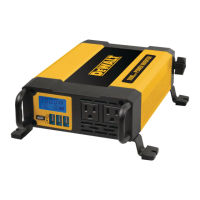
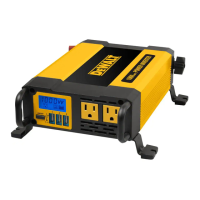
DXAEPI1000
1000 Watt Power Inverter
Inversor de la energía de 1000 vatios
INSTRUCTION MANUAL
MANUAL DE INSTRUCCIONES
If you have questions or comments, contact us.
Si tiene dudas o comentarios, contáctenos.
1-888-394-3392
RD080320
DXAEPI1000_ManualENSP_080320.indd 32-1DXAEPI1000_ManualENSP_080320.indd 32-1 8/3/2020 1:40:35 PM8/3/2020 1:40:35 PM

Questions and Answers

  • A
    Alex RichardsJul 27, 2025
    How to fix television interference with DeWalt DXAEPI1000?
    • L
      lydia08Jul 27, 2025
      If you are experiencing television interference, it may be due to a weak TV signal. To improve the picture: 1. Move the inverter as far away as possible from the TV set, the antenna, and the antenna cables. Use a short AC extension cord, if necessary. 2. Adjust the orientation of the antenna cables and the TV power cord to minimize interference. 3. Make sure that the antenna feeding the TV provides an adequate (snow-free) signal and that high-quality, shielded antenna cable is used.
  • J
    Jasmine GordonJul 31, 2025
    What to do if DeWalt DXAEPI1000 AC outlets shut down?
    • M
      Mrs. Jane ChanJul 31, 2025
      If a fault condition exists, the LCD will display the fault and the AC Outlets will automatically shut down. Should this occur: * Disconnect all appliances from the unit and press the power button again to turn off the unit immediately. * Allow the unit to cool down for several minutes. * Make sure the combined rating of all appliances simultaneously plugged into the inverter does not exceed 1000 watts continuous. * Make sure the appliance cord(s) and plug(s) are not damaged. * Assure there is adequate ventilation around the unit before proceeding.
  • P
    Peter GreenAug 5, 2025
    What to do if DeWalt DXAEPI1000 Inverter is in thermal shutdown?
    • J
      jperezAug 5, 2025
      If the DeWalt Inverter is in thermal shutdown, allow it to cool down. Also, ensure adequate ventilation around the unit and that the load is no more than 1000 watts for continuous operation.
  • A
    Andrew MitchellAug 9, 2025
    What to do if my equipment draws too much power from DeWalt DXAEPI1000 Inverter?
    • C
      Cathy CarterAug 9, 2025
      If your equipment is drawing too much power from the DeWalt Inverter, reduce the load to a maximum of 1000 watts.
  • E
    ericwarnerAug 13, 2025
    What to do if AC output of DeWalt DXAEPI1000 is shorted?
    • J
      Jason CookAug 14, 2025
      If the AC output is shorted, unplug the AC appliance. Disconnect the unit from any 12 volt DC power source and check the appliance cord.
  • A
    Ashley RamosAug 17, 2025
    Why is my DeWalt DXAEPI1000 Inverter causing buzzing in audio systems?
    • V
      Vanessa HessAug 17, 2025
      The buzzing sound in audio systems may be due to the power supply in the electronic device not properly filtering the modified sine wave produced by the DeWalt Inverter. The only solution to this problem is to use a sound system that has a higher quality power supply.
  • T
    Taylor SchultzAug 22, 2025
    What to do if DeWalt DXAEPI1000 Inverter input voltage is below 10.5 volts?
    • S
      Stephanie KhanAug 22, 2025
      If the input voltage is below 10.5 volts, recharge the auto battery or check the DC power supply.

Summary

Important Safety Instructions

Safety Guideline Definitions

Defines signal words like DANGER, WARNING, CAUTION, NOTICE for safety.

General Safety Precautions

Covers critical safety advice from reading instructions to avoiding hazards and proper storage.

Specific Safety Guidelines and Restrictions

Electrical, Fire, and Injury Prevention

Focuses on preventing electric shock, fire, injury, and property damage.

Usage Limitations and Compatibility

Details on extension cords, incompatible devices, and power source requirements.

Inverter Components and Operation Principles

Component Identification

Identifies and describes the front, back, and accessory components of the inverter.

Working Mechanism and Output Waveform

Explains how the inverter works and its output waveform characteristics.

Power Source and Protective Features

Power Source Requirements and Connection

Details acceptable input voltage ranges and connection precautions.

Protective Functions and LCD Indicators

Explains automatic shutdown mechanisms and LCD indicators for faults.

Installation and Connection Procedures

Mounting and Environmental Setup

Guidance on secure mounting and choosing an optimal operating location and temperature.

Connecting to Power Source

Instructions for connecting the inverter to a 12V DC power source.

Operation, Maintenance, and Troubleshooting

Connecting Loads and Operating Instructions

How to connect appliances, operate the unit, and notes on usage.

Care and Maintenance: Storage

Guidelines for proper storage of the inverter.

Specific AC Outlet Problems

Addresses problems with AC outlets, including fault conditions and required actions.

Advanced Troubleshooting and Warranty Information

Specific USB Power Port Problems

Lists common USB port issues like faults, low voltage, overload, and their remedies.

Common Audio and Power Output Issues

Provides solutions for buzzing in audio systems, TV interference, and power output problems.

Warranty and Refund Policies

Outlines the terms and conditions of the one-year limited warranty and 90-day refund policy.

DeWalt DXAEPI1000 Specifications

General IconGeneral
Input Voltage12V DC
Output Voltage120V AC
Outlets2
USB Ports2
Overload ProtectionYes
Frequency60 Hz
Efficiency90%
Number of Outlets2
CoolingFan cooled
Dimensions11.5 x 6.5 x 5.5 inches
Power Output1000W
Peak Power2000W
Protection FeaturesOverload, Overheat, Short Circuit

Related product manuals