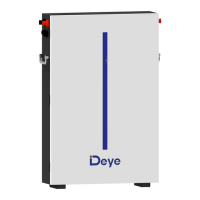
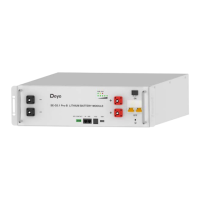
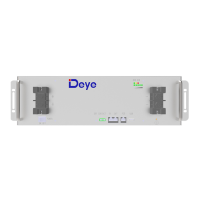
The Deye Spring series LFP Battery (SE-G5.1 Pro) is a 48V lithium iron phosphate battery system designed for power backup in remote or outside telecom plants, such as Access Terminals, Base Transceiver Stations, and Base Station Controllers. It boasts high system integration, reliability, long service life, and a wide operating temperature range.
Function Description:
The battery system provides electrical energy for backup purposes. It features a front panel with various indicators and connection points:
- Power button: Turns the entire Battery Management System (BMS) standby on/off, without power output.
- DRY CONTACT output: For external dry contact connections.
- PCS (Inverter communication terminal): An RJ45 port supporting CAN protocol (500kbps baud rate) and RS-485 (9600bps baud rate) to output battery information to the inverter.
- IN/OUT (Parallel Communication Terminal): RJ45 ports for communication between multiple parallel batteries. The "IN" terminal connects to the "OUT" terminal of the previous battery, and the "OUT" terminal connects to the "IN" terminal of the next battery.
- SOC (State of Charge) LEDs: Five LEDs indicating the pack's SOC at 20%, 40%, 60%, 80%, and 100%.
- RUN light: A green LED indicating the battery's running status.
- Alarm light: A red LED indicating an alarm condition.
- USB port: Used for inserting a USB flash drive for battery firmware upgrades.
- Negative and Positive output terminals: For connecting the battery to the load/inverter.
- Grounding bolt: For grounding the battery.
- Handle: For carrying/moving the battery.
- Fixing points: For securing the battery in a cabinet.
Important Technical Specifications:
- Battery Chemistry: LiFePO4
- Capacity (Ah): 100
- Scalability: Max. 64 pcs pack (327kWh) in parallel (Max. 32 pcs without external setup)
- Nominal Voltage (V): 51.2
- Operating Voltage (V): 43.2~57.6
- Energy (kWh): 5.12
- Usable Energy (kWh): 4.61 (test conditions: 90% DOD, 0.5C charge & discharge at 25°C; usable energy may vary due to system configuration parameters)
- Charge/Discharge Current (A): Recommend 50A, Max. 100A, Peak 150A (2mins, 25°C; current affected by temperature and SOC)
- Recommend Depth of Discharge: 90%
- Dimension (W/H/D,mm): 445133430
- Weight Approximate (kg): 44
- Master LED indicator: 5 LEDs for SOC (20%~100%), 3 LEDs for working, alarming, protecting.
- IP Rating of enclosure: IP20
- Working Temperature: Charge: 0℃~55℃, Discharge: -20℃~55℃
- Storage Temperature: 0℃~35℃
- Humidity: 5%~95%
- Altitude: ≤2000m
- Cycle Life: ≥6000 (25±2°C, 0.5C/0.5C, 70%EOL)
- Installation: 19-inch standard cabinet, cabinet depth ≥600mm / with rack
- Communication Port: CAN2.0, RS485
- Certification: UL1973, IEC62619, CE, UN38.3
Usage Features:
- Installation: Battery modules are designed for installation in standard 19-inch cabinets or racks. It is recommended to install modules in upper shelves first and proceed downwards. Proper lifting aids and techniques should be used due to the heavy weight. All connections require insulated tools, and polarity must be verified before energizing the system to prevent damage and voiding the warranty.
- Cable Connection:
- Single Battery: Connect positive and negative power cables to the battery terminals and then to the inverter. Ensure the inverter's output switch is off before connecting. The power terminals are covered with protective covers to prevent short circuits, which must be removed for connection and reattached immediately after.
- Multiple Batteries in Parallel: For parallel connections, use cables of the same diameter and length for each battery to ensure current balance. Communication lines (standard RJ45 network cables) are connected between adjacent batteries. Specific pin definitions are provided for PCS, IN, and OUT ports for communication with the inverter and other batteries.
- Activation: After installation, wiring, and configuration, press the power button to activate the battery. A flashing green working light on the front panel indicates normal operation.
- Firmware Update:
- USB Upgrade: Requires a FAT32 formatted USB flash drive with upgrade files placed in a folder named "upgrade" at the first level of the directory.
- PC Upgrade: Connect the battery to a computer, select "Firmware - Browse - Upgrade File" in the monitoring software, and follow the on-screen prompts. For multiple PACKs, specify the device address (hexadecimal or decimal).
- PCS Upgrade: Performed via the Deye PowerView website (pv.inteless.com/plants) by logging in, selecting the target device, and initiating a remote upgrade after choosing the firmware type ("Energy Storage Machine/BMS") and version.
Maintenance Features:
- General Information:
- Install the battery within 3 months of arrival, as it is not fully charged.
- Do not reinstall or dismantle any battery in the product, as this can reduce performance or damage the battery.
- If the battery is over-discharged, charge it within 48 hours. Parallel charging is possible by connecting the charger to the output port of any product battery.
- The battery contains no serviceable parts; do not attempt to open it.
- Disconnect the Li-Ion battery from all loads and charging devices before cleaning and maintenance. Place protective caps over terminals.
- Inspection:
- Regularly inspect for loose/damaged wiring, cracks, deformations, or leakage. Replace damaged batteries; do not charge or use them.
- Check the battery's state of charge. Consider replacement if run time drops below 80% or charge time increases significantly.
- Cleaning: Clean with a soft, dry cloth. Do not use liquids, solvents, or abrasives.
- Maintenance: The Li-Ion battery is maintenance-free. Charge it to >80% capacity at least once a year to preserve capacity.
- Storage:
- Store in a dry, cool environment.
- Maximum storage period at room temperature is 6 months. Check voltage if stored longer; if below 48V, charge according to the charging strategy (discharge to cutoff voltage with 0.2C10A current, then charge with 0.2C10A current for ~3 hours, keeping SOC at 40-70%).
- Avoid ignition sources, high temperatures, and explosive/flammable areas during storage.
- Troubleshooting: The manual provides a detailed troubleshooting table for various fault types (BMS fault, electrochemical cell fault, overvoltage protection, undervoltage protection, high/low temperature protection), their generation conditions, possible causes, and recommended solutions (e.g., replace battery, contact local engineers). Users should use monitoring software to identify protection modes.
- Battery Recovery (Recycling): The manual outlines a hydrometallurgical process for recovering aluminum, copper, lithium, and iron from discarded LiFePO4 batteries, aiming for an 80% recovery efficiency. This involves dissolving aluminum foil, precipitating aluminum hydroxide, and then dissolving lithium iron phosphate to recover iron and lithium compounds. The diaphragm material is considered harmless with no recycling value.
- Transportation: Battery products must be transported in packaging that prevents severe vibration, impact, or extrusion, and protects from sun and rain. Transport must comply with all local, national, and international regulations. Li-Ion batteries fall under hazard class UN3480, class 9, packaging group PI965 Section I. Class 9 Miscellaneous Dangerous Goods and UN Identification labels are required.



 To Next Page
 General