3
36
Award BIOS Setup Utility
3.5 Selecting the Method of Powering-off the System
Sélection de la Méthode pour Eteindre le Système
Auswahl der Abschaltmethode
Seleccionando el Método de Apagar el Sistema
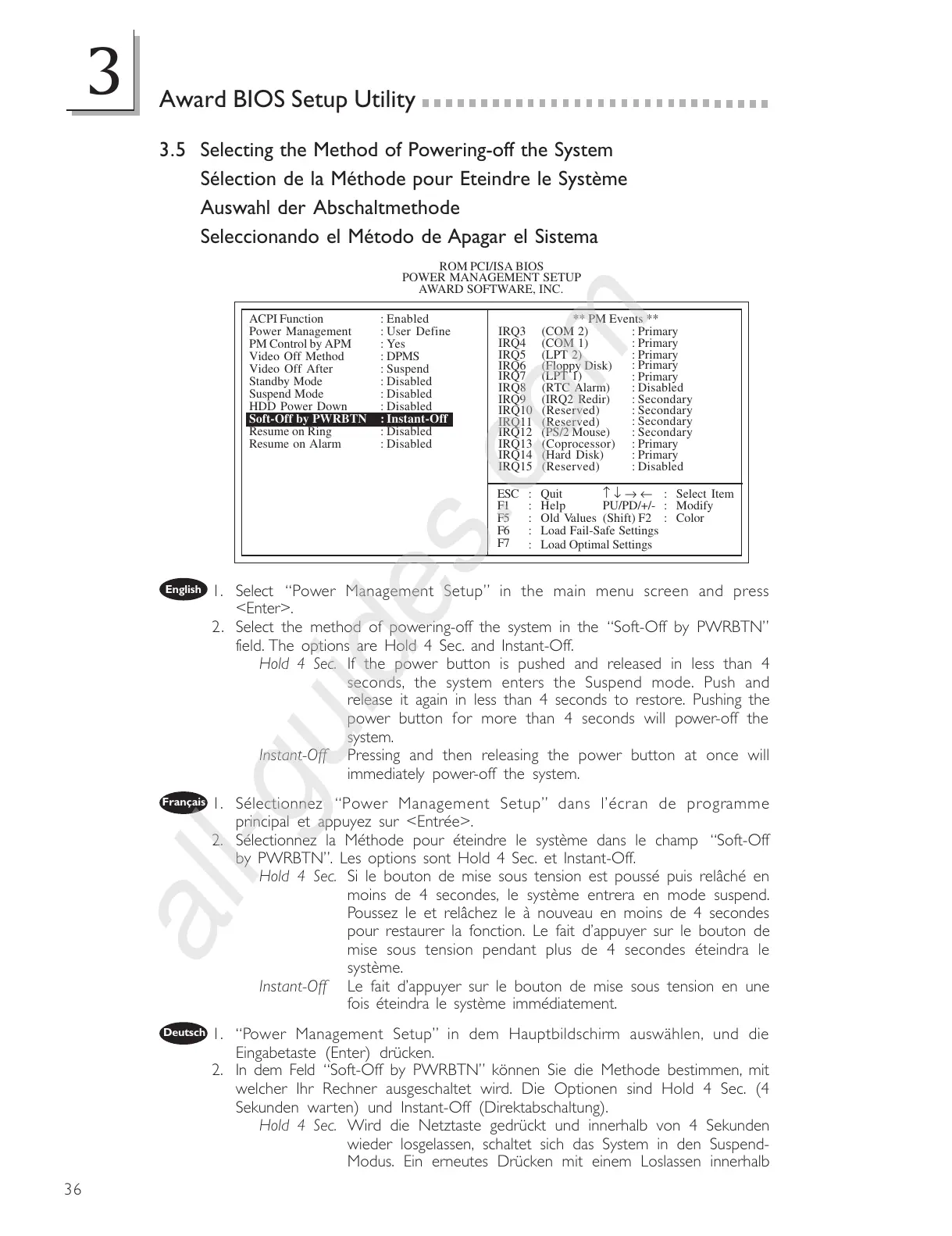
1. Select Power Management Setup in the main menu screen and press
<Enter>.
2. Select the method of powering-off the system in the Soft-Off by PWRBTN
field. The options are Hold 4 Sec. and Instant-Off.
Hold 4 Sec. If the power button is pushed and released in less than 4
seconds, the system enters the Suspend mode. Push and
release it again in less than 4 seconds to restore. Pushing the
power button for more than 4 seconds will power-off the
system.
Instant-Off Pressing and then releasing the power button at once will
immediately power-off the system.
1. Sélectionnez Power Management Setup dans lécran de programme
principal et appuyez sur <Entrée>.
2. Sélectionnez la Méthode pour éteindre le système dans le champ Soft-Off
by PWRBTN. Les options sont Hold 4 Sec. et Instant-Off.
Hold 4 Sec. Si le bouton de mise sous tension est poussé puis relâché en
moins de 4 secondes, le système entrera en mode suspend.
Poussez le et relâchez le à nouveau en moins de 4 secondes
pour restaurer la fonction. Le fait dappuyer sur le bouton de
mise sous tension pendant plus de 4 secondes éteindra le
système.
Instant-Off Le fait dappuyer sur le bouton de mise sous tension en une
fois éteindra le système immédiatement.
1. Power Management Setup in dem Hauptbildschirm auswählen, und die
Eingabetaste (Enter) drücken.
2. In dem Feld Soft-Off by PWRBTN können Sie die Methode bestimmen, mit
welcher Ihr Rechner ausgeschaltet wird. Die Optionen sind Hold 4 Sec. (4
Sekunden warten) und Instant-Off (Direktabschaltung).
Hold 4 Sec. Wird die Netztaste gedrückt und innerhalb von 4 Sekunden
wieder losgelassen, schaltet sich das System in den Suspend-
Modus. Ein erneutes Drücken mit einem Loslassen innerhalb
English
Français
Deutsch
ROM PCI/ISA BIOS
POWER MANAGEMENT SETUP
AWARD SOFTWARE, INC.
ACPI Function
Power Management
PM Control by APM
Video Off Method
Video Off After
Standby Mode
Suspend Mode
HDD Power Down
Soft-Off by PWRBTN
Resume on Ring
Resume on Alarm
: Enabled
: User Define
:Yes
: DPMS
: Suspend
: Disabled
: Disabled
: Disabled
:Instant-Off
: Disabled
: Disabled
ESC
F1
F5
F6
F7
: Quit
: Help
: Old Values
: Load Fail-Safe Settings
: Load Optimal Settings
PU/PD/+/-
(Shift) F2
: Select Item
: Modify
: Color
↑ ↓ → ←
** PM Events **
IRQ3 (COM 2)
IRQ4 (COM 1)
IRQ5 (LPT 2)
IRQ6 (Floppy Disk)
IRQ7 (LPT 1)
IRQ8 (RTC Alarm)
IRQ9 (IRQ2 Redir)
IRQ10 (Reserved)
IRQ11 (Reserved)
IRQ12 (PS/2 Mouse)
IRQ13 (Coprocessor)
IRQ14 (Hard Disk)
IRQ15 (Reserved)
: Primary
: Primary
: Primary
: Primary
: Primary
: Disabled
: Secondary
: Secondary
: Secondary
: Secondary
: Primary
: Primary
: Disabled



 To Next Page