0
1 2
3
4
5
6
7
8 9
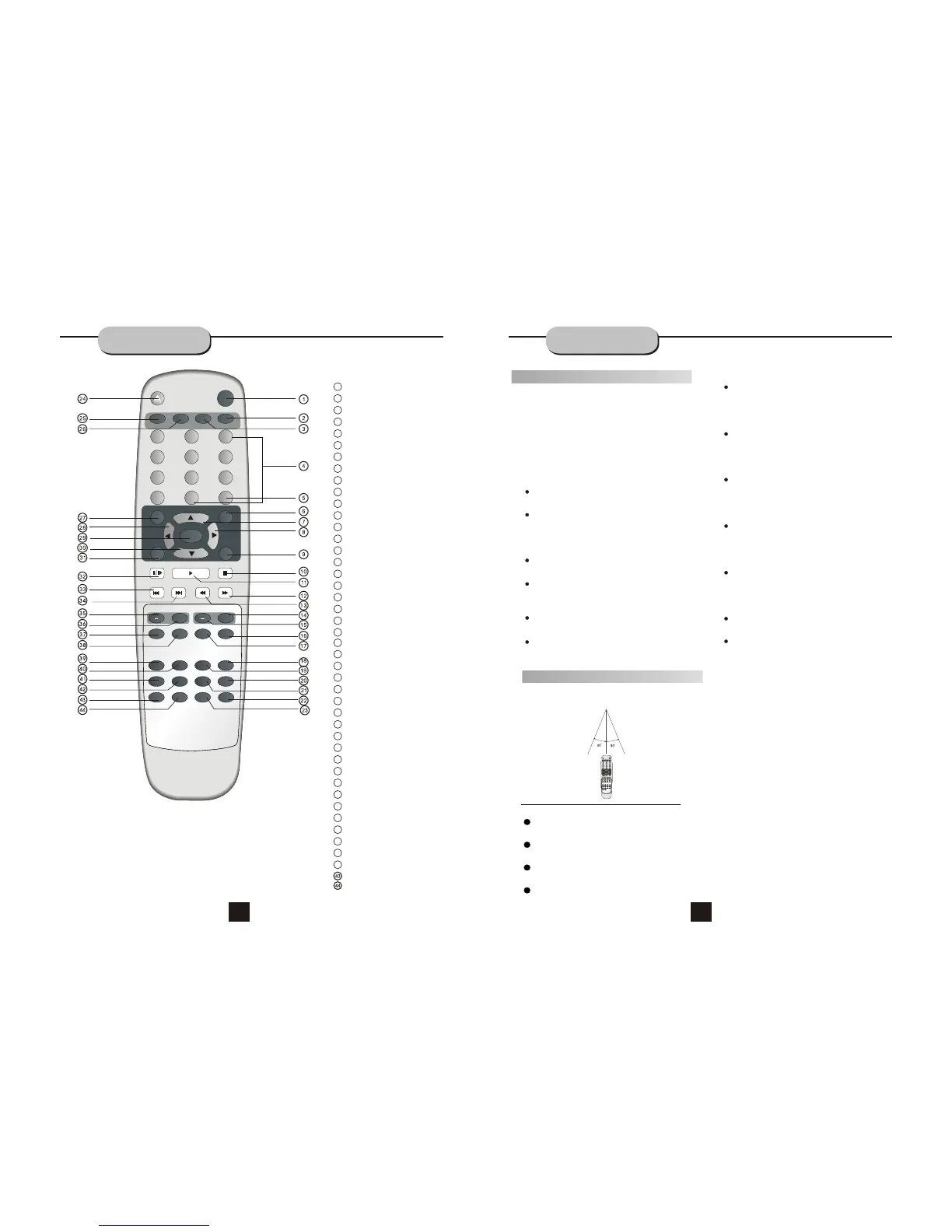
ANGLE
GOTO
DISPLAY
SETUP
MENU
ENTER
RETURN
STOP
+10
PAUSE/STEP
PLAY
IPOD
LANGUAGE
PROG
REPEAT
TITLE
P/N
VIDEO
ZOOM L/R
DVD
USB
SUBTITLE
MUTE
SLOW
A-B
OPEN/CLOSE
SOURCE
VOL
CH
+ +
FM/MODE PRE/TUN
MEMO AUTO
REMOTE
CONTROLLER
2
4
5
6
22
7
13
19
14
15
12
10
11
9
21
20
8
1
17
18
16
3
MUTE
0-9 NUMBER KEYS
SCROLL UP
SCROLL RIGHT
STOP
PLAY
FW D
REV BUTTON
A-B
38
37
36
24
27
25
26
28
29
32
31
30
33
35
34
39
42
40
41
SCROLL DOWN
SCROLL LEFT
OPEN/CLOSE
ENTER
PAUSE/STEP
PREV BUTTON
NEXT BUTTON
Notes:
Do not direct the remote sensor toward
any light source, such as direct sunlight or
a strong fluorescent light, as it may cause
the unit to operate incorrectly.
When other remote controls are used
nearby or when the remote is used near
equipment using infrared rays, interference
may occur.
Placing an object on the remote control
may cause it to inadvertently depress a
button, changing a function and shortening
battery life.
Do not glaze the front of the DVD receiver
with colored glass, as it may cause
interference with normal operation of the
controller.
Make sure there is no barrier between the
remote control and remote sensor, as it
could prevent the unit from receiving the
signal.
Do not spill water or put wet items on the
remote control.
Never disassemble remote control.
Battery Installation
1. Push down and out on the battery Compart-
ment cover to remove it.
2. Insert the two AAA b atteries into the battery
compartment of the remote control, making
sure the + and - signs on the batteries and
inside the batteries compartment match up.
3. Replace the battery compartment cover.
Notes:
Do not mix batteries from different manu-
facturers, nor old ones with new.
If the remote control will not be used for an
extended period of time, remove the
batteries to prevent damage-causing
corrosion.
Remove dead batteries immediately to
prevent damage-causing corrosion.
If battery leakage occurs, wipe the battery
liquid from the battery compartment, then
replace both batteries.
Always replace both batteries at the same
time, using new, fully charged batteries.
Life expectancy of batteries may vary
depending on amount of use.
""
OPERATING THE
REMOTE CONTROL
Notes:
Point the remote control directly at the
player's remote sensor.
Do not leave the remote control in an
extremely hot or humid place.
Do not spill water or put anything wet
on the remote control.
Battery life is ~1 year under normal
conditions.
Point the remote control directly at the
player's remote sensor.
Do not leave the remote control in an
extremely hot or humid place.
Do not spill water or put anything wet
on the remote control.
Battery life is ~1 year under normal
conditions.
Point the remote control at the remote sensor.
(The pictures below are for reference only.)
0
1 2
3
4
5
6
7 8 9
TUNER
SCART
AUX
SETUP
FM MODE PRE/TUN
MEMO
ENTER
AUTO
STOP
VOL
+10
PAUSE/STEP
PLAY
+
CH
ZOOM PROG
SLOW
REPEAT
GOTO TITLE
MENU
DISPLAY
N/P SUBTITLE LANGUAGE ANGLE
RESUME
A-B
MUTE
RETURN
+
R/L
DVD
VIDEO
RDS
23
ANGLE
TITLE
GOTO
SETUP
RETURN
CH+
CH
-
AUTO
MEMO
REPEAT
L/R
ZOOM
SOURCE
USB
SUBTITLE
LANGUAGE
DISPLAY
PAUSE/STEP
VOL +
VOL
-
FM/MODE
PRE/TUN
SLOW
PROG
VIDEO
P/N
DVD
IPOD
Using the Remote Control
9 10


 To Next Page
 Loading...