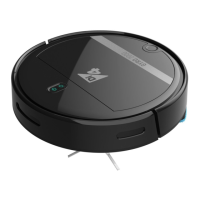
The Di4 Gyro Laser 2500 / 5000 is a robotic vacuum cleaner designed for automated floor cleaning. It offers various cleaning modes, smart navigation, and convenient control options, including a remote control and a mobile application.
Function Description:
The Di4 Gyro Laser robot vacuum is designed to autonomously clean floors by sweeping, vacuuming, and, for the Gyro Laser 5000 model, mopping. It utilizes laser navigation to map the environment, plan efficient cleaning paths, and avoid obstacles. The robot can detect low battery levels and automatically return to its charging base for recharging. Users can select from different cleaning modes to suit specific needs, such as automatic cleaning, partial cleaning for concentrated dirt, zone cleaning for designated areas, and manual control. A virtual wall feature allows users to define areas where the robot should not clean.
Important Technical Specifications:
The device comes in two models: Gyro Laser 2500 and Gyro Laser 5000. Both models feature a laser head pressure sensor and a laser ranging sensor for navigation. They are equipped with side brushes, a rolling brush assembly, and a dustbin. The Gyro Laser 5000 model includes an optional water tank and mop for wet cleaning. The charging time for the robot is approximately 4 hours. The device operates on a 2.4G Wi-Fi network for app connectivity and is compatible with voice control assistants like Alexa and Google Home.
Usage Features:
- Preparation: Before first use, users need to install the dustbin and side brushes and remove any protective strips from the bumper. The charging base should be placed against a wall on a flat surface, with clear space around it (0.5m to the left and right, 1.5m in front).
- Charging: The robot can be charged by placing it on the charging base or by connecting it directly with the power adapter. A blinking indicator light turns green when charging is complete. The robot can automatically return to the charging base when its battery is low during cleaning.
- Connectivity: The robot connects to a mobile application ("Di4 Connect") via a 2.4G Wi-Fi network. The app allows users to register, log in, add the device by scanning a QR code, and control various functions.
- Cleaning Modes:
- Automatic Cleaning: The robot scans and maps the environment, then cleans systematically, starting with edges and filling in bow-shaped patterns for comprehensive coverage.
- Partial Cleaning: Ideal for concentrated dirt, this mode cleans a 1.5x1.5 meter square area centered on the robot.
- Zone Cleaning: Users can define specific zones on the app map for the robot to clean.
- Designated Spot Cleaning: Users can specify a target point on the map for the robot to clean.
- Suction Adjustment: The suction power can be adjusted via the app or remote control.
- Manual Control: Users can manually steer the robot forward, backward, and turn using the app or remote control.
- Virtual Wall: A virtual wall can be drawn in the app to restrict the robot from entering certain areas.
- Mopping Function (Gyro Laser 5000 only): The water tank can be filled with water, and the mop attached. The robot can then perform wet cleaning, with adjustable water seepage levels via the app. This function should not be used on carpets.
- Pause, Wake Up, Shut Down: The robot can be paused during operation. It enters sleep mode after 3 minutes of inactivity and can be woken up by pressing any button on the robot or app. To shut down, press and hold the start button for a few seconds, or manually turn off the main switch.
Maintenance Features:
Regular maintenance is crucial for optimal performance.
- Dustbin and Filters:
- Remove the dustbin by pressing its button.
- Open the dustbin side cover and empty the rubbish.
- Open the HEPA filter cover, remove the HEPA filter and the primary filter.
- Tap the HEPA filter gently to remove dust (do not wash with water).
- Wash the primary filter with water and let it dry completely.
- Ensure both filters are dry before re-installing them.
- The dustbin itself cannot be washed with water; clean it with a damp cloth or brush.
- The primary filter should be washed every 15-30 days, and the HEPA filter has a lifespan of about 3 months.
- Water Tank and Mop (Gyro Laser 5000 only):
- Remove the water tank and empty any remaining water.
- Remove and wash the mop.
- Clean the water tank.
- Allow the mop and water tank to air dry naturally. Avoid prolonged storage of the water tank with water inside.
- Rolling Brush and Side Brush:
- Open the rolling brush cover assembly and take out the rolling brush.
- Use the cleaning brush to cut and remove tangled hair from the rolling brush.
- Check and clean the side brushes for any tangled hair or debris.
- Charging Contacts, Ground Sensors, Drive Wheels, and Universal Wheel:
- These components contain sensitive electronic parts. Clean them with a dry mop or cloth. Do not use wet cleaning to prevent water ingress.
- Battery Removal:
- The appliance must be disconnected from the power supply before removing the battery.
- Press the lower button of the battery pack to remove it.
- The battery must be removed from the appliance before disposal and should be disposed of safely in designated containers. Users are not advised to replace the battery themselves.
Important Warnings:
- Verify mains voltage matches the product label before plugging in.
- Do not tangle or wrap the power cable during use.
- Do not operate the device with wet hands or feet.
- Unplug immediately in case of breakdown or damage and contact authorized technical support.
- Do not open the device; only qualified personnel should perform repairs.
- Incorrect use or handling voids the warranty.
- The appliance is for domestic use only; commercial or industrial use voids the warranty.
- Do not vacuum liquids, sharp objects (pins, nails, glass), or incandescent objects (matches, cigarettes).
- Do not use the turbobrush for polishing floors, vacuuming liquids, wet/damp dust, hot ash, burning objects, sharp/hard items (razors, pins, thumbtacks, glass pieces), flour, cement, plaster, printer/photocopier toner.
- B&B TRENDS SL. is not responsible for damages due to non-observance of warnings.
- If storing the product for a long time, fully charge it, turn off the host, and recharge every 3 months to prevent over-discharge.
- If the battery is over-discharged or unused for a long time, it may not charge. Contact customer service for maintenance. Do not disassemble the product yourself.

 Need help?
 General

 To Next Page