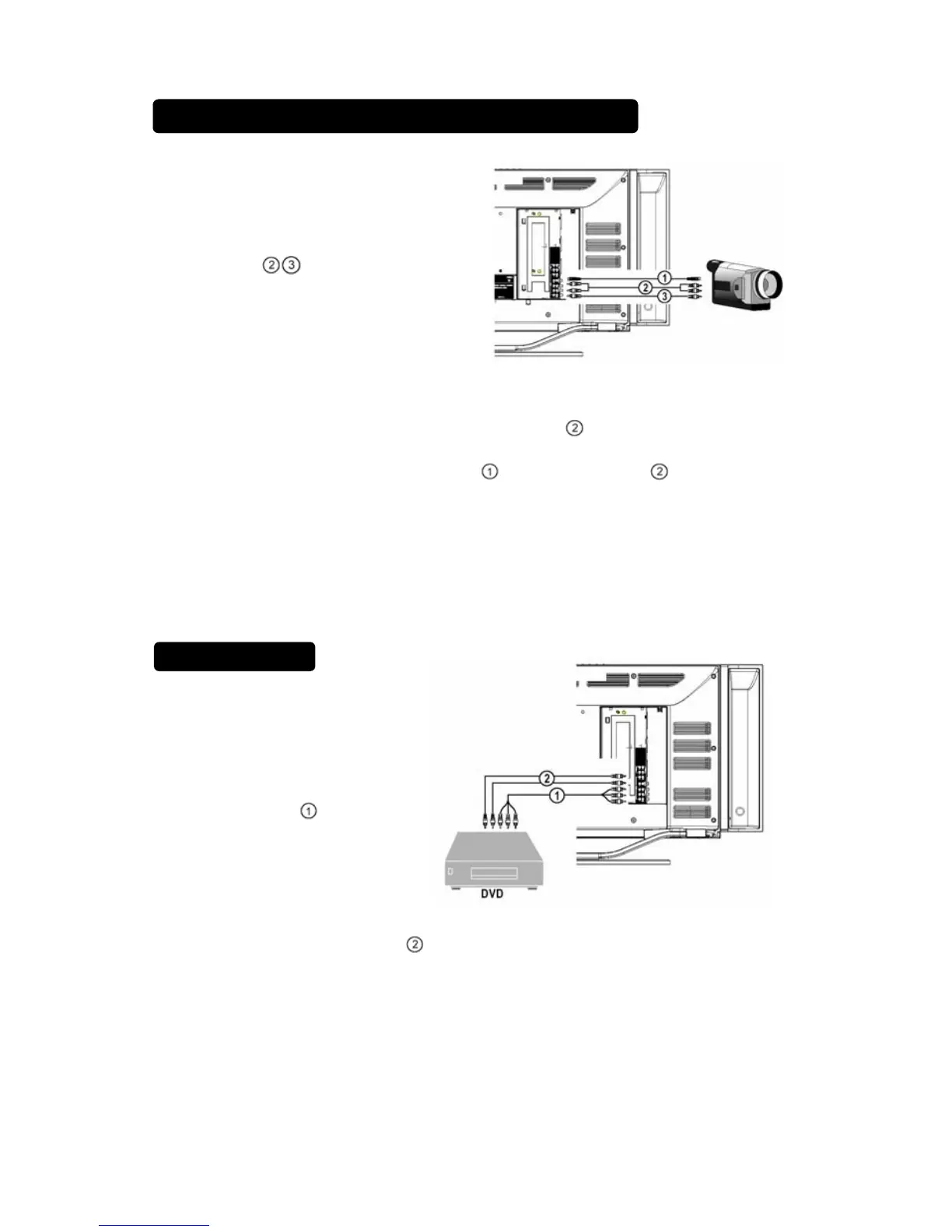
CAMCORDER, VIDEO GAME SET …
DIGITAL CAMERA
How to connect
1. Use AV to
Connect your digital
camera, camcorder,
videogame set
2. For stereo equipment also connect AUDIO R
.
S-VHS quality with an S-VHS camcorder is obtained by connecting the S-
VHS cable with the S-VIDEO input and AUDIO input .
How to use
1. Select AV1、AV2 or S-VIDEO input .
2. Turn on the external AV equipment.
DVD PLAYER
How to connect
1. Connect the three
separate component
video cables
to the
DVD player’s. Y, Pb
and Pr ports and to the
Y, Pb and Pr ports on
the TV.
2. Connect the audio cables
to the DVD player’s AUDIO L and R ports
and to the AUDIO L and R ports on the TV.
How to use
1. Select COMPONENT.
2. Turn on the DVD set.
13



 To Next Page