persist.
● YourSwingTrackersensorcontainssensitiveelectroniccomponents.Do
notattempttomodifyorrepairyourSwingTrackersensoryourself.
Disassemblingyoursensorwillvoidthemanufacturer’swarranty.
● TheSwingTrackersensorcontainssmallpartsandisachokinghazard.It
isnotappropriateforchildrenundertheageofthree.
● YourSwingTrackersensorissplashproof.However,donotuseyour
sensorinrainorsubmergeunderwater.
● Donotoverstretchthesensorstrap.Itisonlyintendedforusewiththe
SwingTrackersensor.
● UnplugtheUSBpowercableanddiscontinueuseifithasbecome
damagedorhasbeenexposedtorain,liquidorexcessivemoisture.
PACKAGECONTENTS
WhatcomesintheBox
● Sensor
● SensorMount
● SensorStrap
● ChargingStation
● StoragePouch
WorkswiththefreeSwingTrackeriOSApp
USINGYOURSWINGTRACKERSENSOR
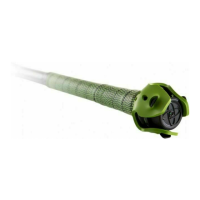
AttachSwingTrackerSensortoyourBat
Placetheendofyourbatonafirmsurfacewiththeknob
pointingupward.Stretchtheroundholeinthecenterof
thesensorstrapovertheknob.Positionthe
sensormountontopofthebatknob.Hold
thesensormountinplacewithonehand.


 To Next Page
 Loading...