EasyManua.ls Logo

Diamond Multimedia Stream2TV - Page 14

Diamond Multimedia Stream2TV
65 pages
Print Icon
To Next Page IconTo Next Page
To Previous Page IconTo Previous Page
Loading...
14
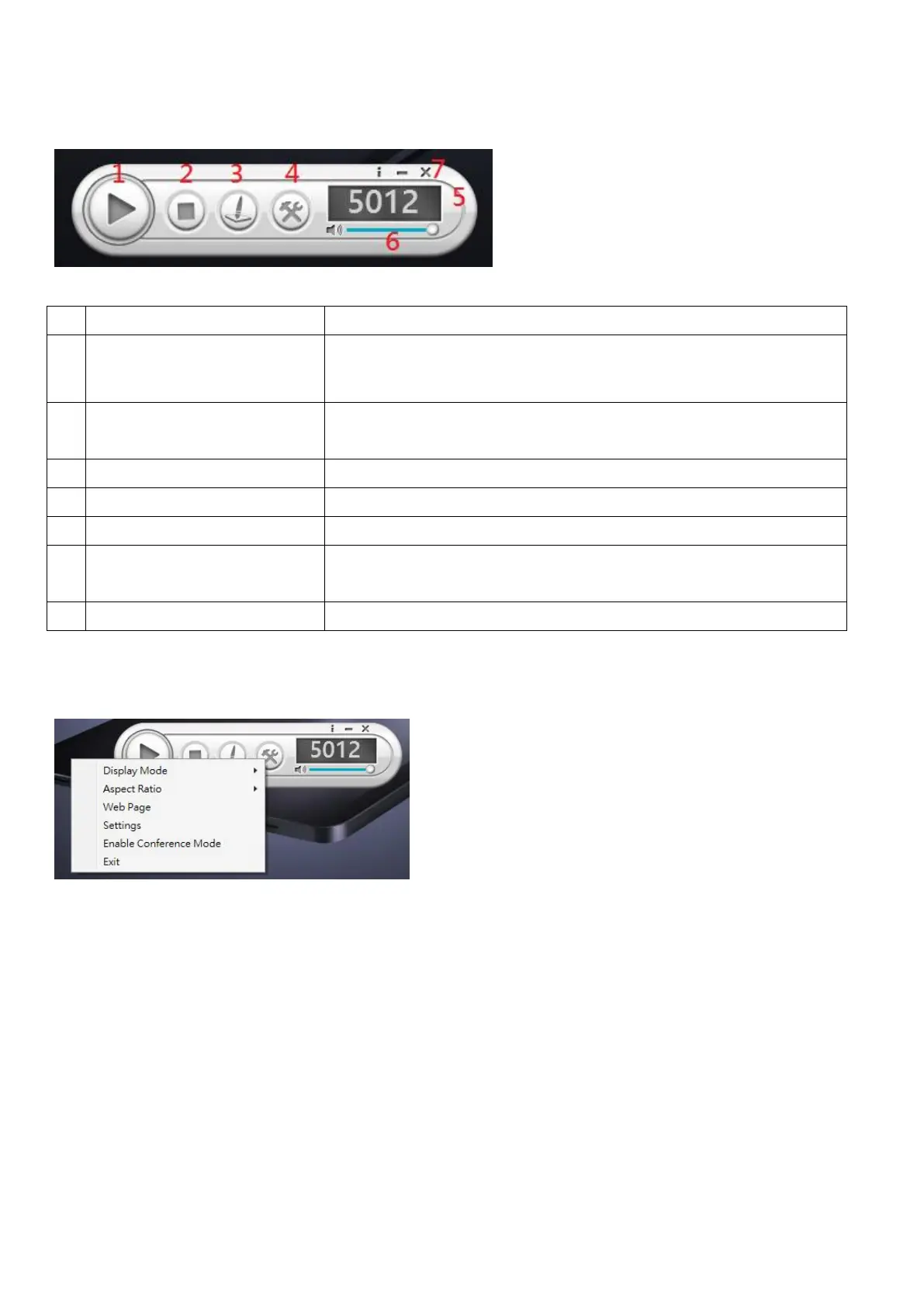
Main functions
No
Name
Function Description
1
Play/Pause
Start / pause presentation. If paused, a current presentation or
stream will freeze.
2
Stop
Stops a current presentation or stream and will go back to
instruction page.
3
Annotator
To start the new sheet for notes taking or on the current slide
4
Menu
Access menu list.
5
Login code
Show the application login code.
6
Volume
Control the slide bar to change the volume. Press the icon to
mute.
7
Information/Minimize/Close
Minimize and close the Application Software window. Information
Menu
You can also click ‘Menu’ button to access menu list.
(1) Display Mode

Related product manuals