EasyManua.ls Logo

DIEBOLD NIXDORF P1200 - User Manual

DIEBOLD NIXDORF P1200
71 pages
Print Icon
To Next Page IconTo Next Page
Loading...
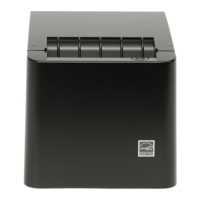
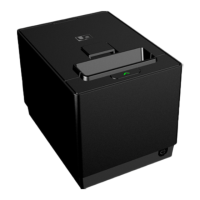
P1200 Standard POS Printer
Thermal Printer
User Manual
01750352498B

Other manuals for DIEBOLD NIXDORF P1200

Questions and Answers

Summary

MANUFACTURERS DECLARATION AND APPROVAL

FCC-Class A Declaration

Details compliance with FCC rules for Class A digital devices, including interference regulations.

EU Directives Compliance

Covers compliance with EEC directives for EMC, Low Voltage, and RoHS, including CE marking.

SUPPLIERS DECLARATION OF CONFORMITY

FCC Compliance Statement

States device compliance with Part 15 of FCC Rules, subject to interference conditions.

SAFETY SUMMARY

Symbols, Warnings, and Cautions

Explains warning symbols and general cautions for safe handling and operation of the printer.

Prohibited Actions and Precautions

Details actions to avoid, proper grounding, and general precautions for safe operation and maintenance.

Environmental and Usage Precautions

Provides guidelines on environmental conditions, cleaning, paper handling, and safe usage practices.

IMPORTANT INFORMATION TO THE USER

Power Supply and Cable Specifications

Details requirements for power adapters, interface cables, and power cords for compliance and safety.

Power Cord Requirements

Specifies power cord types for USA/Canada and Europe for safe operation and regulatory compliance.

UNPACKING AND CONTENTS

Unpacking Procedure

Provides step-by-step instructions for opening the carton, removing the printer, and checking contents.

Packaging for Transportation

Advises keeping original packaging for future printer transportation and storage.

PRODUCT OVERVIEW

Introduction and Features

Introduces the thermal printer, its architecture, and key features like paper handling and cutting.

Model Description and Accessories

Details the printer's model naming convention and lists standard accessories included in the shipping carton.

SPECIFICATIONS

General Printer Specifications

Details resolution, interface, emulation, character sets, printing speed, barcodes, and fonts.

Environmental and Performance Specs

Outlines environmental operating conditions, internal buffers, thermal head performance, and reliability metrics.

Options and Paper Roll Details

Describes optional interfaces, reliability figures, available options, and detailed paper roll specifications.

APPEARANCE AND CONNECTORS

Printer Views and Controls

Illustrates front/rear views, detailing controls like LED indicators and the Feed Button.

Power Button and Connectors Overview

Explains the power button function and provides an overview of the printer's interface and input/output connectors.

Interface and Power Connector Specs

Details pin assignments and specifications for RS232, Ethernet, Power USB, USB, and Power Cable connectors.

Cash Drawer Connector

Describes the 6-pin RJ12 connector for cash drawers, including pin assignments.

SET UP PROCEDURE

Operational Requirements

Outlines necessary communication interfaces (Serial, Ethernet, USB) and power supply requirements for printer operation.

Printer Setup and Power Off

Provides step-by-step instructions for physically setting up the printer and safely turning it off.

INSTALLATION PROCEDURE

Connecting Cables and Options

Guides on connecting power, USB, optional interface cards, Y-cable, and cash drawer cables.

Choosing Installation Location

Provides guidance on selecting a suitable location, including table-top and wall-mounted orientations.

Loading the Paper Roll

Details the procedure for loading a paper roll, including warnings about hot print heads and cutters.

DIAGNOSTICS

Offline Diagnostic Procedure

Explains how to access and navigate the printer's offline diagnostic menu for configuration and testing.

Diagnostic Menu Structure

Details the hierarchical structure of the service menu, outlining options for tests, configuration, and information retrieval.

GENERAL MAINTENANCE

Cleaning Printer Covers

Provides instructions for cleaning the printer's exterior covers with a cloth and mild detergent.

Cleaning the Thermal Print Head

Details the procedure for cleaning the thermal print head, emphasizing caution against damage.

TROUBLESHOOTING

Paper Jam and Cutter Issues

Guides on removing jammed paper and resetting the printer after a cutter jam, including LED indicators.

Common Problems and Solutions

Addresses common issues like power, printing, and cash drawer failures with causes, checks, and solutions.

LED Indication Table

Maps printer status, LED colors, and control patterns to actions and troubleshooting sections.

APPENDIX

Ethernet Interface Details

Briefly mentions Ethernet interface availability when the option card is connected.

Web Setting Page Configuration

Explains configuring printer settings via web interface (IP, TCP/UDP, SNMP).

DIEBOLD NIXDORF P1200 Specifications

General IconGeneral
BrandDIEBOLD NIXDORF
ModelP1200
CategoryPrinter
LanguageEnglish

Related product manuals