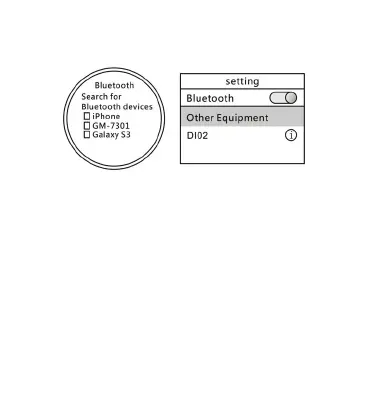
interface,slide down the screen to enter the shortcut sector
Surface,touchtheicontoopentheBluetooth.
Watch side pairing BluetoothPairing a Bluetooth
mobilephoneside
2, Open the Bluetooth mobile phone side.the side of the
Bluetooth watch search inside click on“search for Bluetooth
devices”(shown above),and connect.Or searchfor Bluetooth
watchphoneside,andconnect.
3, The mobile phone side open the Bluetooth notification,select
Sync you ne
ed to set one by one,as columns:Click the Sync
settings,you can set the text according to your desired
settings,contacts,call history,calendar,and other information with
yourphone sync,seta goodfeaturetowatch all the synchronized
pushnotificationcenter.


 To Next Page