CHRONOMETRES – PRO /PRO-STOPWATCHES /
CRONÓMETROS – PRO
DT2500P
CHRONOMETRES 3
LIGNES
Chronomètre 2000 mémoires
version USB avec imprimante intégrée
3 - ROW DISPLAY
STOPWATCHES /
2000 memories stopwatch USB
version with printer
CRONÓMETROS 3
LĺNEAS
Cronómetro 2000 memorias
versión USB con impresora
Features:
Chronograph
2000 memories
Segregated memory (capability to
memorize LAP times of different
races)
User Selectable
LAP/SPLIT or LAP/SPEED display
Average and best lap time display
Automatic release of LAP
time after 10 seconds to allow
progress monitoring
Data can be printed at
operation or selectively by
race later
Data can be uploaded to
computer through upload
cableith software (cable
and software optional)
Locking button to avoid
manipulation errors
Size : 6cm x 7.5 cm x 2cm
Weight : 360 g
Timer
Dual timers which start
one after another for use
in training programs
Can be used as ordinary
countdown timer if 2nd
timer is not set
Clock
Hour, minute, seconds,
month, date, day and
alarm
12/24 hour and
month/date or
Caractéristiques :
Chronomètre :
2000 mémoires
Mémoire séparée (possibilité de
mémoriser le temps de chaque tour
sur différentes courses)
Possibilité pour l’utilisateur de
sélectionner l’affichage Retour/Temps
ou Retour/Vitesse
Affichage de la moyenne et du
meilleur temps au tour
Publication automatique tu temps
au Tour après 10 secondes pour un
suivi du progrès
Fonction d’impression des données
pendant le fonctionnement ou de
manière sélective par course
ultérieurement
Transfert des données sur
ordinateur (câble et logiciel en option)
Bouton de verrouillage du
chronomètre pour éviter les erreurs de
manipulation
Dimensions DT2500P : 6 cm x 7.5
cm x 2 cm
Poids du DT2500P : 360 g
Minuteur :
Double minuteries qui démarre
l’une avec l’autre lors des
entrainements
Possibilité d’utilisation de compte à
rebours traditionnel si la 2
ème
minuterie
n'est pas réglée
Horloge :
Heure, minute, secondes, mois,
date, jour et réveil
Possibilité pour l’utilisateur
d’afficher le
format 12/24 heures et mois/date ou
date/mois/
Características:
Cronómetro:
2000 memorias
Memoria independiente (puede
memorizar el tiempo de cada ronda de
las diferentes carreras)
Posibilidad por el usuario seleccionar
la visualización Vuelta/Tiempo,
Vuelta/Velocidad
Visualización del medio tiempo y del
mejor tiempo
Publicación automática del
tiempo al ronda después 10 segundos
para seguir el progreso
Función de impresión directa o
diferida
Se puede transferir los datos al
ordenador (cable y software en opción)
Cierre automático con disparador
para evitar los errores de manipulación
Dimensiones del DT2500 P: 6
cm x 7.5 cm x 2 cm
Peso del DT2500P : 360 g
Minutero :
Doble minutero que arranca el
uno con el otro durante las
preparaciones
Posibilidad utilizar la función
cuenta atrás tradicional si el segundo
minutero no esta regulado
Reloj :
Horas, minutos, segundos,
mes, fecha, día y alarma
Posibilidad por el usuario
seleccionar la visualización en
el formato 12/24h y mes/fecha
o fecha/mes/
Función cuenta atrás, formato
12/24h, calendario europeo y
alarma

 Need help?
 General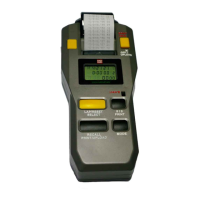

 To Next Page
